
Mobile Tracking API Reference
CustomerLabs Mobile Tracking enables you to collect, unify, and activate user behavioural data from your mobile application. By integrating with the CustomerLabs API, you can track anonymous and identified users across sessions, stitch identities across platforms using advertising IDs and external identifiers, and send structured events to any downstream destination.
Fields to Collect
Section titled “Fields to Collect”Before sending data to CustomerLabs, your mobile app must collect the following fields. These are passed across the three core API endpoints.
Required Fields
Section titled “Required Fields”| Field | Type | Description |
|---|---|---|
app_id | string | CustomerLabs application identifier — available under Settings → General → Account ID |
aaid / idfa | string | Advertising ID — AAID on Android, IDFA on iOS |
limitAdTracking | boolean | User’s ad tracking permission (true = limited, false = allowed) |
sessionId | string | Session identifier, generated as CL- + UUIDv4 for each new session. Stored in mobile local storage. |
user_id | string | User identifier, generated as app_id + UUIDv4 on first visit. Stored in mobile local storage. |
appPackageName | string | Application package name / bundle ID |
app_version_name | string | App version name |
carrier | string | Mobile carrier name |
deviceModelName | string | Device model identifier |
deviceTimeZone | string | Device timezone (e.g., Asia/Kolkata) |
extInfoVersion | string | Platform identifier — i2 for iOS, a2 for Android |
externalStorageSize | string | Total external storage in GB |
fingerprint | string | Device build fingerprint |
freeSpaceExternalStorage | string | Free external storage in GB |
locale | string | Device locale (e.g., en-US) |
longVersion | string | App long version string |
osVersion | string | OS version number |
screenDensity | string | Screen pixel density |
screenHeight | string | Screen height in dp |
screenWidth | string | Screen width in dp |
shortVersion | string | App short version string |
user_agent | string | WebView user agent string |
Optional Fields
Section titled “Optional Fields”| Field | Type | Description |
|---|---|---|
fcmToken | string | Firebase Cloud Messaging token |
google_analytics__app_instance_id | string | Google Analytics app instance identifier |
google_analytics__app_session_id | string | Google Analytics session identifier |
customerlabs_user_id | string | CustomerLabs user identifier |
facebook__fbc | string | Facebook click identifier (fbc) |
API Endpoints
Section titled “API Endpoints”Common Headers
Section titled “Common Headers”All endpoints require the following headers:
| Header | Value |
|---|---|
Content-Type | application/json |
CL-User-Agent | <user_agent> |
1. External IDs Endpoint
Section titled “1. External IDs Endpoint”URL: https://io.v2.customerlabs.co/app/externalIds Method: POST
Call this endpoint at the start of every session — for both new and returning users. It registers the device’s advertising IDs, device metadata, and UTM parameters with CustomerLabs to enable cross-platform identity stitching.
Request Body
Section titled “Request Body”{ "id": "app_id", "uid": "user_id", "sid": "session_id", "external_ids": { "idfa": "idfa_value", "aaid": "aaid_value", "google_analytics__app_instance_id": "ga_app_instance_id", "google_analytics__app_session_id": "ga_session_id", "customerlabs_user_id": "user_id", "facebook__fbc": "fbc_value" }, "additional_info": { "limitAdTracking": "limitAdTracking_value", "fcmToken": "fcmToken_value", "user_agent": "user_agent_value", "appPackageName": "appPackageName_value", "app_version_name": "app_version_name_value", "carrier": "carrier_value", "deviceModelName": "deviceModelName_value", "deviceTimeZone": "deviceTimeZone_value", "extInfoVersion": "extInfoVersion_value", "externalStorageSize": "externalStorageSize_value", "fingerprint": "fingerprint_value", "freeSpaceExternalStorage": "freeSpaceExternalStorage_value", "locale": "locale_value", "longVersion": "longVersion_value", "osVersion": "osVersion_value", "screenDensity": "screenDensity_value", "screenHeight": "screenHeight_value", "screenWidth": "screenWidth_value", "shortVersion": "shortVersion_value", "fbclid": "fbclid_value", "gclid": "gclid_value", "msclkid": "msclkid_value", "wbraid": "wbraid_value" }, "utm_params": { "utm_source": "utm_source_value", "utm_medium": "utm_medium_value", "utm_campaign": "utm_campaign_value", "utm_content": "utm_content_value", "utm_term": "utm_term_value" }}Request Body Parameters
Section titled “Request Body Parameters”| Field | Type | Required | Description |
|---|---|---|---|
id | string | Yes | CustomerLabs application identifier (app_id) used to route data to the correct account |
uid | string | Yes | Unique user identifier (app_id + UUIDv4), persisted in mobile local storage to track the user across sessions |
sid | string | Yes | Session identifier (CL- + UUIDv4), regenerated for each new app session to group events within a single visit |
external_ids | object | Yes | Map of third-party identifiers (IDFA, AAID, GA app instance ID, GA session ID, CustomerLabs user ID) used to stitch user identity across platforms |
additional_info | object | Yes | Device metadata, ad click IDs, and app details used for audience segmentation and ad platform matching |
utm_params | object | No | UTM campaign parameters captured from the deep link or referral URL that initiated the app session |
Response
Section titled “Response”| Status | Description |
|---|---|
200 OK | Success |
400 Bad Request | Validation error |
500 Internal Server Error | Server error |
{ "user_id": "user_id", "external_ids": { "idfa": "idfa", "aaid": "aaid", "google_analytics__app_instance_id": "google_analytics__app_instance_id", "google_analytics__app_session_id": "google_analytics__app_session_id", "customerlabs_user_id": "customerlabs_user_id", "facebook__fbc": "facebook__fbc" }, "additional_info": { "extInfoVersion": "a2", "appPackageName": "app_package_name", "shortVersion": "device_short_version", "longVersion": "device_long_version", "osVersion": "device_os_version", "deviceModelName": "device_model_name" }}{ "error": "error_message"}2. Profile Identify Endpoint
Section titled “2. Profile Identify Endpoint”URL: https://io.v2.customerlabs.co/app/identify Method: POST
Call this endpoint when a user logs in or when you have identifiable user information (email, phone). This links the anonymous device identity to a known user profile and enriches the profile with user traits.
Request Body
Section titled “Request Body”{ "id": "app_id", "uid": "user_id", "sid": "sessionId", "event_name": "event_name", "event_source": "mobile_app", "added_at": "2026-03-12T05:45:15Z", "traits": { "email": "user@example.com", "phone": "+918424032105", "first_name": "Nelson", "last_name": "Jaffery", "no_of_orders": "5", "accepts_marketing": "true", "address1": "Line 1", "address2": "Line 2", "city": "Thane", "company": "CustomerLabs", "country": "India", "province": "Maharashtra", "postal_code": "400601" }, "identify_by": { "identify_by_email": "user@example.com", "identify_by_phone": "+918424032105" }}Request Body Parameters
Section titled “Request Body Parameters”| Field | Type | Required | Description |
|---|---|---|---|
id | string | Yes | CustomerLabs application identifier (app_id) |
uid | string | Yes | Unique user identifier (app_id + UUIDv4), persisted in mobile local storage |
sid | string | Yes | Session identifier (CL- + UUIDv4), regenerated for each new app session |
event_name | string | Yes | Name of the event being tracked |
event_source | string | Yes | Event source — set to mobile_app for mobile app events |
added_at | string | Yes | Event timestamp in ISO 8601 format (e.g., 2026-03-12T05:45:15Z) |
identify_by | object | Yes | Used to identify a user in the CustomerLabs database (e.g., email, phone). All traits in the request will be assigned to the matched user profile. |
traits | object | Yes | Map of user profile attributes: email, phone, first_name, last_name, no_of_orders, accepts_marketing, address1, address2, city, company, country, province, postal_code |
Response
Section titled “Response”| Status | Description |
|---|---|
200 OK | Success |
400 Bad Request | Validation error |
500 Internal Server Error | Server error |
{ "user_id": "user_id", "external_ids": { "idfa": "idfa", "aaid": "aaid", "google_analytics__app_instance_id": "google_analytics__app_instance_id", "google_analytics__app_session_id": "google_analytics__app_session_id", "customerlabs_user_id": "customerlabs_user_id", "facebook__fbc": "facebook__fbc" }, "additional_info": { "extInfoVersion": "a2", "appPackageName": "app_package_name", "shortVersion": "device_short_version", "longVersion": "device_long_version", "osVersion": "device_os_version", "deviceModelName": "device_model_name" }}{ "error": "error_message"}3. Events Tracking Endpoint
Section titled “3. Events Tracking Endpoint”URL: https://io.v2.customerlabs.co/app/track Method: POST
Call this endpoint to track user actions and behavioural events (e.g., View Item, Add to Cart, Purchase, Search).
Request Body
Section titled “Request Body”{ "id": "app_id", "uid": "user_id", "sid": "sessionId", "event_name": "Purchase", "event_source": "mobile_app", "added_at": "2026-03-12T05:45:15Z", "identify_by": { "identify_by_email": "user@example.com", "identify_by_phone": "+918424032105" }, "properties": { "value": 100, "currency": "USD", "transaction_id": "TXN-12345", "shipping": 10, "tax": 10, "discount": 10, "coupon": "SAVE10", "affiliation": "affiliation_value", "search_string": "running shoes", "description": "description_value" }, "products": [ { "product_id": "SKU-001", "product_name": "Running Shoes", "product_price": 100, "product_quantity": 1 } ], "traits": { "email": "user@example.com", "phone": "+918424032105", "first_name": "Nelson", "last_name": "Jaffery", "no_of_orders": "5", "accepts_marketing": "true", "address1": "Line 1", "address2": "Line 2", "city": "Thane", "company": "CustomerLabs", "country": "India", "province": "Maharashtra", "postal_code": "400601" }, "utm_params": { "utm_source": "utm_source_value", "utm_medium": "utm_medium_value", "utm_campaign": "utm_campaign_value", "utm_content": "utm_content_value", "utm_term": "utm_term_value" }}Request Body Parameters
Section titled “Request Body Parameters”| Field | Type | Required | Description |
|---|---|---|---|
id | string | Yes | CustomerLabs application identifier (app_id) |
uid | string | Yes | Unique user identifier (app_id + UUIDv4), persisted in mobile local storage |
sid | string | Yes | Session identifier (CL- + UUIDv4), regenerated for each new app session |
event_name | string | Yes | Name of the event (e.g., View Item, Add to Cart, Purchase, Search) |
event_source | string | Yes | Event source — set to mobile_app for mobile app events |
added_at | string | Yes | Event timestamp in ISO 8601 format (e.g., 2026-03-12T05:45:15Z) |
identify_by | object | No | Used to identify a user in the CustomerLabs database and associate the event with them. Optional for anonymous users, recommended for identified users. Accepts identify_by_email and/or identify_by_phone. |
properties | object | No | Additional information about the event: value, currency, transaction_id, shipping, tax, discount, coupon, affiliation, search_string, description |
products | array | No | Array of product objects for e-commerce events. Each object supports: product_id, product_name, product_price, product_quantity |
traits | object | No | Personally Identifiable Information (PII) of the user (e.g., email, phone, name) |
utm_params | object | No | UTM campaign parameters from the deep link or referral URL that initiated the app session |
external_ids | object | No | External identifiers for the user (e.g., IDFA, AAID, click IDs) |
additional_info | object | No | Supplementary context (e.g., device info, app info, location) |
Response
Section titled “Response”| Status | Description |
|---|---|
200 OK | Success — header only, no response body |
400 Bad Request | Validation error |
500 Internal Server Error | Server error |
{ "validation_error": { "error_message": "error_message" }}{ "error": "error_message"}Implementation Flow
Section titled “Implementation Flow”- Anonymous User Tracking
- Identify Profile
- Track UTM Parameters & Click IDs
Anonymous User Tracking
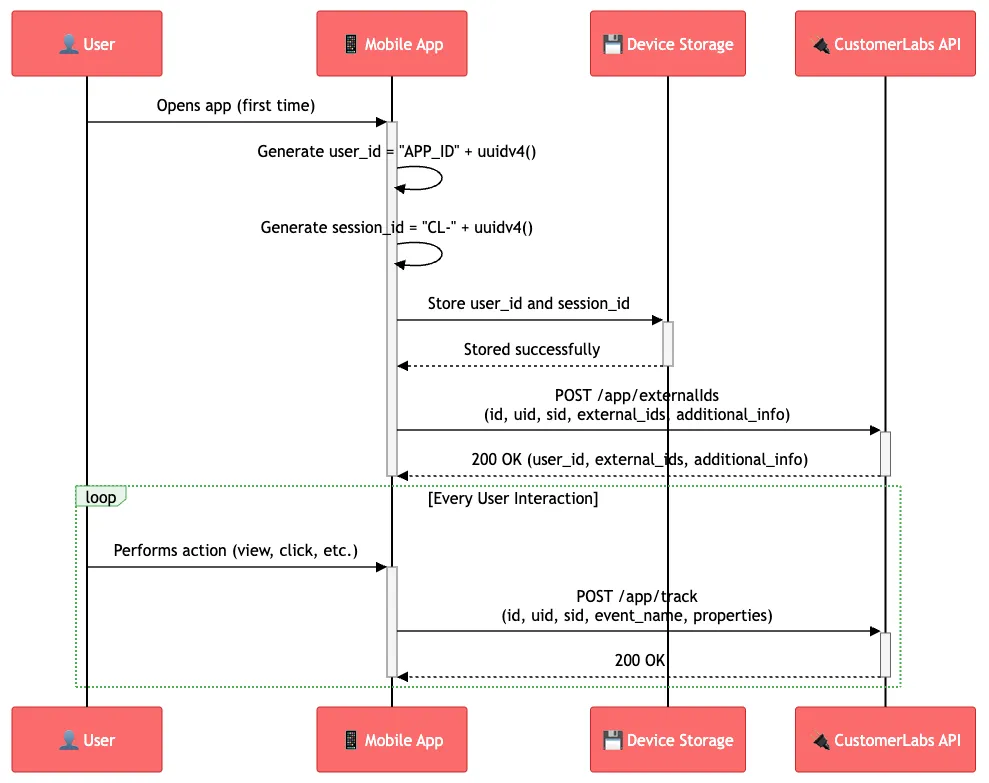
Section titled “Anonymous User Tracking”First App Launch
Section titled “First App Launch”-
Generate unique identifiers when a user opens the app for the first time:
user_id = "YOUR_APP_ID" + uuidv4()session_id = "CL-" + uuidv4() -
Store identifiers in device storage for persistence.
-
Call the External IDs API immediately with the required parameters.
-
Track user interactions — after a successful External IDs API call, use the Track Event API for every user interaction in your app.
Subsequent App Launches
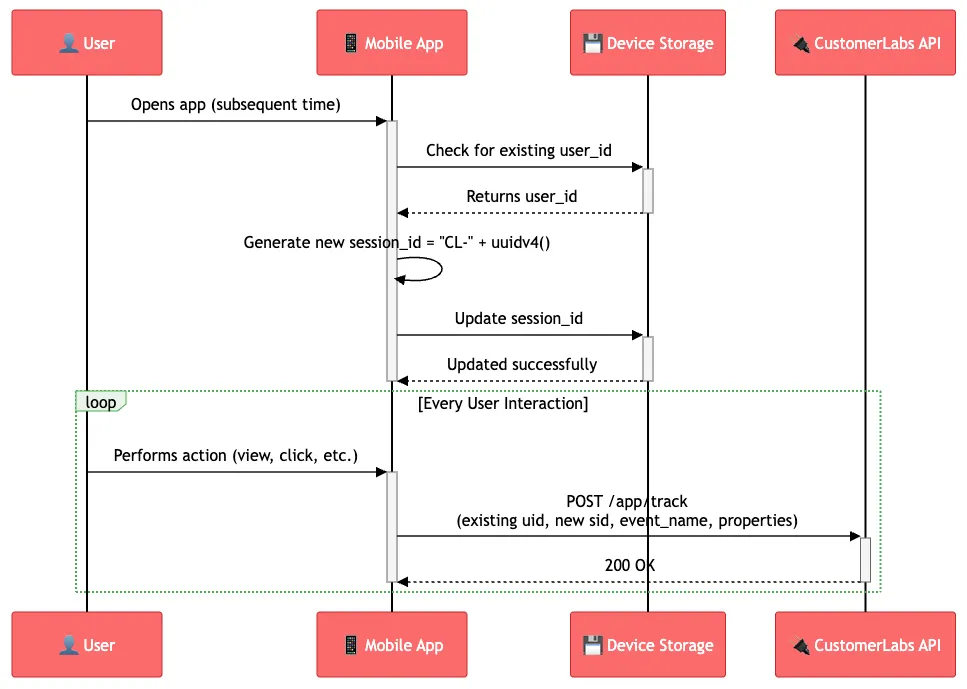
Section titled “Subsequent App Launches”-
Check device storage for existing
user_idandsession_id. -
Reuse the existing
user_idif found — do not generate a new one. -
Generate a new
session_idfor each app session:session_id = "CL-" + uuidv4() -
Update device storage with the new
session_id. -
Continue tracking events using the existing
user_idand newsession_id.
Identify Profile
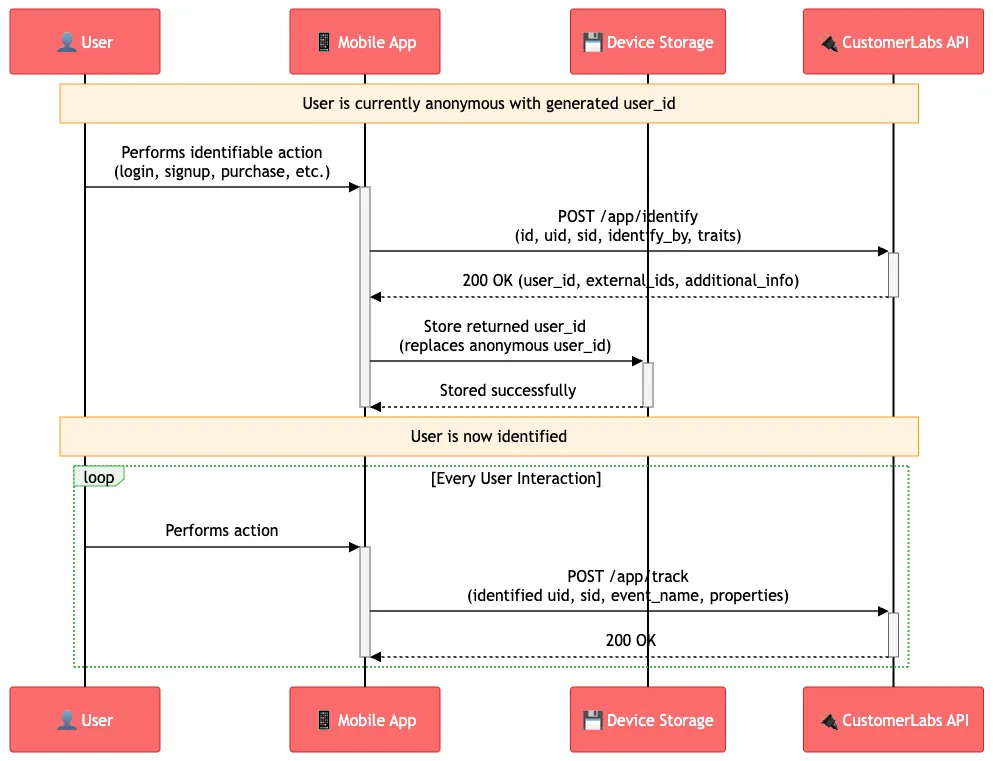
Section titled “Identify Profile”Use this flow when a user performs an identifiable action such as login, sign up, purchase, or adding billing/shipping information.
- Call the Identify Profile API with the required parameters.
- Store the returned
user_idfrom the API response to device storage (replacing the anonymoususer_id). - Continue tracking events using the newly identified
user_idfor all subsequent interactions.
Track UTM Parameters & Click IDs
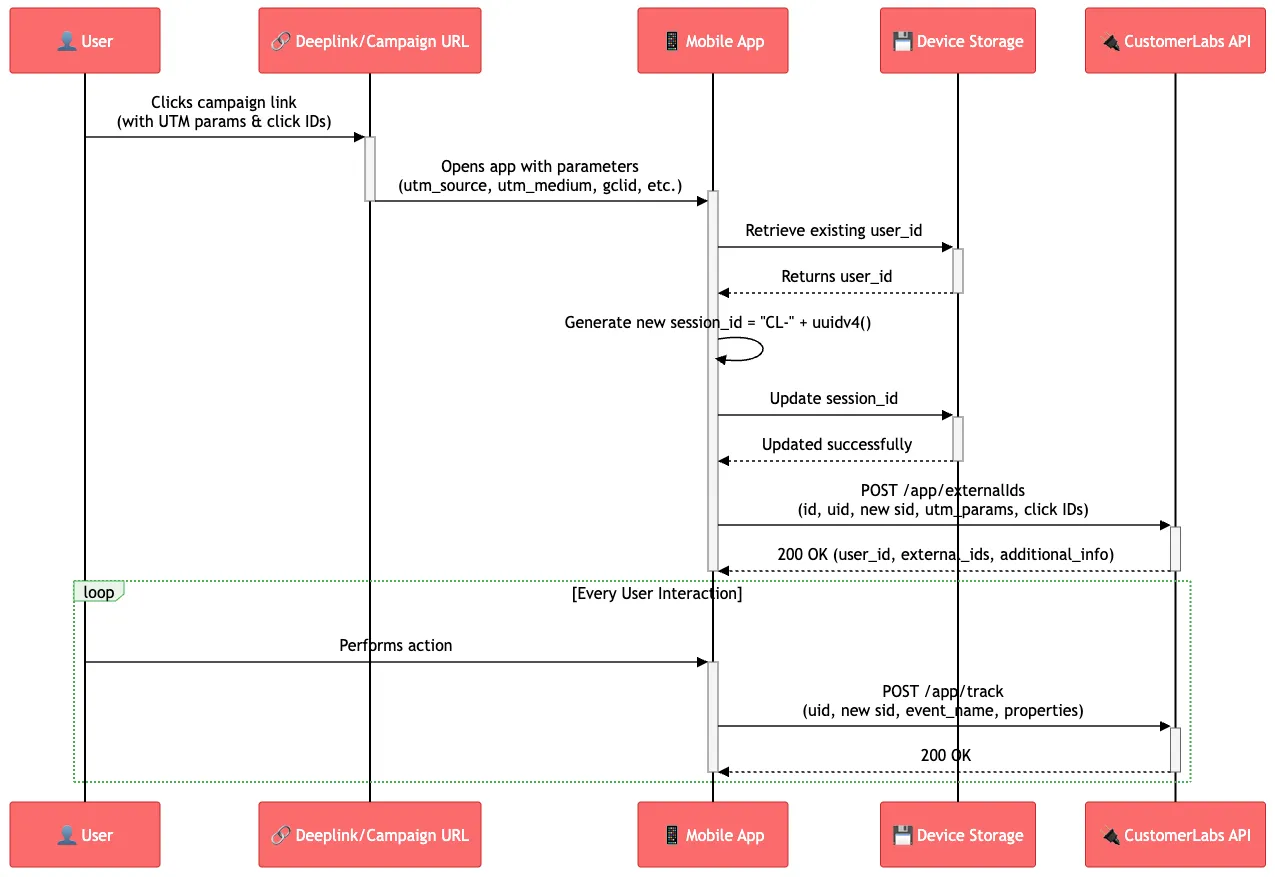
Section titled “Track UTM Parameters & Click IDs”Use this flow when your app receives UTM parameters or click IDs via a deeplink.
-
Generate a new
session_idto associate the campaign data with a fresh session:session_id = "CL-" + uuidv4() -
Update device storage with the new
session_id. -
Call the External IDs API with the required parameters, including:
- The received UTM parameters (
utm_source,utm_medium,utm_campaign, etc.) - Any click IDs (e.g.,
gclid,fbclid,ttclid)
- The received UTM parameters (
-
Continue tracking events using the updated
session_idfor subsequent interactions.
Key Implementation Notes
Section titled “Key Implementation Notes”User & Session ID Generation
Section titled “User & Session ID Generation”user_id— Generated once on first app install asapp_id+ UUIDv4. Persisted in mobile local storage and reused across all subsequent sessions.session_id— Generated asCL-+ UUIDv4 at the start of every new app session. Stored in mobile local storage for the duration of the session.
Identity Stitching
Section titled “Identity Stitching”- Use
external_ids(AAID/IDFA, GA IDs) to stitch anonymous mobile users with ad platform identities. - Use
identify_by_emailoridentify_by_phonein theidentify_byobject to link events and traits to a known user profile. - Once a user is identified via
/app/identify, all subsequent events carrying the sameidentify_byvalue will be attributed to that profile.
Platform Identifiers
Section titled “Platform Identifiers”Set extInfoVersion based on the platform:
| Platform | Value |
|---|---|
| iOS | i2 |
| Android | a2 |
Ad Tracking Consent
Section titled “Ad Tracking Consent”Always collect and pass limitAdTracking:
| Value | Meaning |
|---|---|
false | User has allowed ad tracking — AAID/IDFA available |
true | User has restricted ad tracking — AAID/IDFA may be zeroed out |
Timestamps
Section titled “Timestamps”All added_at values must be in ISO 8601 format with UTC timezone.