
BigQuery v1 Integration (Deprecated)
Google BigQuery is a fast, scalable, and fully managed cloud data warehouse designed for analytics. By integrating CustomerLabs with BigQuery, you can build your own marketing data lake — centralizing all customer event data in one place for analysis, reporting, and attribution.
CustomerLabs sends your event data directly to BigQuery with no code required.
Prerequisites
Section titled “Prerequisites”Before you begin, ensure you have:
- A Google Cloud Platform (GCP) account
- A GCP project with the BigQuery API enabled
- Billing enabled on the project
- A CustomerLabs account
Setup Overview
Section titled “Setup Overview”The integration involves four steps — three in GCP and one in CustomerLabs:
- Locate your Project ID and verify the BigQuery API is enabled.
- Grant access to the CustomerLabs service account via IAM.
- Enable billing on your GCP project.
- Paste your Project ID into CustomerLabs to complete the connection.
Step 1: Get Your Project ID and Verify BigQuery API
Section titled “Step 1: Get Your Project ID and Verify BigQuery API”-
Log in to Google Cloud Platform.
-
Click the project selector at the top. Your Project ID is listed in the ID column next to the project name.
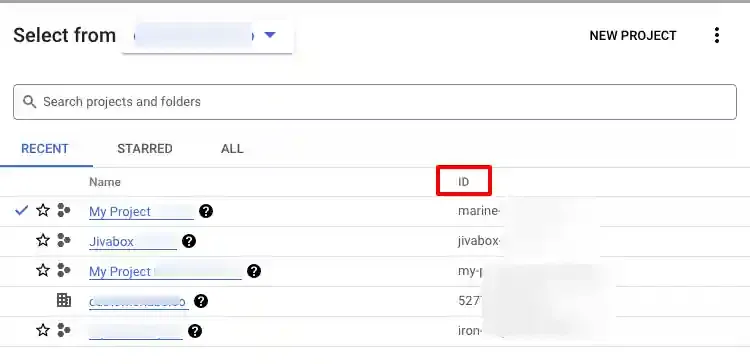
Copy the Project ID — you will need it in Step 4.
-
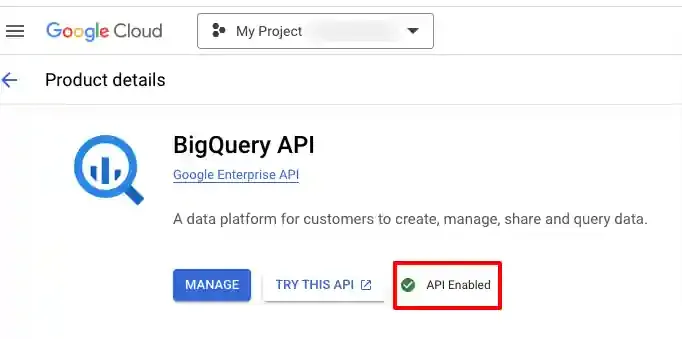
Verify that the BigQuery API is enabled. Go to APIs & Services → Library, search for “BigQuery API”, and confirm the status shows API Enabled.
Step 2: Grant Access to CustomerLabs (IAM)
Section titled “Step 2: Grant Access to CustomerLabs (IAM)”CustomerLabs writes data to your BigQuery project using a dedicated service account. You need to grant that service account the appropriate roles.
-
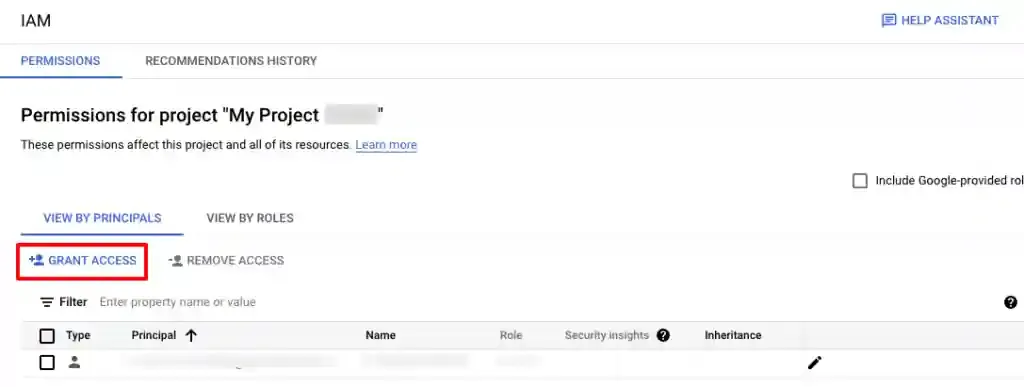
In GCP, navigate to IAM & Admin → IAM. Select your project, then click + Grant Access.
-
In the New principals field, paste the CustomerLabs service account ID:
clabs-bq-connector@future-pulsar-107805.iam.gserviceaccount.com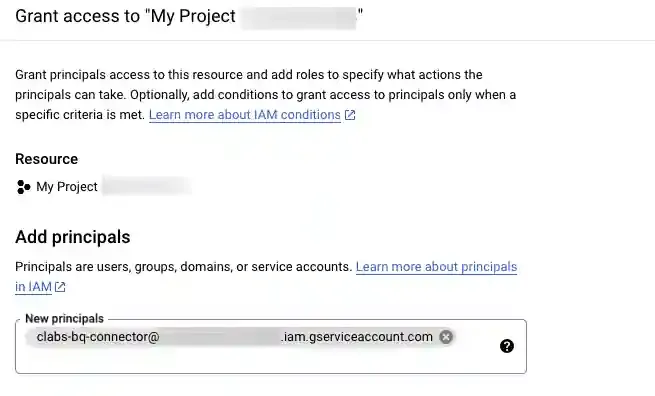
-
Assign the following two roles, then click Save:
- BigQuery Data Owner
- BigQuery Job User
Step 3: Enable Billing
Section titled “Step 3: Enable Billing”BigQuery requires an active billing account to process data jobs.
-
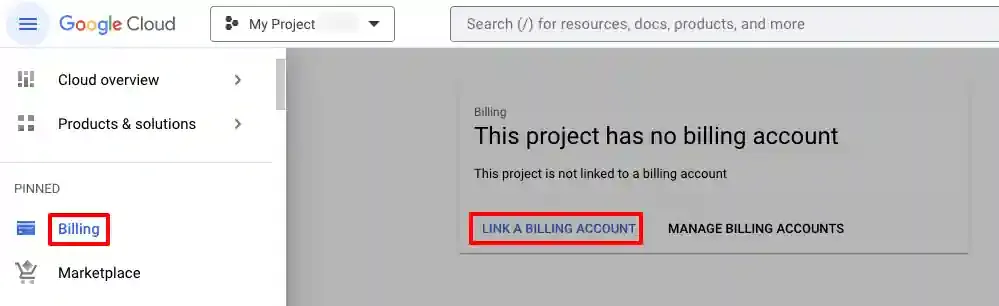
In GCP, navigate to Billing from the left sidebar.
-
If billing is not active, click Link a Billing Account and follow the prompts.
-
Confirm the billing status is Active before proceeding.
Step 4: Connect BigQuery in CustomerLabs
Section titled “Step 4: Connect BigQuery in CustomerLabs”-
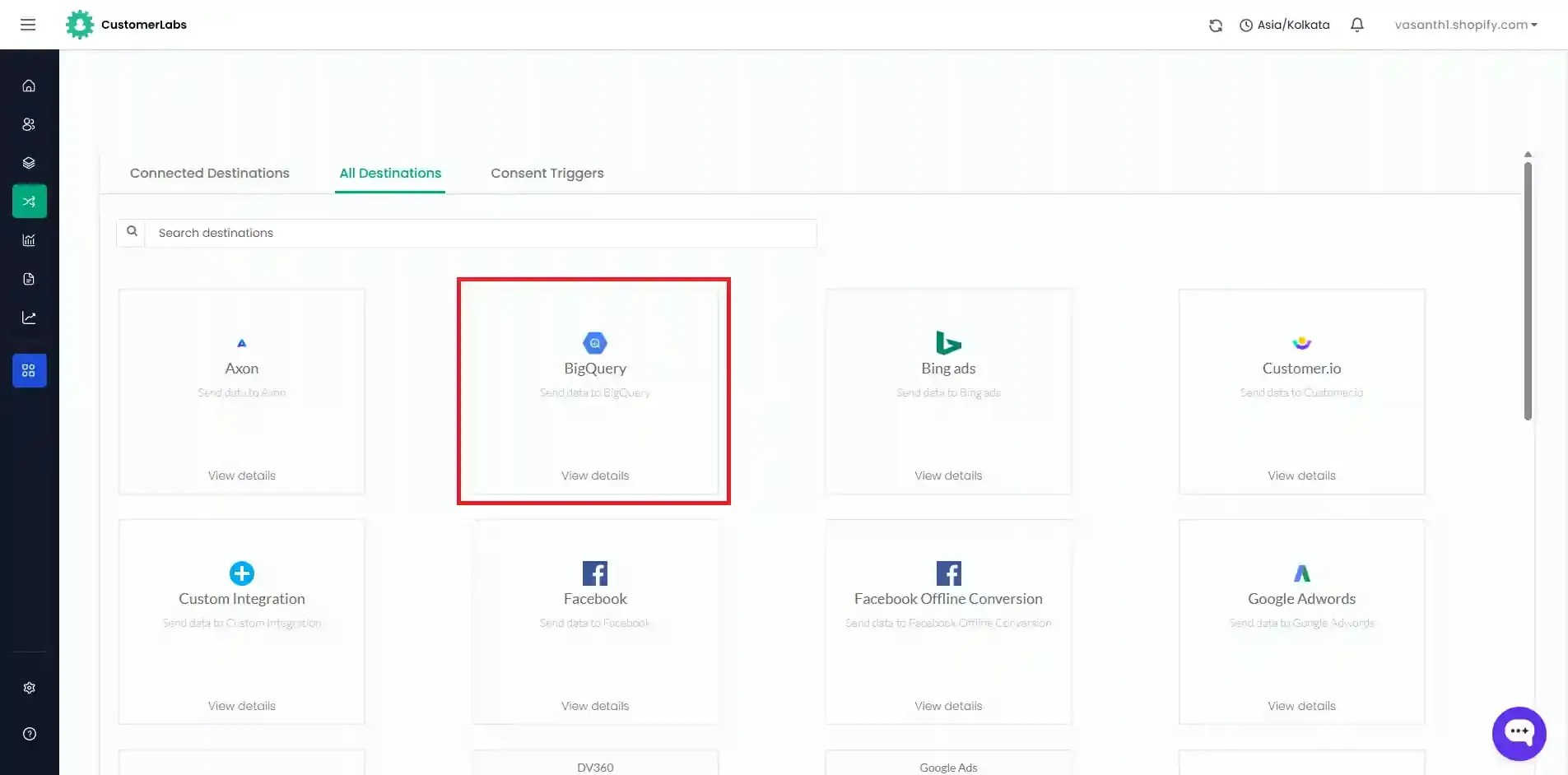
Log in to your CustomerLabs account and navigate to Destinations.
-
Search for and select BigQuery.
-
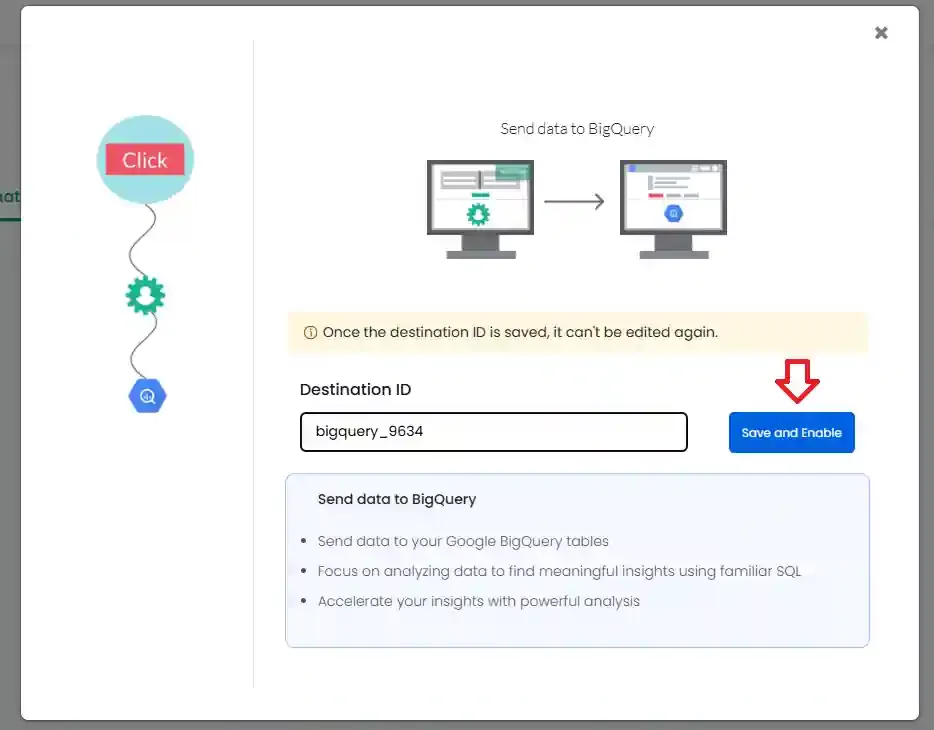
Enter a Destination ID and click Save and Enable.
-
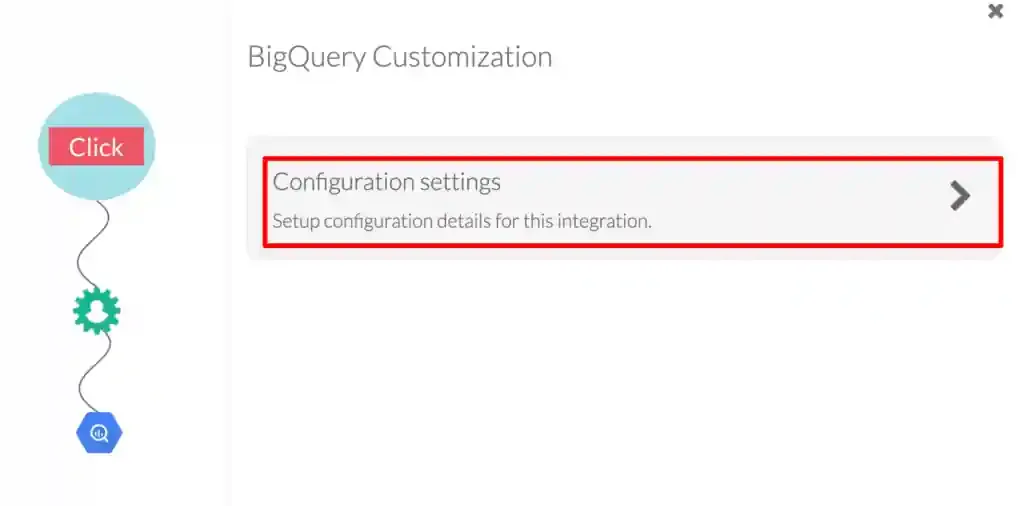
Click Configuration settings.
-
Paste the Project ID you copied earlier into the Google Project ID field and click Save Changes.
Schema Reference
Section titled “Schema Reference”CustomerLabs creates three tables in your BigQuery dataset:
| Table | Purpose |
|---|---|
events_data | All event-level data from your website |
users_data | Known user profiles |
anonymous_users_data | Maps anonymous IDs to known user IDs |
events_data
Section titled “events_data”Stores all tracked events. Top-level fields:
| Field | Type | Description |
|---|---|---|
screen_size | STRING | User’s screen resolution (e.g., 1920 x 1080) |
platform | STRING | Operating system (e.g., Windows 10, Mac OS X10) |
country | STRING | Derived from IP (e.g., India, United States) |
city | STRING | Derived from IP (e.g., Chennai, Saint Paul) |
state | STRING | Derived from IP (e.g., Tamil Nadu, Minnesota) |
postal_code | STRING | Derived from IP (e.g., 500044) |
continent | STRING | Derived from IP (e.g., Asia, North America) |
visitor_type | STRING | New or Returning |
session_id | STRING | Session identifier (e.g., CL-5bh3y984u23uefhf) |
source | STRING | Traffic source (e.g., direct, google search) |
source_type | STRING | Traffic type (e.g., organic, unknown) |
page_title | STRING | Title of the visited page |
page_url | STRING | URL of the visited page |
device | STRING | mobile device or desktop |
ip_address | STRING | User’s IP address |
location | STRING | Lat/long derived from IP (e.g., 37.7510, -97.8220) |
timezone | STRING | Derived from IP (e.g., Asia/Kolkata) |
Nested (RECORD REPEATED) Fields
Section titled “Nested (RECORD REPEATED) Fields”| Field | Nested Schema | Description |
|---|---|---|
user_traits | key, value (STRING) | Profile attributes: first_name, last_name, email, phone_number, etc. |
group_traits | key, value (STRING) | Reserved for future use |
cl_utm_params | key, value (STRING) | UTM parameters: utm_source, utm_medium, utm_campaign, etc. |
cl_other_params | key, value (STRING) | All non-UTM URL query parameters (e.g., gclid, user-agent) |
event_attributes | key, value, type (STRING) | Event context: event_from, event_source, event_status |
products → product_traits | key, value, type (STRING) | Product details for e-commerce events |
external_ids | key, value, type (STRING) | Cross-platform IDs: GA client ID, _fbp, _fbc, customerlabs_user_id |
group_external_ids | key, value, type (STRING) | Reserved for future use |
additional_info | key, value (STRING) | Device, browser, session, and first interaction metadata |
segments | segment_id, segment_name, added_at | Reserved for future use |
users_data
Section titled “users_data”Stores known user profiles.
| Field | Type | Description |
|---|---|---|
user_id | STRING | CustomerLabs user ID |
inserted_at | TIMESTAMP | Time the record was ingested |
Nested fields: traits, external_ids, additional_info, segments — same schema as events_data.
anonymous_users_data
Section titled “anonymous_users_data”Maps anonymous visitors to their resolved user IDs.
| Field | Type | Description |
|---|---|---|
user_id | STRING | Known CustomerLabs user ID |
anonymous_user_id | STRING | Anonymous ID assigned before identification |
inserted_at | TIMESTAMP | Time the record was ingested |
Sample Data
Section titled “Sample Data”user_traits
Section titled “user_traits”[ { "key": "email", "value": "test@gmail.com" }, { "key": "first_name", "value": "test" }, { "key": "last_name", "value": "last" }]cl_utm_params
Section titled “cl_utm_params”[ { "key": "utm_source", "value": "google" }, { "key": "utm_medium", "value": "cpc" }, { "key": "utm_campaign", "value": "summer_sale" }]cl_other_params
Section titled “cl_other_params”[ { "key": "gad_source", "value": "2" }, { "key": "gclid", "value": "Cxfgcgyugyhuivdshue89732r89uy298..." }, { "key": "user-agent", "value": "Mozilla/5.0 (Linux; Android 10; K)..." }]event_attributes
Section titled “event_attributes”[ { "key": "event_from", "value": "website" }, { "key": "event_source", "value": "js_helper" }, { "key": "event_status", "value": "active" }]product_traits
Section titled “product_traits”[ [ { "key": "product_id", "value": "1", "type": "number" }, { "key": "product_name", "value": "Blue T-Shirt", "type": "string" }, { "key": "product_price", "value": "100", "type": "number" } ], [ { "key": "product_id", "value": "2", "type": "number" }, { "key": "product_name", "value": "Black Jeans", "type": "string" }, { "key": "product_price", "value": "200", "type": "number" } ]]external_ids
Section titled “external_ids”[ { "key": "client_id", "value": "js8628376773", "type": "google_analytics" }, { "key": "_fbc", "value": "js786486283752523", "type": "facebook" }]Sample Queries
Section titled “Sample Queries”Query 1 — Count Events per User
Section titled “Query 1 — Count Events per User”Returns a count of how many times each user triggered a specific event.
SELECT user_id, count(user_id)FROM `[Dataset Id].events_data`WHERE action = "pageview"GROUP BY user_idQuery 2 — Identity Resolution: Merge Anonymous + Known Users
Section titled “Query 2 — Identity Resolution: Merge Anonymous + Known Users”Stitches anonymous visitors to their resolved user IDs and counts events per unified user.
WITHanonymous_user_list AS (  SELECT user_id, anonymous_user_id FROM (    SELECT user_id, anonymous_user_id,           ROW_NUMBER() OVER(PARTITION BY anonymous_user_id ORDER BY inserted_at DESC) AS top    FROM `[Dataset Id].anonymous_users_data`  ) WHERE top = 1)
SELECT user_id, count(user_id) FROM ( SELECT IFNULL(aul.user_id, t0.user_id) AS user_id FROM `[Dataset Id].events_data` t0 LEFT JOIN anonymous_user_list AS aul ON aul.anonymous_user_id = t0.user_id WHERE action = "pageview") GROUP BY user_idQuery 3 — Get Full User Profiles for an Event
Section titled “Query 3 — Get Full User Profiles for an Event”Retrieves complete user profile data for everyone who performed a specific event (e.g., Added to cart), with identity resolution applied.
WITHanonymous_user_list AS (  SELECT user_id, anonymous_user_id FROM (    SELECT user_id, anonymous_user_id,           ROW_NUMBER() OVER(PARTITION BY anonymous_user_id ORDER BY inserted_at DESC) AS top    FROM `[Dataset Id].anonymous_users_data`  ) WHERE top = 1),
event_users_list AS (  SELECT user_id FROM (    SELECT IFNULL(aul.user_id, t0.user_id) AS user_id    FROM `[Dataset Id].events_data` t0    LEFT JOIN anonymous_user_list AS aul ON aul.anonymous_user_id = t0.user_id    WHERE action = "Added to cart"  ) GROUP BY user_id),
users_master AS (  SELECT * FROM (    SELECT *,           ROW_NUMBER() OVER(PARTITION BY user_id ORDER BY inserted_at DESC) AS top    FROM `[Dataset Id].users_data`  ) WHERE top = 1)
SELECT * FROM event_users_list AS eulINNER JOIN users_master AS um ON eul.user_id = um.user_id