
BigQuery v2 Integration
Google BigQuery is a fast, scalable, and fully managed cloud data warehouse designed for analytics. By integrating CustomerLabs with BigQuery, you can build your own marketing data lake — centralizing all customer event data in one place for analysis, reporting, and attribution.
CustomerLabs sends your event data directly to BigQuery with no code required. v2 is the current default for new clients and improves on v1 with partitioning, clustering, monthly-sharded event tables, and append-only master tables for users and anonymous mappings.
What’s new in v2
Section titled “What’s new in v2”| Aspect | v2 |
|---|---|
| Dataset name | <app_id>_v2 (e.g., cl1234567abcd_v2) |
| Events table | events_data_YYYYMM (monthly shard, e.g., events_data_202601) |
| Users table | users_data_master (append-only, may contain duplicates) |
| Anonymous users table | anonymous_users_data_master (append-only, may contain duplicates) |
| Groups table | Removed |
| Partitioning | Events: HOUR on triggered_ts. Users / Anon: DAY on inserted_at. |
| Partition filter | Required on events (requirePartitionFilter=true); not required on users / anon |
| Clustering | Events: action, user_id. Users: user_id_hash. Anon: anonymous_user_id_hash. |
| Sharding | Events: monthly. Users / Anon: not sharded. |
| Refresh interval | Client-configurable in CustomerLabs UI |
| Optional dedup | Scheduled queries to dedupe master → users_data / anonymous_users_data |
Prerequisites
Section titled “Prerequisites”Before you begin, ensure you have:
- A Google Cloud Platform (GCP) account
- A GCP project with the BigQuery API enabled
- Billing enabled on the project
- A CustomerLabs account
Setup Overview
Section titled “Setup Overview”The integration involves four steps — three in GCP and one in CustomerLabs:
- Locate your Project ID and verify the BigQuery API is enabled.
- Grant access to the CustomerLabs service account via IAM.
- Enable billing on your GCP project.
- Paste your Project ID into CustomerLabs to complete the connection.
Step 1: Get Your Project ID and Verify BigQuery API
Section titled “Step 1: Get Your Project ID and Verify BigQuery API”-
Log in to Google Cloud Platform.
-
Click the project selector at the top. Your Project ID is listed in the ID column next to the project name.
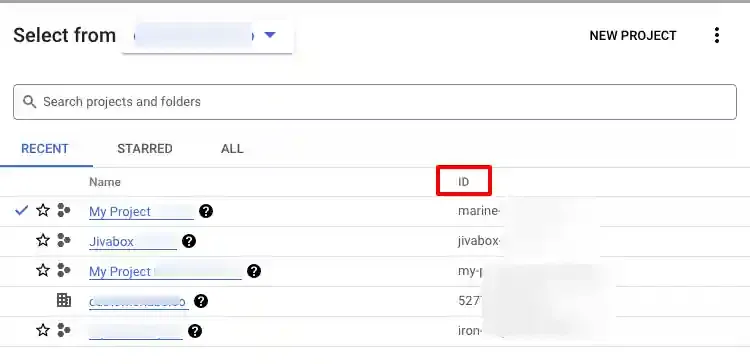
Copy the Project ID — you will need it in Step 4.
-
Verify that the BigQuery API is enabled. Go to APIs & Services → Library, search for “BigQuery API”, and confirm the status shows API Enabled.
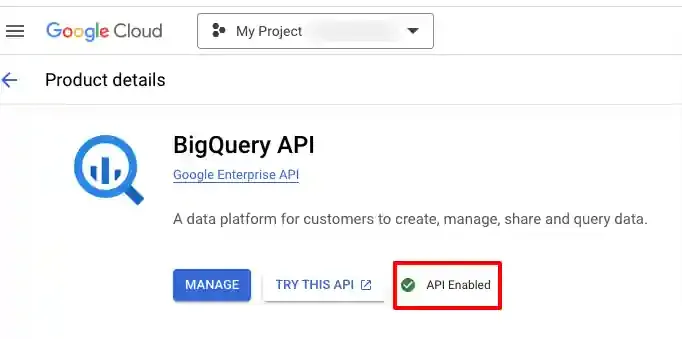
Step 2: Grant Access to CustomerLabs (IAM)
Section titled “Step 2: Grant Access to CustomerLabs (IAM)”CustomerLabs writes data to your BigQuery project using a dedicated service account. You need to grant that service account the appropriate roles.
-
In GCP, navigate to IAM & Admin → IAM. Select your project, then click + Grant Access.
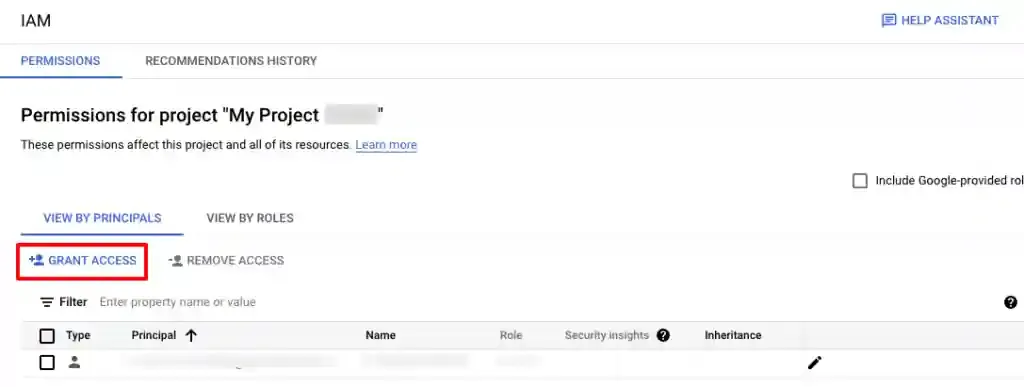
-
In the New principals field, paste the CustomerLabs service account ID:
clabs-bq-connector@future-pulsar-107805.iam.gserviceaccount.com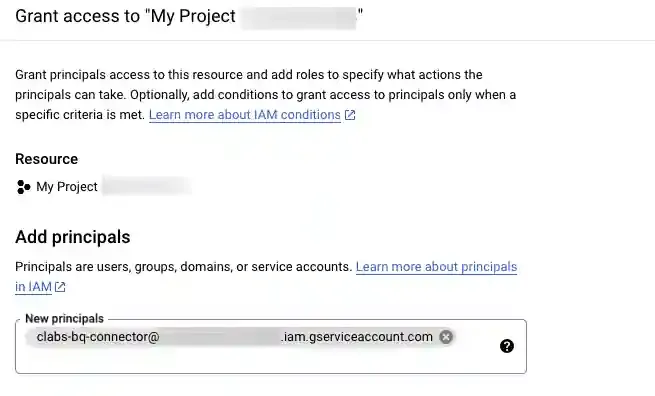
-
Assign the following two roles, then click Save:
- BigQuery Data Owner
- BigQuery Job User
Step 3: Enable Billing
Section titled “Step 3: Enable Billing”BigQuery requires an active billing account to process data jobs.
-
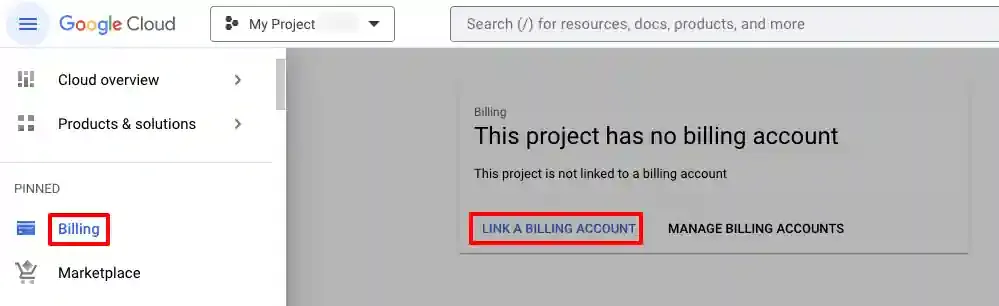
In GCP, navigate to Billing from the left sidebar.
-
If billing is not active, click Link a Billing Account and follow the prompts.
-
Confirm the billing status is Active before proceeding.
Step 4: Connect BigQuery in CustomerLabs
Section titled “Step 4: Connect BigQuery in CustomerLabs”-
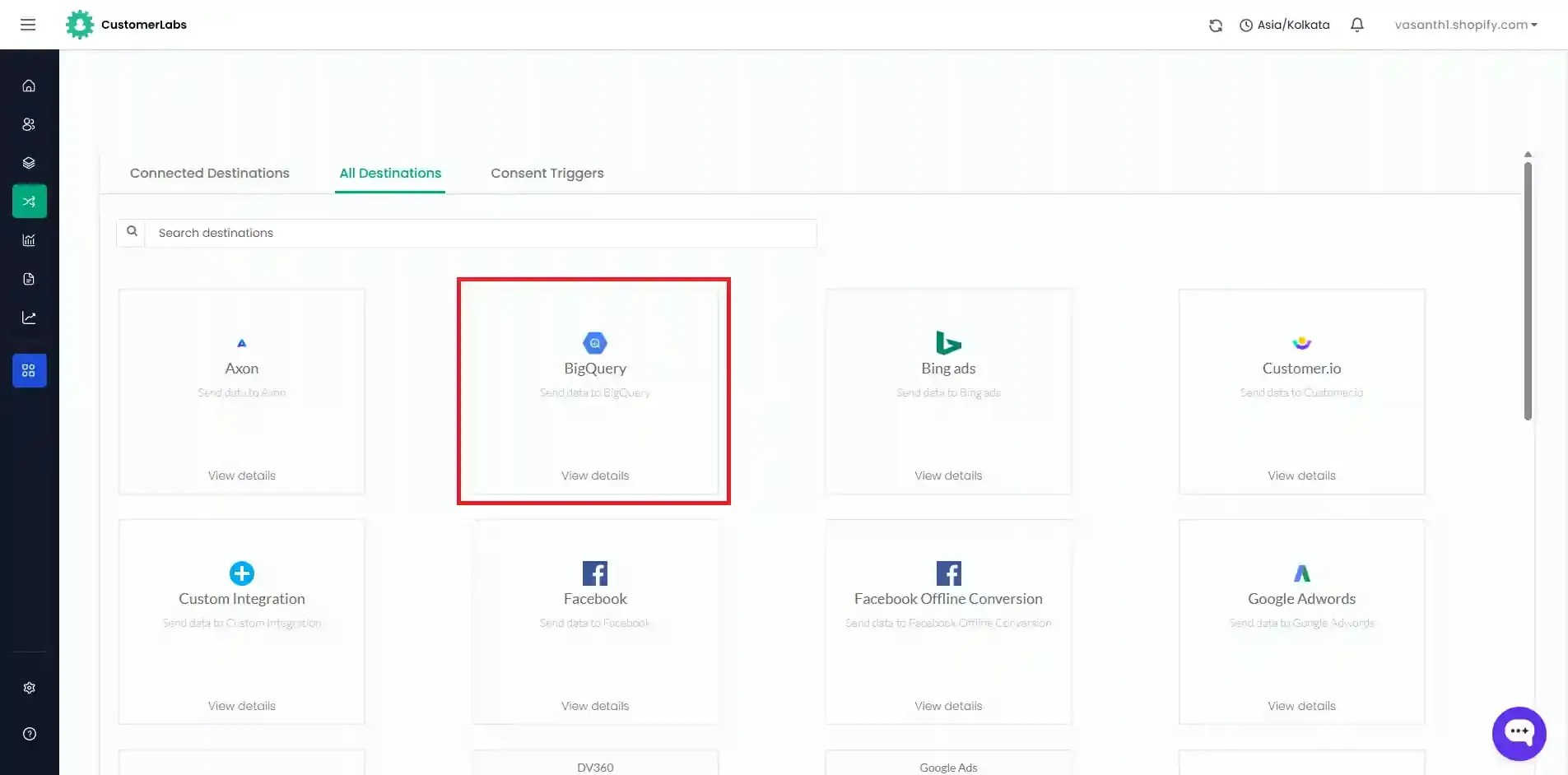
Log in to your CustomerLabs account and navigate to Destinations.
-
Search for and select BigQuery v2.
-
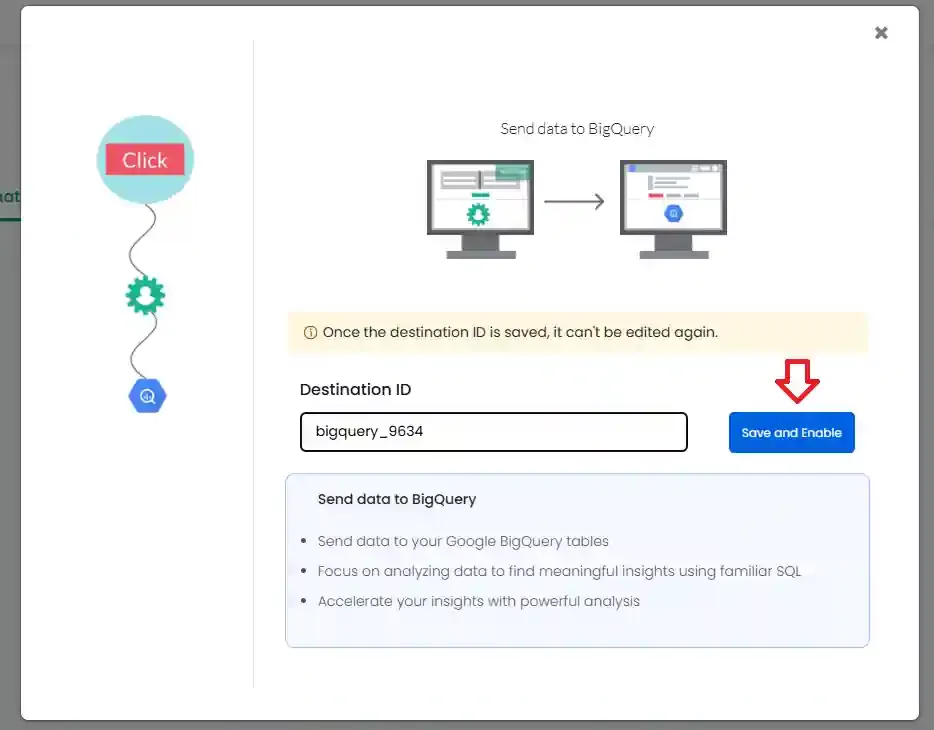
Enter a Destination ID and click Save and Enable.
-
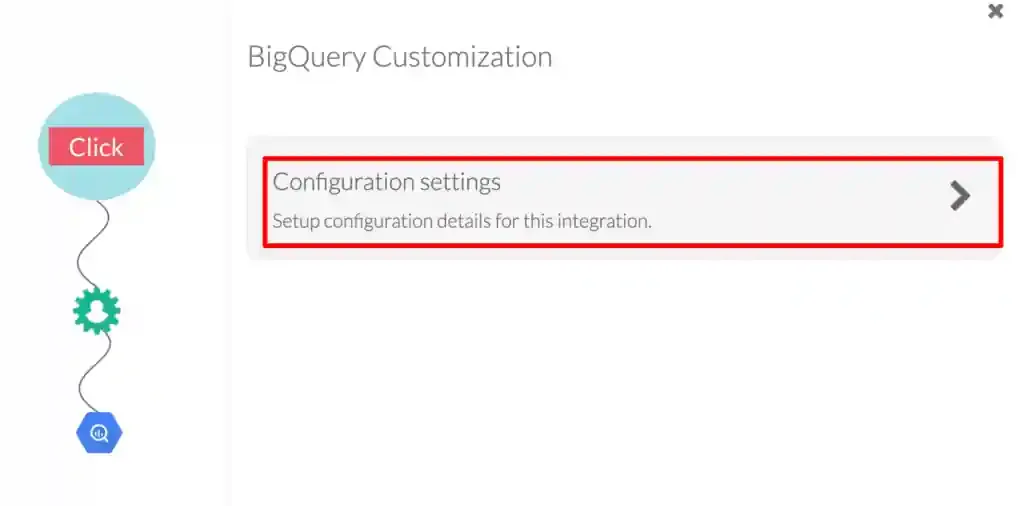
Click Configuration settings.
-
Paste the Project ID you copied earlier into the Google Project ID field, set your Refresh interval, and click Save Changes.
Schema Reference
Section titled “Schema Reference”CustomerLabs v2 writes to the dataset <app_id>_v2 and creates three table families:
| Table | Purpose |
|---|---|
events_data_YYYYMM | Monthly-sharded event fact tables |
users_data_master | Append-only snapshots of known-user profiles |
anonymous_users_data_master | Append-only anonymous → known ID mappings |
events_data_YYYYMM — Events fact table
Section titled “events_data_YYYYMM — Events fact table”| Aspect | Value |
|---|---|
| Sharding | Monthly (events_data_202601, events_data_202602, …) |
| Partition | HOUR on triggered_ts |
| Cluster | action, user_id |
| Partition filter | Required — every query must include a triggered_ts filter |
| Key | message_id |
Top-level columns
Section titled “Top-level columns”| Column | Type | Notes |
|---|---|---|
user_id | STRING | Anonymous or known user id |
action | STRING | Event name (e.g., pageview, cl_purchase, Purchased, Added to cart, session_campaign_details) |
action_type | STRING | pageview / click / empty |
triggered_ts | TIMESTAMP | Event triggered time (UTC). Use this — not cl_triggered_ts (that’s the CL-internal schema). |
message_id | STRING | Unique event id |
session_id | STRING | Browser sessions; empty for server-side events (e.g., cl_purchase) |
source | STRING | Traffic source at event time (google, Direct, www.ecosia.org, etc.) |
source_type | STRING | Channel category (Organic Search, Direct, Referrer, etc.) |
page_url, page_title | STRING | URL & title at event time |
browser, browser_language, screen_size, platform, device, timezone | STRING | Client context |
country, city, state, postal_code, continent, location, ip_address | STRING | Geo (most generated from IP) |
visitor_type | STRING | New or Returning |
Nested (RECORD REPEATED) columns
Section titled “Nested (RECORD REPEATED) columns”| Column | Inner schema | Purpose |
|---|---|---|
user_traits | key, value | User-level traits. Standard: first_name, last_name, email, phone_number. Geo fields here are IP-derived. |
group_traits | key, value | Future use (currently unpopulated for most clients). |
cl_utm_params | key, value | UTM params: utm_source, utm_medium, utm_campaign, utm_term, utm_content, utm_creative, utm_id, utm_adid, utm_cl_referrer_path, utm_cl_sub_domain. |
cl_other_params | key, value | Other URL query params. UTMs are not here. Examples: gclid, gad_source, user-agent. |
event_attributes | key, value, type | Event-specific properties. See examples below. |
products → product_traits | key, value, type (doubly nested) | E-commerce product detail. |
external_ids | key, value, type | External identifiers — identify_by_email, identify_by_phone, audiencelab_id, google_analytics__session_id, google_analytics__client_id, facebook___fbp, facebook___fbc, customerlabs_user_id, etc. |
group_external_ids | key, value, type | Future use. |
additional_info | key, value | First-touch / device / session metadata. |
segments | segment_id, segment_name, added_at (TIMESTAMP) | Segments the user belongs to. Note: added_at is TIMESTAMP here. |
event_attributes examples
cl_purchase:order_id,transaction_id,total,subtotal,tax,discount,value,currencyPurchased:transaction_id,transaction_number,value,subtotal,tax,shipping,discount_price,discount_percentage,gateway,customer_id,content_type,currency
users_data_master — Known-user profiles (append-only)
Section titled “users_data_master — Known-user profiles (append-only)”| Aspect | Value |
|---|---|
| Partition | DAY on inserted_at |
| Cluster | user_id_hash |
| Partition filter | Not required |
| Append-only | Yes — multiple rows per user_id over time. Dedupe with ROW_NUMBER() or a scheduled query. |
| Column | Type | Notes |
|---|---|---|
user_id | STRING | CustomerLabs-issued user id (e.g., cl3967trkvb12gh35mm802-…) |
traits | REPEATED (key, value) | Profile traits |
external_ids | REPEATED (key, value, type) | Linked external IDs (same set as events) |
additional_info | REPEATED (key, value) | Misc |
segments | REPEATED (segment_id, segment_name, added_at STRING) | Note: added_at is STRING here, not TIMESTAMP (this differs from the events table). |
inserted_at | TIMESTAMP | When this snapshot was written |
user_id_hash | INT64 | Cluster key |
anonymous_users_data_master — Anonymous → known mapping (append-only)
Section titled “anonymous_users_data_master — Anonymous → known mapping (append-only)”| Aspect | Value |
|---|---|
| Partition | DAY on inserted_at |
| Cluster | anonymous_user_id_hash |
| Partition filter | Not required |
| Append-only | Yes — dedupe per anonymous_user_id by latest inserted_at or use a scheduled query. |
| Column | Type | Notes |
|---|---|---|
user_id | STRING | Known user id |
anonymous_user_id | STRING | Anonymous (pre-identification) id; converted to known once the user identifies |
inserted_at | TIMESTAMP | When the link was recorded |
anonymous_user_id_hash | INT64 | Cluster key |
Sample Data
Section titled “Sample Data”user_traits
Section titled “user_traits”[ { "key": "email", "value": "test@gmail.com" }, { "key": "first_name", "value": "test" }, { "key": "last_name", "value": "last" }]cl_utm_params
Section titled “cl_utm_params”[ { "key": "utm_source", "value": "google" }, { "key": "utm_medium", "value": "cpc" }, { "key": "utm_campaign", "value": "summer_sale" }]cl_other_params
Section titled “cl_other_params”[ { "key": "gad_source", "value": "2" }, { "key": "gclid", "value": "Cxfgcgyugyhuivdshue89732r89uy298..." }, { "key": "user-agent", "value": "Mozilla/5.0 (Linux; Android 10; K)..." }]event_attributes (cl_purchase)
Section titled “event_attributes (cl_purchase)”[ { "key": "order_id", "value": "ORD-10231", "type": "string" }, { "key": "transaction_id", "value": "txn_7281", "type": "string" }, { "key": "total", "value": "249.50", "type": "number" }, { "key": "currency", "value": "USD", "type": "string" }]product_traits
Section titled “product_traits”[ [ { "key": "product_id", "value": "1", "type": "number" }, { "key": "product_name", "value": "Blue T-Shirt", "type": "string" }, { "key": "product_price", "value": "100", "type": "number" } ], [ { "key": "product_id", "value": "2", "type": "number" }, { "key": "product_name", "value": "Black Jeans", "type": "string" }, { "key": "product_price", "value": "200", "type": "number" } ]]external_ids
Section titled “external_ids”[ { "key": "client_id", "value": "js8628376773", "type": "google_analytics" }, { "key": "_fbc", "value": "js786486283752523", "type": "facebook" }]Querying v2 — Patterns
Section titled “Querying v2 — Patterns”Pattern 1 — Anonymous-user resolution
Section titled “Pattern 1 — Anonymous-user resolution”Required for any user-level analysis. Stitches anonymous IDs to their resolved known IDs.
SELECT COALESCE(a.user_id, e.user_id) AS user_id, e.action, e.triggered_tsFROM `<PROJECT>.<DATASET>_v2.events_data_YYYYMM` eLEFT JOIN `<PROJECT>.<DATASET>_v2.anonymous_users_data_master` a ON e.user_id = a.anonymous_user_idWHERE e.triggered_ts >= TIMESTAMP('2026-04-01 00:00:00', 'Asia/Kolkata') AND e.triggered_ts < TIMESTAMP('2026-05-01 00:00:00', 'Asia/Kolkata')Pattern 2 — Event-attribute extraction
Section titled “Pattern 2 — Event-attribute extraction”SELECT (SELECT value FROM UNNEST(event_attributes) WHERE key = 'order_id' LIMIT 1) AS order_id, (SELECT value FROM UNNEST(event_attributes) WHERE key = 'transaction_id' LIMIT 1) AS transaction_id, CAST((SELECT value FROM UNNEST(event_attributes) WHERE key = 'total' LIMIT 1) AS NUMERIC) AS order_valueFROM `<PROJECT>.<DATASET>_v2.events_data_202604`WHERE triggered_ts >= TIMESTAMP('2026-04-01') AND triggered_ts < TIMESTAMP('2026-05-01') AND action = 'cl_purchase'Pattern 3 — UTM extraction
Section titled “Pattern 3 — UTM extraction”SELECT (SELECT value FROM UNNEST(cl_utm_params) WHERE key = 'utm_source' LIMIT 1) AS utm_source, (SELECT value FROM UNNEST(cl_utm_params) WHERE key = 'utm_medium' LIMIT 1) AS utm_medium, (SELECT value FROM UNNEST(cl_utm_params) WHERE key = 'utm_campaign' LIMIT 1) AS utm_campaignFROM `<PROJECT>.<DATASET>_v2.events_data_202604`WHERE triggered_ts >= TIMESTAMP('2026-04-01') AND triggered_ts < TIMESTAMP('2026-05-01')Pattern 4 — Product extraction (doubly-nested)
Section titled “Pattern 4 — Product extraction (doubly-nested)”SELECT e.message_id, (SELECT value FROM UNNEST(p.product_traits) AS t WHERE t.key = 'product_name' LIMIT 1) AS product_name, (SELECT value FROM UNNEST(p.product_traits) AS t WHERE t.key = 'product_sku' LIMIT 1) AS sku, CAST((SELECT value FROM UNNEST(p.product_traits) AS t WHERE t.key = 'product_price' LIMIT 1) AS NUMERIC) AS priceFROM `<PROJECT>.<DATASET>_v2.events_data_202604` e,UNNEST(products) AS pWHERE e.triggered_ts >= TIMESTAMP('2026-04-01') AND e.triggered_ts < TIMESTAMP('2026-05-01')Pattern 5 — Join events to the user master (latest profile)
Section titled “Pattern 5 — Join events to the user master (latest profile)”Query the wildcard events_data_* to scan across monthly shards. Each individual shard still enforces the partition filter on triggered_ts.
WITH event_users AS ( SELECT DISTINCT COALESCE(a.user_id, e.user_id) AS user_id FROM `<PROJECT>.<DATASET>_v2.events_data_*` e LEFT JOIN `<PROJECT>.<DATASET>_v2.anonymous_users_data_master` a ON e.user_id = a.anonymous_user_id WHERE e.action = 'Added to cart' AND e.triggered_ts >= TIMESTAMP('2026-04-01') AND e.triggered_ts < TIMESTAMP('2026-05-01')),users_latest AS ( SELECT * EXCEPT(rn) FROM ( SELECT *, ROW_NUMBER() OVER (PARTITION BY user_id ORDER BY inserted_at DESC) AS rn FROM `<PROJECT>.<DATASET>_v2.users_data_master` ) WHERE rn = 1)SELECT eu.user_id, um.*FROM event_users euJOIN users_latest um USING (user_id)Optional — Scheduled Queries to Dedupe Master Tables
Section titled “Optional — Scheduled Queries to Dedupe Master Tables”The v2 master tables are append-only and may contain duplicate snapshots per user. If you’d rather not dedupe in every read query, set up two scheduled queries that produce deduplicated copies.
users_data_master → users_data
Section titled “users_data_master → users_data”CREATE OR REPLACE TABLE `<PROJECT>.<DATASET>_v2.users_data` ASSELECT * EXCEPT(rn) FROM ( SELECT *, ROW_NUMBER() OVER (PARTITION BY user_id ORDER BY inserted_at DESC) AS rn FROM `<PROJECT>.<DATASET>_v2.users_data_master`) WHERE rn = 1;anonymous_users_data_master → anonymous_users_data
Section titled “anonymous_users_data_master → anonymous_users_data”CREATE OR REPLACE TABLE `<PROJECT>.<DATASET>_v2.anonymous_users_data` ASSELECT * EXCEPT(rn) FROM ( SELECT *, ROW_NUMBER() OVER (PARTITION BY anonymous_user_id ORDER BY inserted_at DESC) AS rn FROM `<PROJECT>.<DATASET>_v2.anonymous_users_data_master`) WHERE rn = 1;Deduplication on Read (no scheduled query)
Section titled “Deduplication on Read (no scheduled query)”If you don’t want a separate scheduled job, dedupe in-line with QUALIFY:
-
Events (duplicate
message_id):QUALIFY ROW_NUMBER() OVER (PARTITION BY message_id ORDER BY triggered_ts DESC) = 1 -
Users (multiple snapshots):
QUALIFY ROW_NUMBER() OVER (PARTITION BY user_id ORDER BY inserted_at DESC) = 1 -
Anonymous mappings:
QUALIFY ROW_NUMBER() OVER (PARTITION BY anonymous_user_id ORDER BY inserted_at DESC) = 1 -
Paired conversion events —
cl_purchase(server-side) andPurchased(client-side) can fire ~2s apart for the same order. Dedupe ontransaction_id(fromevent_attributes) +user_id.
Why these design choices (v2)
Section titled “Why these design choices (v2)”| Feature | What it gives you |
|---|---|
| Sharding (events monthly) | The events_data_YYYYMM naming lets you scope queries to specific months without scanning others — useful for archival or one-month exports. |
Partitioning (events HOUR / users DAY) | BigQuery skips entire partitions when your WHERE filters on the partition key. Cuts bytes scanned dramatically, and enables partition-level expiry / deletion. |
Clustering (events on action, user_id; users on *_hash) | Within each partition, rows are physically sorted on the cluster keys, so filters like action = 'cl_purchase' or user_id = '...' scan only the relevant blocks. Best for high-cardinality filter columns. |
| Master tables | Append-only writes are cheaper and avoid race conditions during sync. Deduplication is pushed to the consumer (you), either via scheduled query or in-line with QUALIFY. |