Customerlabs CDP Documentation
-
Getting Started
-
Core Concepts
-
Website Event Tracking
-
- E-commerce Platform Integration
- WooCommerce + CustomerLabs Integration Guide
- BigCommerce + CustomerLabs Integration Guide
- Custom conversion or synthetic events for Shopify and WooCommerce
- Hubspot + CustomerLabs integration
- Go High Level+ CustomerLabs Integration Tracking
- Typeform + CustomerLabs Integration Tracking
- Formstack + CustomerLabs Integration Tracking
- Swipe Pages + CustomerLabs Integration Tracking
- Calendly + CustomerLabs Integration
- Clickfunnels + CustomerLabs Integration
- Funnelish + CustomerLabs Integration Tracking
- Jotform+ CustomerLabs Intergration
- Shopify+CustomerLabs 1PD Ops Integration Guide
- Systeme.io + CustomerLabs
- Show all articles ( 5 ) Collapse Articles
-
-
-
Destinations
- CustomerLabs + Google Analytics (GA4) Integration
- CustomerLabs + Google Adwords Integration
- Customerlabs + Facebook Offline Conversion Integration
- CustomerLabs + Meta CRM Pixel Integration
- CustomerLabs + Intercom Integration
- CustomerLabs + iiintent.io Integration
- CustomerLabs + LinkedIn Integration
- CustomerLabs + Zapier Integration
- CustomerLabs + Drip Integration
- CustomerLabs + Segment Integration
- CustomerLabs + Google Sheets Integration
- CustomerLabs + Gist (ConvertFox) Integration
- CustomerLabs + Webhooks Integration
- CustomerLabs + BigQuery Integration
- CustomerLabs + Mixpanel Integration
- CustomerLabs + Customer.io integration
- CustomerLabs + Sendinblue Integration
- CustomerLabs + Klaviyo Integration
- CustomerLabs + TikTok Integration (Beta)
- CustomerLabs + Audience Lab Integration
- CustomerLabs + Maropost Integration
- CustomerLabs + LimeChat Integration
- CustomerLabs + KickBox Integration
- CustomerLabs + Snapchat Integration
- CustomerLabs + Taboola Integration
- CustomerLabs + Bing Ads Integration
- CustomerLabs + Google DV360 Integration
- CustomerLabs + Reddit Integration
- Show all articles ( 18 ) Collapse Articles
-
Sources
- Introduction to CustomerLabs Sources
- Source - Freshsales
- Source - HubSpot
- Source - Drift
- Source - Intercom
- Source - Facebook
- Source – Salesforce
- Source - iiintent.io
- Custom Source
- Source - CSV Upload
- Source - Pipedrive
- Source - Jotform
- Source - Typeform
- Source - Google Ads
- Source – Vivenu
- Zoho CRM + CustomerLabs
- Show all articles ( 6 ) Collapse Articles
-
Segmentation
-
Monitoring
-
Privacy
-
Help
-
Change Log
-
Custom Branding
Removed from cart Tracking
Tracking products removed from shopping cart gives marketers exclusive insights into user journey before purchase and can be used to cross sell or up sell with relevant messages/offers
1. Login to your CustomerLabs account
2. Launch Action Recorder by clicking the camera icon
3. You will be redirected to your website and Action Recorder panel will open up
4. Click on “Record Action” to start recording
5. Select “Removed from cart” for Action Name or create a custom name if you wish
6. Change the Action Type to “On click”
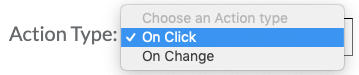
7. Now click on “Index Finger” icon to go to your website
8. Select the “Remove” button in your cart
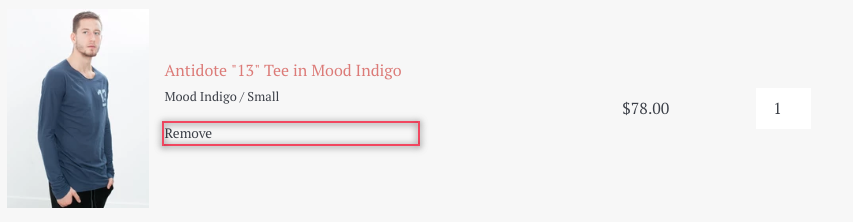
9. Once the button is selected, you will be redirected to the Action Recorder panel
10. Select both “Pick a common selector” and “Map attributes to User Profile” and click “Add details”`
11. Now to add relevant attributes, select “Product_name” from the drop-down. Click on the “Index finger” icon to select the product name (Asymmetric Dress in Black in this case) from your website
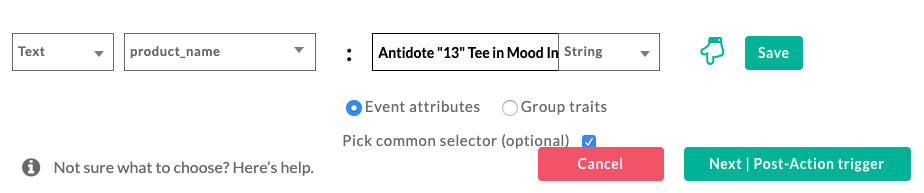
12. Click “Save”
13. Repeat steps 11 and 12 to add multiple product attributes such as Product variant, Size, Quantity, price and more

14. You can skip the next step by clicking on “Next | Tracking rule”
15. Choose the pages that you would like to start tracking for the above defined action and click on “Save” and then “Save Action”

16. Awesome! Your ecommerce products removed from cart tracking event has been successfully configured!
17. If you’re still facing issues, get in touch with our team by clicking on the chat icon on the lower right corner. We will set up all your events for free 🙂

0 out Of 5 Stars
| 5 Stars | 0% | |
| 4 Stars | 0% | |
| 3 Stars | 0% | |
| 2 Stars | 0% | |
| 1 Stars | 0% |