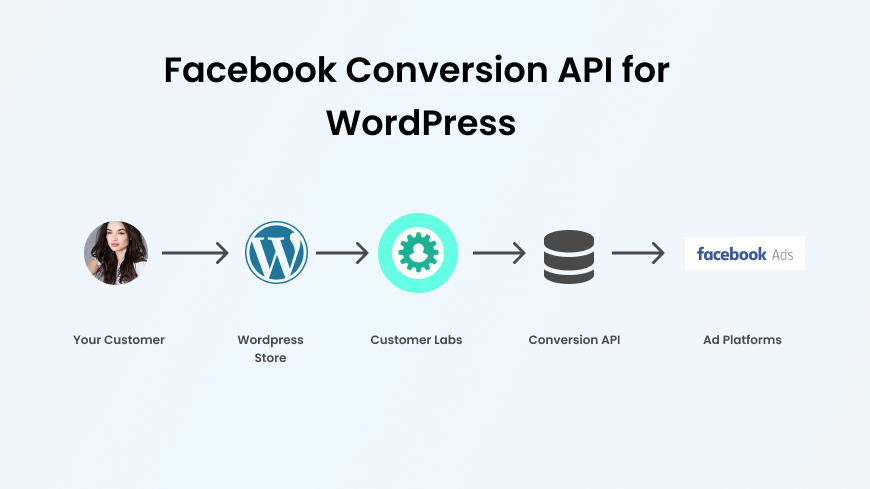
In this blog, we cover what Meta CAPI is, why signal loss is quietly wrecking your ad campaigns, how CAPI works end-to-end, offline conversions, every implementation method available, and how to pick the right one for your business.
What is Meta Conversions API?
The tool your Meta campaigns desperately needed and you’re only reading about now
Meta Conversions API (CAPI) is a server-side integration that sends your conversion data directly from your server to Meta, completely bypassing the browser.
Just clean, reliable conversion signals going straight from your server to Meta’s servers.
If you’ve been running Meta ads since before 2021, you remember what life was like before iOS 14 dropped. ROAS looked great. Attribution made sense. You could see your Black Friday conversions roll in like clockwork.
Then Apple flipped the switch, half your US audience said “Ask App Not to Track,” and your reporting looked like someone had taken a sledgehammer to it.
That was the moment CAPI stopped being optional. The Meta Pixel hasn’t gone anywhere, it’s still doing its job. But browsers, ad blockers, and privacy regulations have slowly stripped away its reliability.
CAPI is Meta’s answer that gives you back the signal you’ve been losing. It’s not a replacement for the Pixel. It’s the upgrade that makes the Pixel actually work again.
If CAPI is different from pixel what does it actually send
What does Meta CAPI actually send?
Let’s make this real with a scenario
A user named Jake is scrolling Instagram on his iPhone. He sees your ad, clicks through to your Shopify store, browses around, adds something to his cart, and after three days of thinking about it, comes back and buys.
Here’s what happens with only the Pixel:
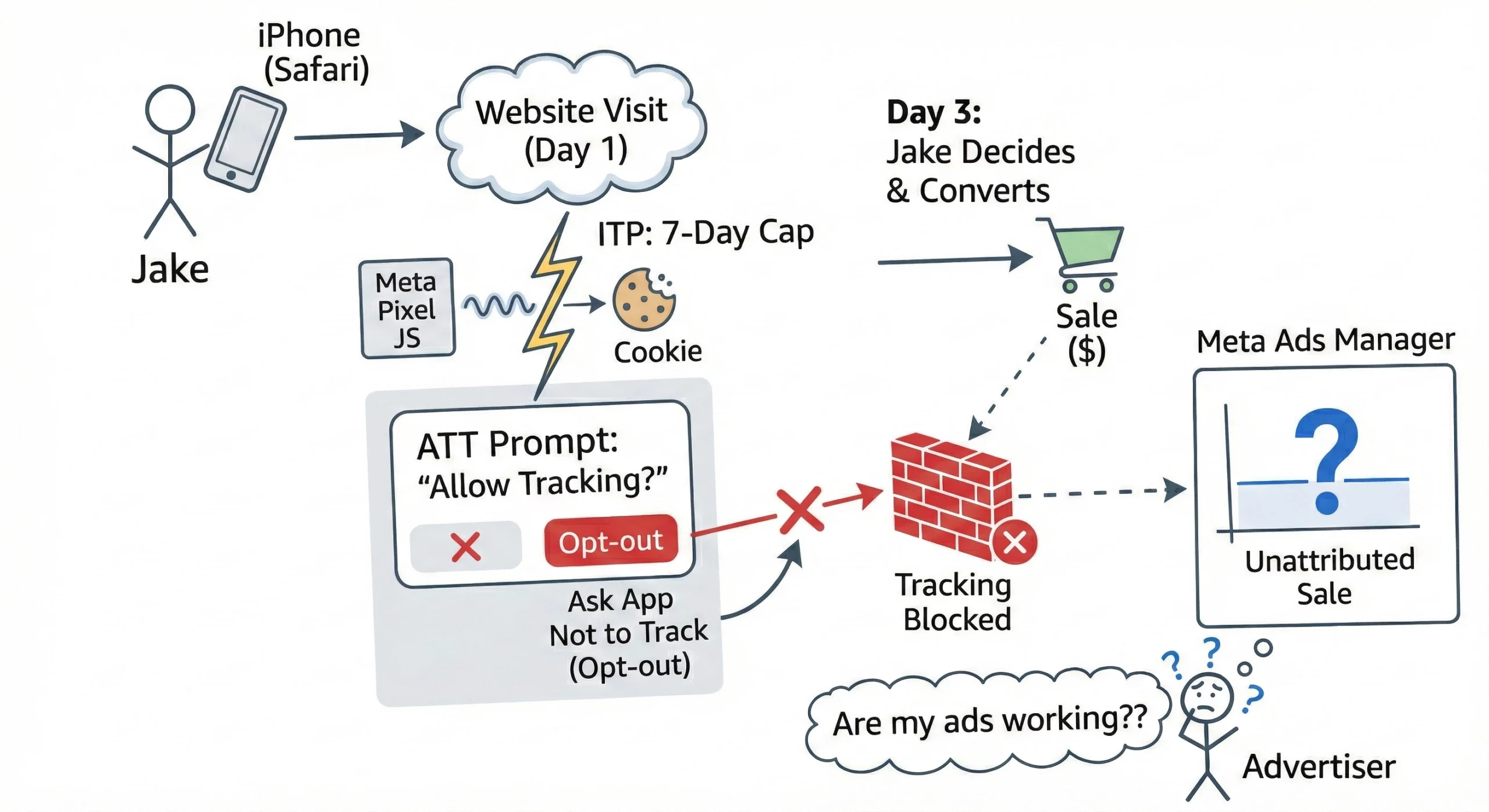
The Pixel fires a JavaScript event in Jake’s Safari browser when he first visits. But Safari’s Intelligent Tracking Prevention (ITP) caps the cookie lifetime to 7 days.
Jake takes 3 days to decide, which should be fine , except he also opted out of tracking when the App Tracking Transparency prompt appeared on his iPhone.
The Pixel never knew he converted. Your Ads Manager shows the sale as “unattributed.” You start questioning whether your Meta ads are even doing anything.
Here’s what happens with CAPI:
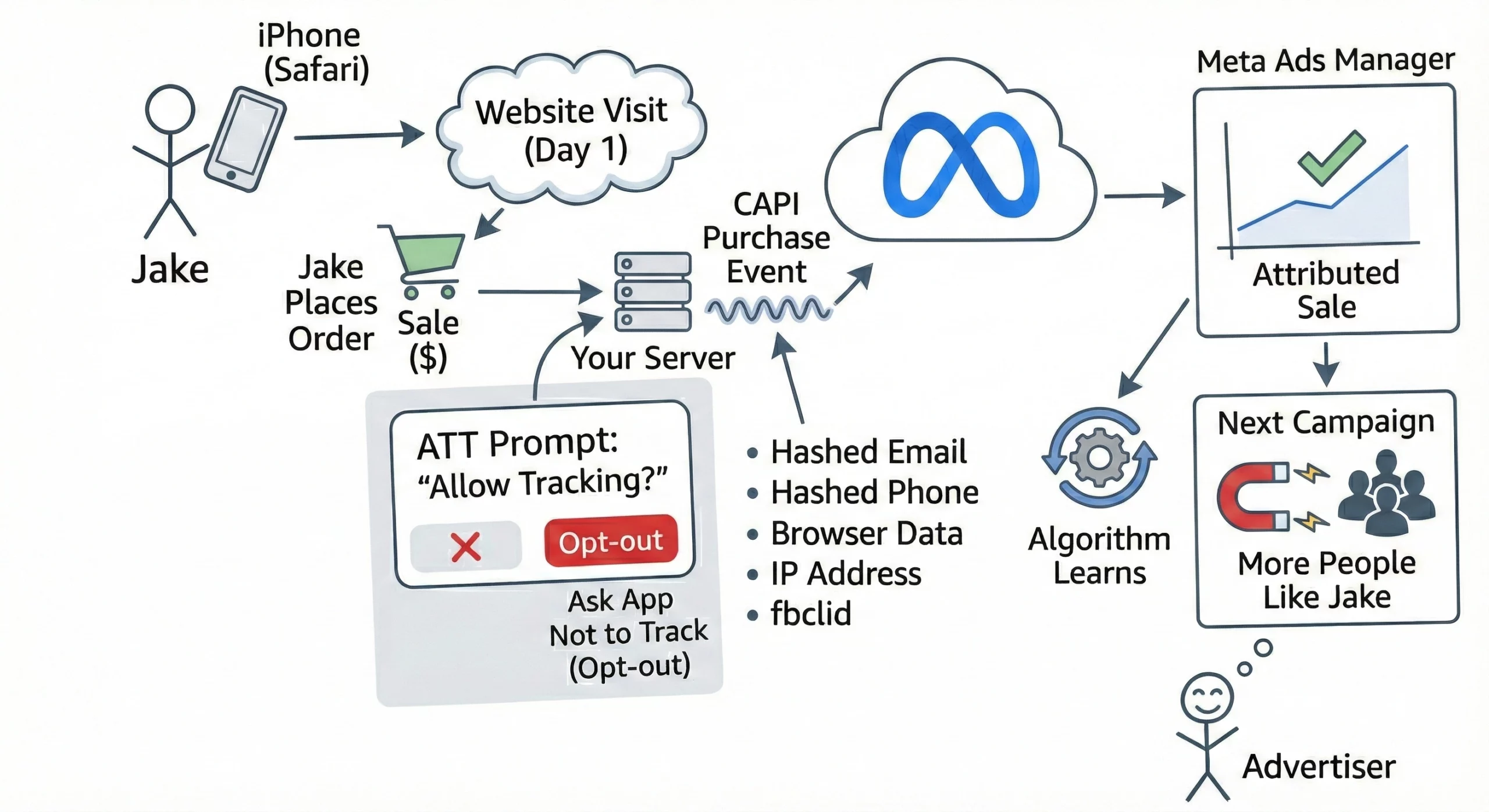
When Jake places his order, your server immediately sends a Purchase event to Meta along with his hashed email, hashed phone number, browser data, IP address, and the fbclid from his original click.
Meta matches that event to Jake’s Facebook profile. The conversion is attributed. The algorithm learns. Your next campaign finds more people like Jake.
That’s the difference. And it compounds over time.
Here’s a breakdown of what CAPI can send to Meta:
- Standard events: Purchase, Lead, AddToCart, ViewContent, InitiateCheckout, CompleteRegistration
- Custom events: Anything specific to your business (e.g., “Quote Requested,” “Trial Started,” “Appointment Booked”)
- Customer data (hashed): Email, phone number, first name, last name, city, state, zip code, country
- Web metadata: IP address, user agent, page URL, referrer
- Transaction data: Order value, currency, order ID, product IDs
All customer data is SHA-256 hashed before it leaves your server. Meta never receives raw PII, just hashed identifiers it uses to match against its own user database.
Still confused, I hope the table down below should clear the difference.
What is the difference between Pixel vs. CAPI?
| Feature | Facebook Pixel | Conversions API |
| Data Collection | Client-side (browser-based) | Server-side (data sent from server directly) |
| Reliability | Less reliable (ad blockers and privacy features) | More reliable (not affected by ad blockers) |
| Privacy Compliance | Limited (requires additional compliance work) | Stronger (more privacy-friendly, GDPR-compliant) |
| Setup Complexity | Easier to implement | Requires more technical expertise for setup |
| Data Matching | Limited (depends on browser interactions) | Improved (first-party data is more accurate) |
| Flexibility | Less flexibility (restricted to what is on the page) | More flexibility (custom events, conversions) |
Is it clear now? I saw this coming. Should I abandon my pixel then? No, Use them both together.
Why did Facebook create the Conversions API?
Due to data privacy updates and browsers blocking third-party data cookies, the effectiveness of Facebook Pixels (a code written on the browser side to track users’ data) saw a constant decline in providing customer information.
There were concerns. There was a rift when it came to concerns that needed to be addressed by businesses for users’ data. Concerns that needed to be addressed by Facebook for marketers.
- Privacy Concerns: Amid the rise of stringent data protection regulations like the General Data Protection Regulation (GDPR), Consumer Data Protection Act (CDPA), Google Chrome’s plan ‘to phase out third-party cookies’ and others- have all posed threats to conventional tracking methods. In response to this, Conversions API emerged as a solution (on the server side) to precisely track while upholding user privacy.
- Decrease in Pixel Reliability: As mentioned earlier, there are many rules like ad blockers, and the limitations of browser-side tracking, have created obstacles for Facebook’s Pixel data tracking. By introducing Conversions API, Meta aimed to provide advertisers with a more reliable server-side-based solution.
To tackle this, CustomerLabs 1PD Ops platform has released the 1P domain tracking that tracks the user behavior data using the 1P cookies set on the server-side. This reduces the reliance on third-party cookie tracking, and improves data signal quality for Meta’s ad algorithms.
- Future-Proofing Advertising Strategies: Meta being aware of the traditional tracking methods becoming obsolete, started taking measures to ensure advertising platforms remain relevant in the future. To achieve this, Meta has introduced an alternative approach enabling advertisers to monitor conversions efficiently. This approach is the Conversions API.
The concerns were put forth, hence solutions were readymade!
Why does Meta Recommend Running Pixel & CAPI Together?
Meta isn’t subtle about this. Their official documentation recommends using both the Meta Pixel and the Conversions API together for optimal performance. Here’s why this matters in practice:
The Pixel captures quick, real-time browser signals, the kind that fire immediately when a user loads a page or clicks a button. CAPI captures the events that the Pixel misses, the purchases that happened on private browsers, the leads that converted three days later, the phone calls that closed the deal, the in-store purchases that happened after an online ad click.
Together, they create what Meta calls redundant signal coverage and that redundancy directly improves your Event Match Quality (EMQ) score.
EMQ is Meta’s internal metric for how well your events are being matched to actual Facebook users.
Higher EMQ means more of your conversion data is being used for optimization. Lower EMQ means the algorithm is working with incomplete information and billing you the same rate for the privilege.
From Meta’s official documentation:
“We recommend implementing the Conversions API alongside the Meta Pixel to maximize event matching and optimize ad delivery.”
(Source: Meta Conversions API Documentation)
One important note: when you’re sending the same event through both the Pixel and CAPI, you need to deduplicate.
Otherwise Meta counts it twice, your conversions inflate, your team celebrates prematurely, and your algorithm gets confused trying to optimize toward a number that doesn’t reflect reality. We’ll cover deduplication in detail shortly.
Next, let’s look into whether CAPI is a necessity rather than a luxury.
Why Meta CAPI is Critical?
Studies suggest that 30–40% of conversions go unattributed because of browser-side tracking limitations.
For a US ecommerce brand spending $50,000 a month on Meta ads, that’s potentially $15,000–$20,000 in impact that Meta’s algorithm never learns from.
This is not a rare scenario. This is Tuesday for most US DTC brands.
What signal loss actually costs you and how Meta’s algorithm “The feedback machine”pays the price?
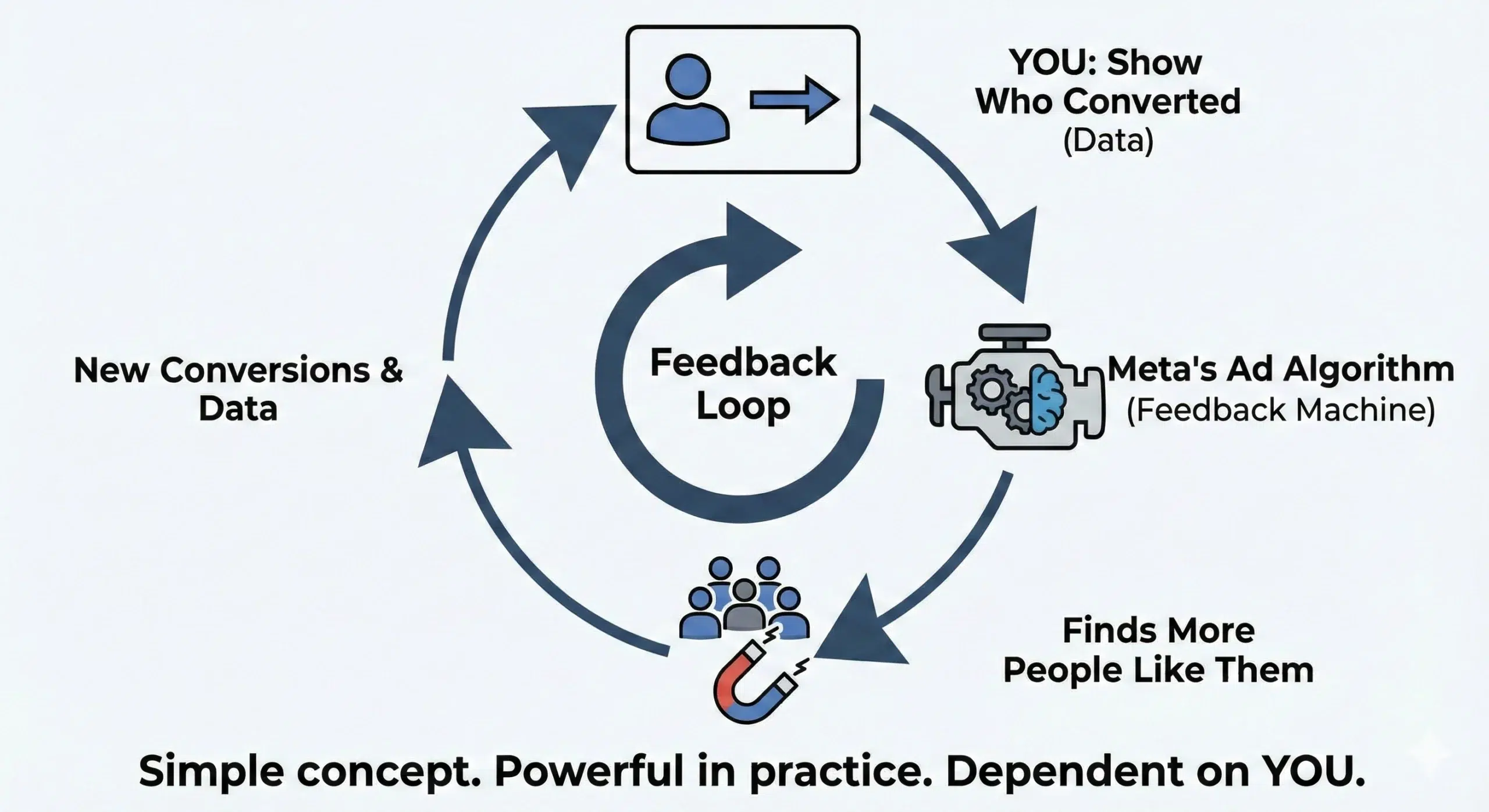
Meta’s ad algorithm is, at its core, a feedback machine. You show who converted and it goes and finds more people like them.
Simple concept. Powerful in practice. But completely dependent on you actually telling it who converted.
Signal loss breaks that feedback loop.
Meta’s learning algorithm has progressively moved from broad demographic targeting toward a system that relies heavily on real conversion signals to identify and find your ideal customer.
The algorithm today is more powerful than it’s ever been. But it’s also more dependent on quality data than it’s ever been.
This is exactly where Signal Engineering becomes the skill that separates average performance marketers from elite ones.
Signal Engineering is not about sending more events. It’s about sending better events that match with the goals that you are willing to achieve for your businesses.
Think of it this way: Pixel-only tracking gives Meta a blurry Polaroid of your customer. CAPI with enriched signals gives it a 4K portrait. The algorithm finds the next customer based on that portrait.
If you’re handing it a blurry photo, don’t be surprised when the lookalike audience looks nothing like your best buyers.
For US brands, signal loss hits especially hard because:
- iOS market share in the US is ~57%, well above the global average, meaning more of your customers are on devices where ATT has the most impact
- US consumers are increasingly privacy-aware and more likely to use tools like ad blockers, VPNs, and private browsing
- CCPA in California and emerging state-level privacy laws add compliance layers that can further restrict client-side tracking
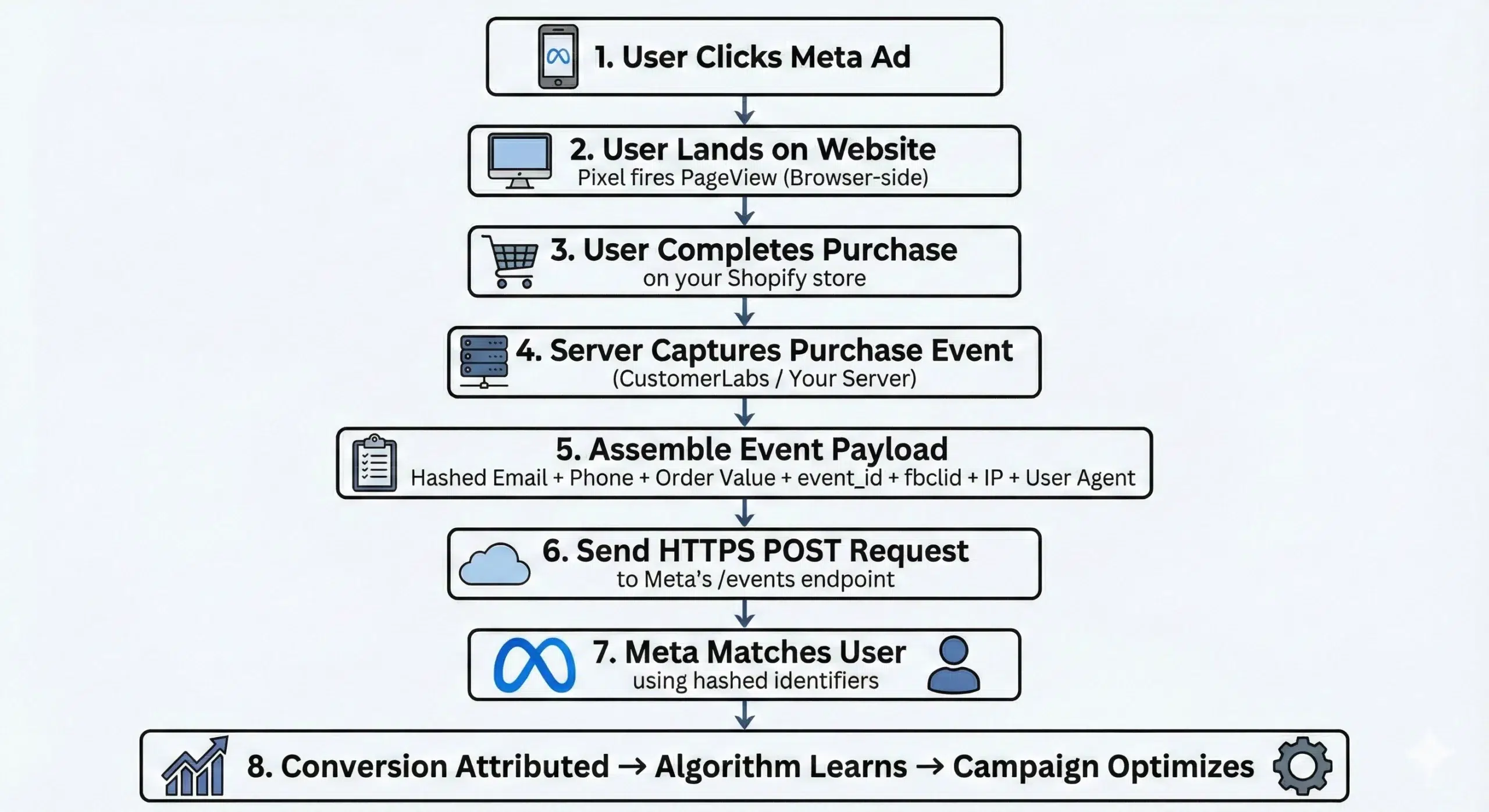
Now let’s understand Meta CAPI’s working mechanism. It is gonna be a bit technical, but bear with me. I will try to break it down as simply as possible.
How Meta Conversions API (CAPI) Works?
Look at the flow given below, that’s exactly what happens when a user clicks your ad and lands on your website.
Now comes the techy stuff.
Key components explained – The parts you need to know
Access Token: Your authentication credential. This tells Meta you’re authorized to send events on behalf of a specific ad account. Treat it like a password, never expose it in client-side code.
Pixel ID: The unique identifier for your Meta Pixel. This connects your CAPI events to the right ad account and dataset in Events Manager.
Event Name: The action that occurred. Use Meta’s standard event names (Purchase, Lead, AddToCart, ViewContent) wherever possible. These map directly to Meta’s optimization algorithms.
Event Time: Unix timestamp of when the event actually happened. Important: Meta accepts events up to 7 days in the past, but for optimization purposes, send in real-time or as close to it as possible.
User Data Object: The heart of CAPI. This is the collection of hashed customer identifiers that Meta uses to match your event to a real user in its system. The more identifiers you include, the better your match rate.
Custom Data: Transaction-specific information: order value, currency, product IDs, order ID, content name. Required for value-based optimization campaigns.
Action Source: Tells Meta where the event happened. For web events: website. For offline events: physical_store, phone_call, email, chat, etc. This is critical for offline conversions to be categorized correctly.
Parameters Guide: what to send, what’s critical, What’s Bonus
| Priority Tier | Parameters | Why It Matters |
| Required (send always) | event_name, event_time, action_source | Events won’t process without these |
| High Impact (send always) | em (email), ph (phone), fbclid, client_ip_address, client_user_agent | Biggest driver of Event Match Quality |
| Recommended | external_id, fn (first name), ln (last name), st (state), zp (zip), country | Incrementally improves match rate, especially useful for US audiences |
| Optional but valuable | value, currency, content_ids, order_id, content_name, num_items | Enables value optimization; required for ROAS-based bidding |
As said earlier when you send events from both pixel and CAPI, events can be double counting which may inflate numbers on the reports. This is how you can fix it.
What is Event deduplication?
A user completes a purchase. Your Pixel fires a Purchase event from their browser. Simultaneously, your server sends a Purchase event via CAPI.
Meta receives two Purchase signals for the same transaction. Without deduplication, it counts both. Your conversion numbers double. Your team is thrilled. Your algorithm is optimizing toward a fantasy.
event_id solves this elegantly.
Assign every event a unique identifier; typically your order ID, or a UUID generated at the time of the event. Pass this same event_id in both the Pixel event payload and the CAPI payload for the same user action.
Meta will look at events within a 48-hour window and deduplicate any that share the same event_name + event_id combination. Attribution and reporting gets on point.
Here’s a few simple rules for event deduplication:
- event_id must be unique per event (not per session)
- Every purchase has a unique event_id. Every lead form submission has a unique event_id
- The same event_id passed through both Pixel and CAPI tells Meta “these are the same thing, count it once”
- Don’t reuse event_id values across different events or users
This is one of those details that separates a correctly implemented CAPI setup from one that quietly inflates your numbers and misleads your optimization.
Next is the most important part which many brands miss out on.
Offline Conversions & Meta CAPI
Since this is a lengthy blog. I decided to come up with some tasks in between. Here’s a small task for you.
I have given three scenarios down below, find out what is common and what is missing?
- A US consumer sees a Facebook ad for a dental clinic, calls to book an appointment, shows up in person, and pays at the front desk.
- A homeowner scrolling Instagram sees an ad for a local HVAC company, fills out a form, gets a sales call the next day, and signs a service contract.
- A DTC brand runs Meta ads, a customer walks into a physical retail location after seeing the ad, and buys in-store.
What’s missing in all three scenarios? Did you find it?
The Pixel recorded the ad click. The purchase happened in the real world.
But without offline conversions, those sales are invisible to Meta’s algorithm and to your attribution reports.
Meta’s Offline Conversions feature (now fully integrated under the CAPI umbrella) lets you send those real-world conversion events back to Meta, so it can match them to the original ad exposure and use them for optimization.
This is a massive deal for:
- US retail brands with both online and physical store presence
- Lead gen and B2B companies where the sale closes over the phone or in a meeting, not on a landing page
- Service businesses like healthcare, legal, financial services, real estate, automotive , where the conversion is an appointment, a consultation, or a signed contract
- High-ticket DTC brands where the buyer journey spans days or weeks and multiple touchpoints
If your business has any offline component to its sales process, ignoring offline conversions means you’re optimizing your Meta campaigns based on a fraction of your actual results.
How Meta matches offline events?
When you send an offline conversion event to Meta, it runs a matching process using the customer identifiers you provide.
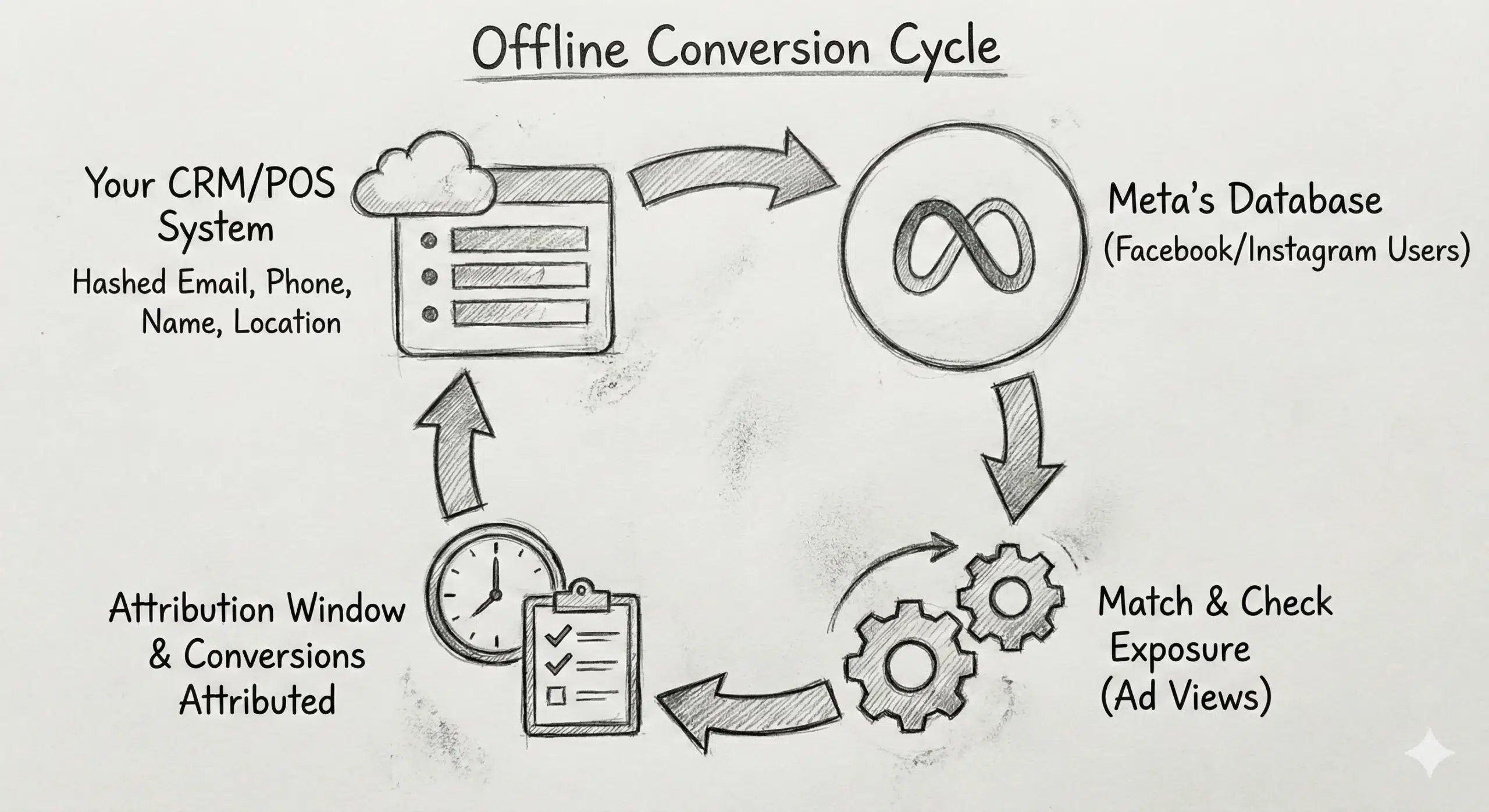
Meta takes the hashed email, phone number, name, and location data from your offline event, pulled from your CRM, POS system, or booking platform and compares it against its database of Facebook and Instagram users.
When it finds a match, it checks whether that user was exposed to one of your ads within the attribution window, and attributes the conversion accordingly.
Match rate depends on what you send:
- Email alone: decent match rate
- Email + phone: strong match rate
- Email + phone + name + zip code: highest match rate
Meta accepts offline events sent within 62 days of the customer interaction. But for algorithm optimization, send as soon as possible after the conversion occurs. A sale that happened yesterday is more useful to the algorithm than one from 60 days ago.
Next, let’s get right into the setup part, I have given you multiple ways on how you can do it.
How to Implement Meta CAPI (All Methods)
There are four ways to implement CAPI. They range from “live in an afternoon” to “clear your sprint calendar for the next six weeks.” Here’s an honest breakdown of all of them.
Let me start with the easiest one.
Method 1: Easiest way to setup Meta CAPI using 1PD Ops Platforms
Through this one method, you can send both online and offline conversion data back to Meta in close to real-time as and when the conversions happen.
- Create an account in CustomerLabs
- On the side bar, select Destinations and Choose Facebook.
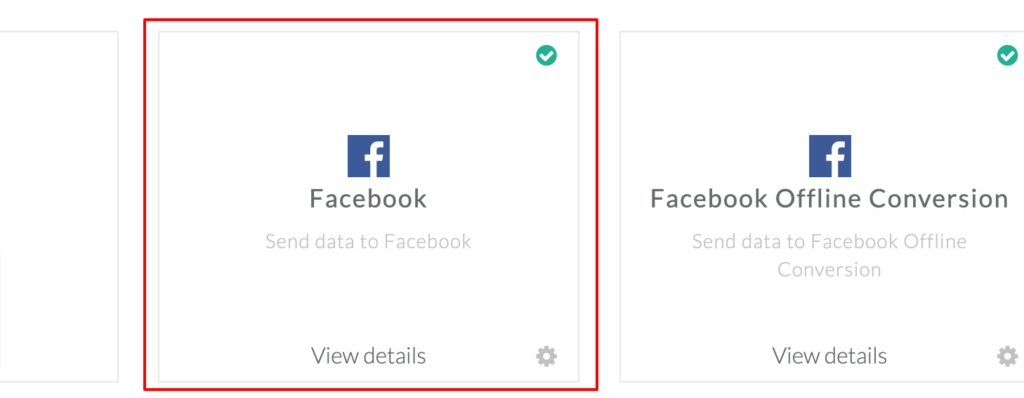
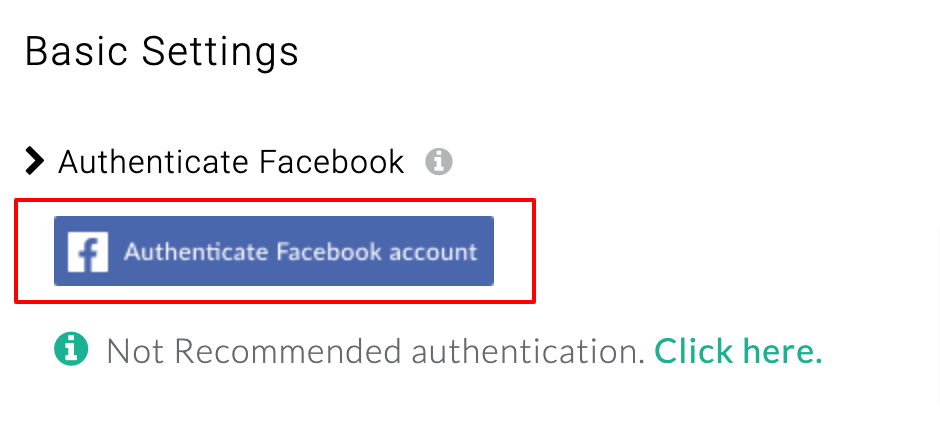
- Authenticate your Facebook account, ad account, pixel and Save
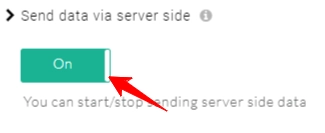
- Turn on the toggle for Send data via server-side if you would wish to send the data via server. (which is Meta CAPI)
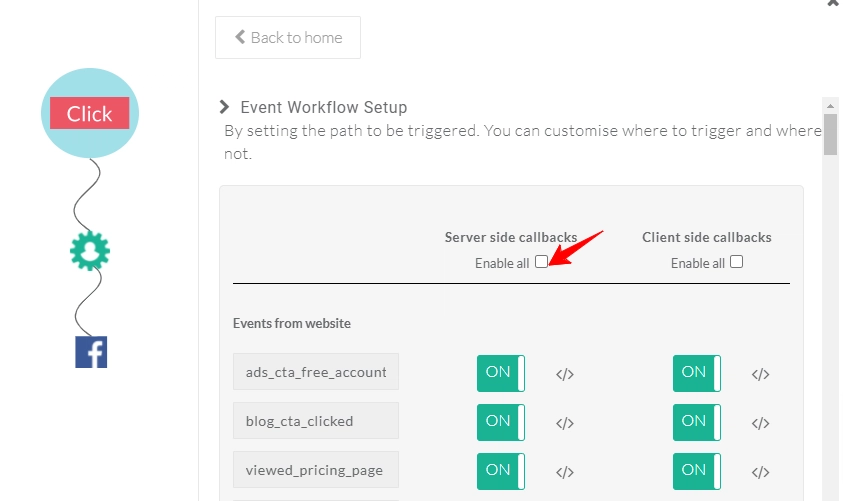
- Setup event workflow and enable server-side callback, customize which event you want to send to Meta
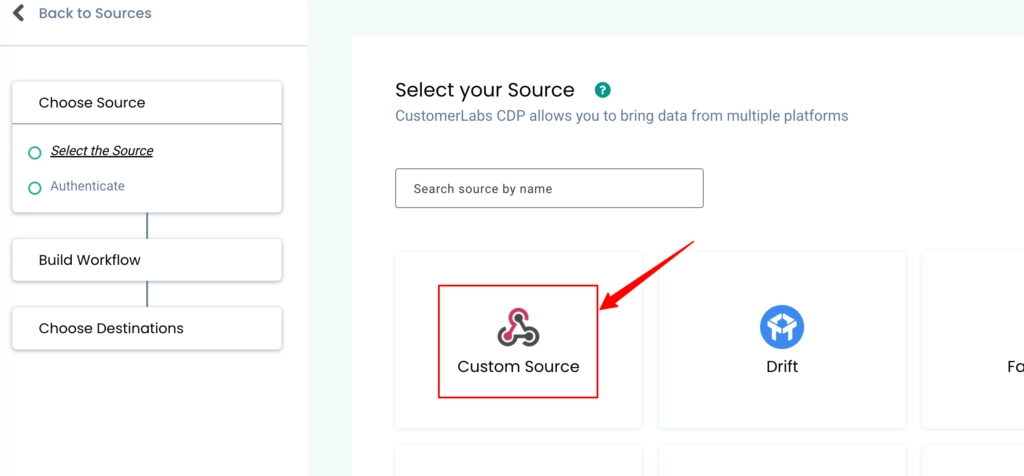
And for Offline conversions
- Click source and select the CRM that you want to integrate with, or just select custom source.
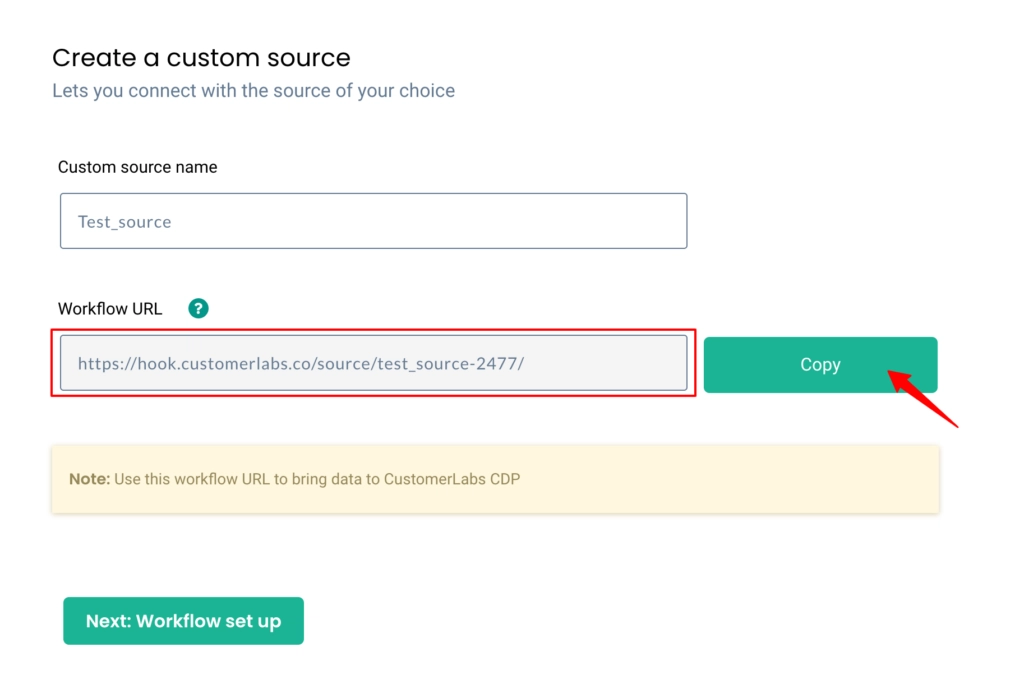
- Name the source, Copy the webhook url and paste in your source’s (any CRM) webhook section.
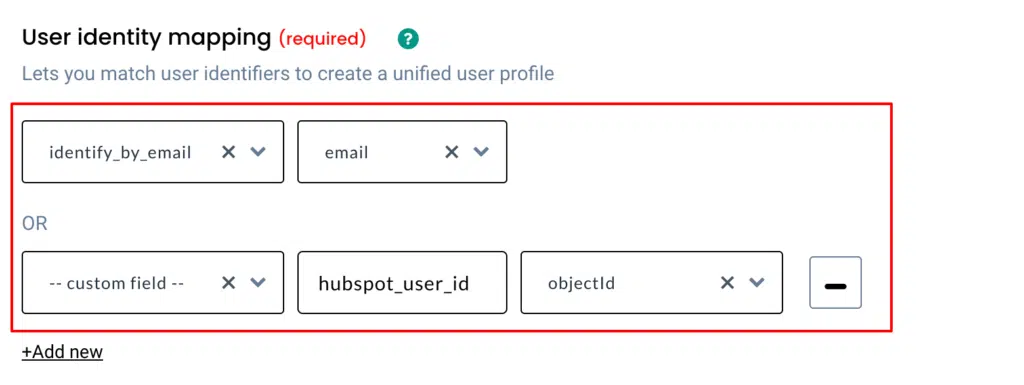
- Setup event workflow and create filter criteria for incoming data.
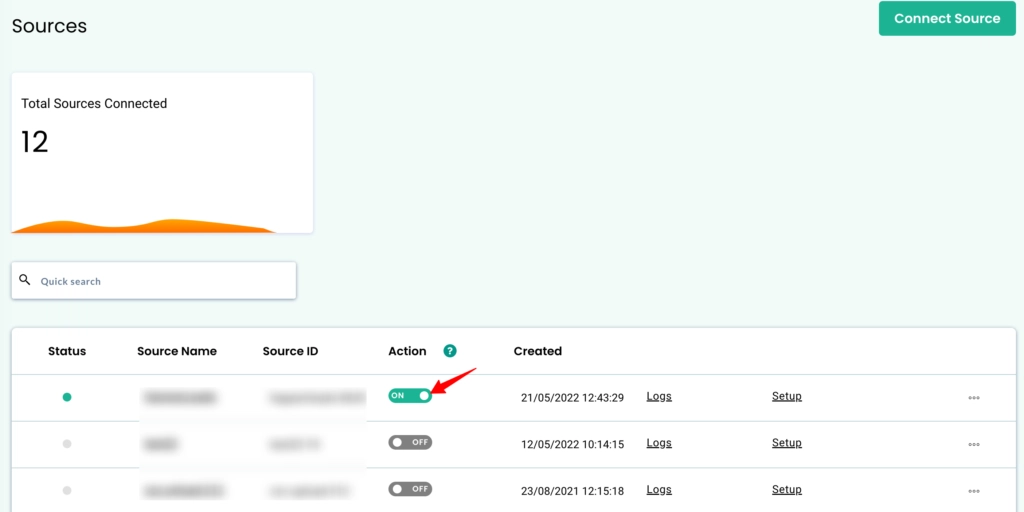
- Once done, flip the toggle to activate the Custom Source.
And that’s it. The entire Meta CAPI including offline conversions API is all set.
Read through the tough setups if you want the hard way.
Method 2: Setup CAPI through CAPI Gateway
1. Open Events Manager
- Go to Meta Events Manager and select the Pixel you want to link with Conversions API.
- Navigate to the Settings tab and find “Set up with Conversions API Gateway.” Click Get Started to begin.

2. Choose Gateway and Deployment
- You’ll be prompted to choose a deployment option, this could be directly via Meta’s infrastructure or via a partner host.
- Meta will guide you through naming your gateway and selecting region or hosting choices as applicable.

3. Provision the Gateway
- Once you complete the input steps, Meta automatically provisions the gateway backend for you, no code required.
- Wait for the deployment to finish (this may take a few minutes).
4. Configure Your Subdomain (DNS)
- In your Domain Registrar/DNS panel, create a CNAME DNS record pointing your chosen subdomain (e.g., capi.yoursite.com) to Meta’s assigned gateway endpoint.

- This step enables your events to be accepted via a first-party domain, helping measurement accuracy and bypassing blockers.
5. Verify and Go Live
- After DNS propagation, return to the Events Manager to verify the gateway status.
- Once active, both browser and server-side data will begin flowing through the Conversions API Gateway.
(Reference: Meta CAPI Gateway Documentation)
Method 3: Server-Side Google Tag Manager
Website → Web GTM → Server GTM → Meta Conversions API
The Server container receives event data and forwards it to Meta using the Conversions API endpoint.
Step 1: Create/Configure GA4 Web Tag to Forward to Server Container
In your GTM Web Container:
- Open your GA4 Configuration tag.
- Set the Transport URL to your server tagging endpoint:
https://YOUR_SERVER_DOMAIN/collect - Add additional event parameters for Meta/Conversions API if needed.
Example GA4 tag config (code snippet for reference):
<!– GA4 Configuration with Server Container endpoint –>
<script>

 gtag('config', 'G-XXXXXXXXXX', {

   transport_url: "https://YOUR_SERVER_DOMAIN/collect"

 });

</script>- This sends visitor events to the server container instead of (or in addition to) Google Analytics.
- Ensure the transport_url is correct and does not end with a slash.
Step 2: Include Event Parameters for Facebook
When you override or extend your GA4 event tag, you can send relevant Meta parameters via the event_params object.
| Meta Standard Event Name | Google Analytics Event Name |
| AddPaymentInfo | add_payment_info |
| AddToCart | add_to_cart |
| AddToWishlist | add_to_wishlist |
| PageView | gtm.dom |
| PageView | page_view |
| Purchase | purchase |
| Search | search |
| InitiateCheckout | begin_checkout |
| Lead | generate_lead |
| ViewContent | view_item |
This helps map standard parameters expected by Meta’s API.
Example GA4 event tag with custom parameters:
gtag('event', 'purchase', {

 "value": 99.99,

 "currency": "USD",

 "transaction_id": "ORDER123",

 "search_term": "headphones"

});
Step 3: In the GTM Server Container: Configure Clients
In your Server Container:
- Go to Clients → New
- Choose the built-in GA4 Client and make sure Default GA4 paths are selected.
This ensures incoming GA4 requests are parsed correctly for use by the Meta tag.
Step 4: Import the Meta Conversions API Tag Template
- In the server container, go to Templates → Tag Templates
- Click Search Gallery
- Search for Meta/Conversions API Tag (by facebookincubator) and add it.
This tag template prepares the server events in the correct format for the Conversions API.
Step 5: Configure the Conversions API Server Tag
In your server container:
- Go to Tags → New. Choose the Meta Conversions API Tag
- Provide: Pixel ID, API Access Token, Test Event Code (Optional)
- Choose an appropriate trigger (e.g., whenever the GA4 client processes an incoming request).
Example config values:
| Setting | Example |
| Pixel ID | 123456789012345 |
| API Access Token | EAAGm0PX4ZC… |
| Action Source | website |
This tells GTM how to fire server-side calls to Meta.
Step 6: Set Up Trigger
To ensure the server tag fires on all GA4 events, create a trigger such as:
Trigger type: Custom Event
Condition: Client Name equals GA4
Down below is the list of custom events parameters
| Meta Parameter Name | GA4 Parameter Name |
| value | value |
| currency | currency |
| search_string | search_term |
| order_id | transaction_id |
| content_ids | x-fb-cd-content_ids |
| content_type | x-fb-cd-content_type |
| content_name | x-fb-cd-content_name |
| content_category | x-fb-cd-content_category |
| contents* | items OR x-fb-cd-contents |
| num_items | x-fb-cd-num_items |
| predicted_ltv | x-fb-cd-predicted_ltv |
| status | x-fb-cd-status |
| delivery_category | x-fb-cd-delivery_category |
| custom_properties* | custom_properties |
This ensures any requests coming through the GA4 client in the server container trigger the Meta Conversions API tag.
Testing & Validation
- Enable Preview mode on both the web and server containers.
- Trigger events and check network requests:
- Web events go to your server endpoint (status 200)
- Server container processes incoming requests
- Outgoing calls are sent to Meta’s Conversions API (check access token & event data)
- Web events go to your server endpoint (status 200)
In Facebook Events Manager, you should see incoming test events if configured (with test_event_code).
(Reference: Meta + Server-Side GTM Integration)
Method 4: End-to-End Manual API Integration
Before sending events to Meta via the Conversions API, you’ll need:
- A Meta Business Manager account
- A Meta Pixel associated with your ad account
- A System User with an API Access Token that has permissions for Conversions API
- Your Pixel ID
- A server environment capable of making HTTPS POST requests to Meta’s API endpoint
Step 1: Create API Access Token & Find Your Pixel ID
- Go to Meta Events Manager
- Select the Pixel you want to use
- Under Settings → Conversions API, generate a System User Access Token
- Copy the Pixel ID and the Access Token
These credentials authenticate your server-to-server requests.
Step 2: Understand the Conversions API Endpoint
To send events, you’ll use Meta’s Graph API Conversions endpoint: “https://graph.facebook.com/v18.0//events”
Replace <PIXEL_ID> with your actual Pixel ID.
You’ll need to include:
- access_token — Your System User token
- data — Array of event objects (Facebook Developers)
Step 3: Construct Event Payload (With Required Parameters)
Here’s the most basic payload structure Meta expects:
| Field | Description |
| event_name | Name of the conversion event |
| event_time | Unix timestamp (seconds) |
| event_source_url | Page URL where the event occurred |
| user_data | Hashed customer identifiers |
| action_source | e.g., website |
Example JSON Payload
POST https://graph.facebook.com/v18.0/123456789012345/events

?access_token=EAAG...
{

"data": [

    {

      "event_name": "Purchase",

      "event_time": 1697052642,

      "event_source_url": "https://yourstore.com/thankyou",

      "action_source": "website",

      "user_data": {

        "em": "hash_sha256_of_email",

        "ph": "hash_sha256_of_phone",

        "client_ip_address": "123.123.123.123",

        "client_user_agent": "Mozilla/5.0..."

      },

      "custom_data": {

        "currency": "USD",

        "value": 79.99

      }

    }

  ]

}- The user data (em, ph, etc.) must be hashed with SHA-256 before sending.
- Use as many identifiers as possible, this improves Event Match Quality.
Step 4: Hash Customer Identifiers (User Data)
Meta requires hashed identifiers to match signals for people. Common fields you should hash include:
const crypto = require('crypto');

Hash these fields before you submit:

function sha256(value) {

  return crypto.createHash('sha256').update(value).digest('hex');

}- phone
- first_name, last_name
- city, state, zip, country
Step5: Event Deduplication (If Pixel + Conversions API)
If you’re also firing Meta Pixel (client-side), you must deduplicate so Meta knows a server and pixel event are the same action.
Include event_id in both:
- Pixel event
- Conversions API event
Example with event ID:
{
"event_name": "Purchase",

  "event_id": "abc123-unique-uuid",

  ...
}
This ensures Meta does not count duplicate conversions twice.
Step 6: Sending the API Request (Code Example)
Here’s a typical server-side POST request in Node.js (axios):
const axios = require('axios');

axios.post(

  `https://graph.facebook.com/v18.0/${PIXEL_ID}/events?access_token=${ACCESS_TOKEN}`,

  {

    data: [

      {

        event_name: "Purchase",

        event_time: Math.floor(Date.now()/1000),

        event_source_url: "https://yourstore.com/thankyou",

        action_source: "website",

        user_data: {

          em: sha256("[email protected]"),

          ph: sha256("1234567890")

        },

        custom_data: {

          currency: "USD",

          value: 59.99

        }

      }

    ]

  }

).then(res => {

  console.log("Success", res.data);

}).catch(err => {

  console.error("Error", err.response.data);

});
This example shows a simple purchase event payload.
Step 7: Test & Validate Implementation
Use Meta’s Test Events Tool in Events Manager to verify your setup:
- Generate a Test Event Code in Events Manager
- Include it in your payload like this:
“test_event_code”: “TEST1234”
- Send the request
- Watch for activity in Meta’s Test Events view
If configured correctly, events will appear almost instantly.
So woowww… too much code and what not. Given today’s AI world, fidgeting with these steps. God bless you coz I have given the easiest way too.
You can look at the comparison table down below to see which is best for your situation.
P.S, Native integrations comes up with challenges, if you don’t trust me scroll down and start reading the case study yourself with proof.
Implementation Comparison – The Honest Table
| Method | Technical Skill Needed | Setup Time | Signal Quality Ceiling | Offline Conversions | Maintenance |
| No-Code Platform (CustomerLabs) | Low | Hours | Very High | Yes | Minimal |
| CAPI Gateway | Medium-High | Days | Medium | No | Ongoing DevOps |
| Server-Side GTM | Medium | Days | Medium | Limited | Ongoing GTM work |
| Manual API | High | Weeks | Very High | Yes (custom build) | High engineering |
Here’s a gist why your business needs Meta Conversions API: Meta Conversions API – Maximize Ad Campaign Performance.
Activating First-Party Data through Facebook Conversions API Across the Customer Funnel
Any businesses will have 3 objectives to leverage their first-party data through the Facebook Conversions API:
- Prospecting
- Optimization
- Re-engagement
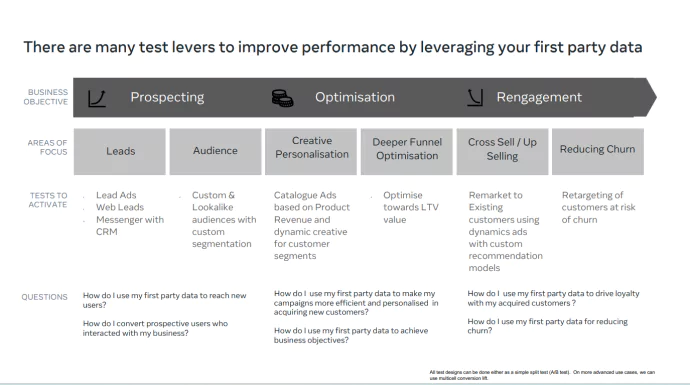
Prospecting
When a customer lands on your website, it marks the beginning of their interaction with your brand’s product or service. This interaction is an opportunity for your business to get valuable information about the customers. In this stage, utilization of first-party data can help you to reach new customers who have never interacted with your brand or reach out to prospective users who have interacted but haven’t purchased.
Take the example of Hyundai,
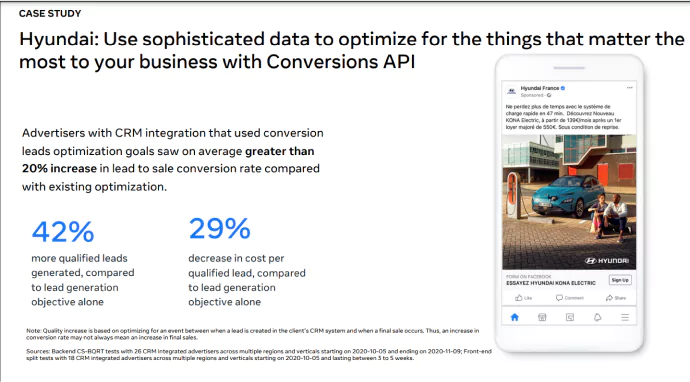
By using conversion leads optimization saw an average of 20% increase in lead-to-sale conversion rate. It also saw 42% more qualified leads and a 29% decrease in cost per qualified lead.
Optimization
Once after collecting data about new customers, their preferences, behavior, and interactions – all of this information can be used to create personalized ad campaigns tailored to specific audience segments. Additionally, by using first-party data, you can identify and target high-value customers who are likely to generate significant revenue over time. To gain these lifetime valued customers, optimizing ad campaigns through first-party data will be of help.
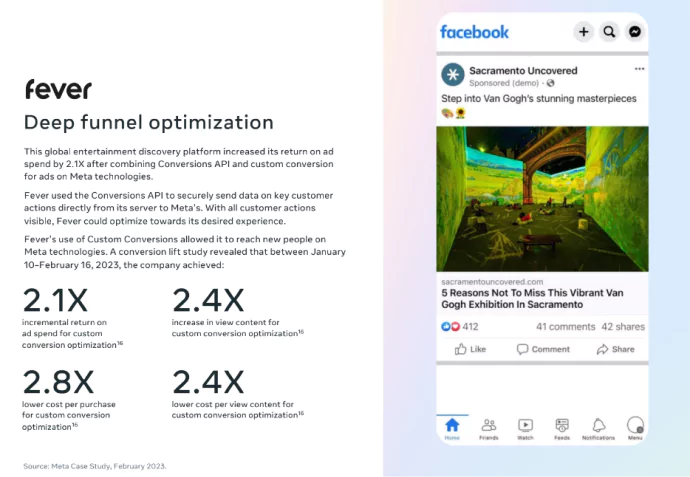
Fever, a global entertainment discovery platform, by making use of the optimization strategy in Facebook Conversions API has begun to understand its customer journey. With this, they combined both Conversions API and Custom Conversions, saw a 2.1X increase in ROAS, 2.4X increase in content view, 2.8X lower cost per purchase, and 2.4X lower cost per view content.
Re-engagement
Now when a customer has landed on your website, he/she might have made some engagement with your product or service. Here, first-party data along with Facebook CAPI can be utilized to drive loyalty with acquired customers for re-engagement. This can be done by implementing re-engagement tactics – through cross-selling or upselling. Additionally, one main advantage of re-engaging customers is that it can help reduce churn and retain customers.
With activation, let’s now take a look at the powerful applications of CAPI.
Powerful Applications of the Conversions API
With the digital landscape taking a rollercoaster, businesses are looking out for innovative ways to optimize their online presence. Facebook has crafted the Conversions API tool from which marketers can benefit.
Custom Conversion Event Optimization
Using Facebook’s Conversions API, you can sync custom conversion events to optimize the ad campaigns to meet your business goals. For instance, instead of sending the basic standard purchase event, you can send the specific product purchase event. This helps with clearing out the sale of specific products.
Similarly, you can leverage this custom conversion event strategy to get more high AOV purchases if you send the high AOV purchase event to Meta Ads to optimize the campaign for that.
The below video focuses on explaining in detail what you must do if you need more high AOV purchasers.
Attribution Modeling
The Conversions API for attribution modeling, sends accurate and comprehensive data about customers’ journeys and actions. Behavior data such as purchases, sign-ups, or any other conversions) are sent directly from the server to Meta’s server. Thus, you can attribute conversions to specific touchpoints.
Lookalike Modeling
Facebook Conversions API allows businesses to send quality customer information directly from their server to Meta. Using Meta’s value-based lookalike audience feature you can create audiences similar to high-value customers. This top of the funnel audiences are very high intent and are high-value. This audience is highly likely to take desired actions.
Predictive Analytics
Facebook Conversions API facilitates real-time customer information using AI and machine learning for businesses to gain valuable insights about users enabling businesses to build predictive models forecasting user behavior and lure them to engage with products and services.
Also read on A Comprehensive Guide to Predictive Analytics in the AI Era
Aid Automated Bidding Algorithms
The Conversions API is an important component of Facebook’s advertising system as it supplies Facebook’s algorithms with conversion event data of users that are required to power automated bidding. These conversions involve actions like purchases, registrations, or other specific goals that businesses eagerly wait for. CAPI here enables automated bidding used to tailor bids based on the conversion signals received.
CRM Integration
For CRM Integration, Facebook Conversions API enables businesses to send customer information and behavior directly from their CRM systems to Meta. This helps in the seamless transfer of user information helping businesses to better understand customer preferences and tailor ad campaigns.
This also helps in tracking the offline interactions of the user inside Meta Ads, boosting the overall attribution and maximizing ad campaign performance.
Cross-device Tracking
Facebook CAPI helps marketers in tracking and sending user behavior data from their server to Facebook, ensuring whether these conversions are attributed to the correct users irrespective of the devices they use.
Event Match Quality
Facebook Conversions API enables marketers to measure and optimize their ad campaigns by enabling them to send direct event data of customers from their websites or apps to Facebook. Here, EMQ plays a significant role by rating event match quality as Poor, Okay, Good, or Great. Conversions API helps you send as much data as possible increasing your event match quality.
What Are The Best Practices of Meta CAPI?
These best practices come directly from Meta’s official documentation, they’re not suggestions, they’re the standard for getting the most out of your CAPI implementation.
Send events in real-time. Meta accepts events up to 7 days old for attribution, but for algorithm optimization, real-time or near-real-time delivery is critical. A purchase event sent 6 days late contributes almost nothing to campaign learning.
Hash all customer data correctly. All PII; email, phone, name must be SHA-256 hashed before it’s sent. But hashing alone isn’t enough. You must normalize first: lowercase all emails, strip all non-numeric characters from phone numbers (use E.164 format), and lowercase all name fields before hashing. Sending [email protected] hashed vs. [email protected] hashed will produce different hashes and Meta won’t match them.
Include client_ip_address and client_user_agent for web events. These two parameters are frequently skipped and frequently underestimated. They significantly improve Meta’s ability to match web events to users, especially for visitors who haven’t logged into Facebook in the current session.
Always implement event deduplication with event_id. If you’re running both Pixel and CAPI (which you should be), every event needs a unique event_id passed through both channels. Without this, you’re double-counting conversions and feeding the algorithm bad data.
Use the correct action_source for every event. website for web events. physical_store, phone_call, email, chat, or other for offline events. This isn’t just metadata, it’s how Meta categorizes and routes your events internally.
Set your attribution window to match your business reality. US B2B brands and high-ticket retailers often have consideration periods that span weeks. Make sure your Meta campaign attribution window (7-day click, 1-day view, etc.) reflects your actual buying cycle, otherwise you’re measuring the wrong slice of the conversion journey.
Test before you go live. Meta Events Manager has a built-in test event tool under the “Test Events” tab. Use it to verify your events are arriving correctly formatted and being processed before pushing to production. Catching a misconfigured hashing function in testing is a lot less painful than discovering it after 30 days of live campaigns.
Security Measures with Conversions API
Given the sensitive nature of the data shared through Facebook Conversions API (CAPI), ensuring robust security measures during implementation is critical. Facebook employs SHA256 encryption to safeguard the transfer of data, but businesses must also take proactive steps to protect data at every stage of the process.
You must have the full control of your customer’s first-party data. CAPI works by sending user data, such as conversion events and personally identifiable information (PII), from your server to Facebook’s servers. It depends on the business how and what kind of data you send.
Using CustomerLabs 1PD Ops platform’s sentinel, you can offer privacy to your customers, have control over data, and sync data with Meta as per Meta’s requirements.
Next up is a real case study for you that will convey the importance of CAPI and why you need to set up Meta CAPI using CustomerLabs.
Look How Smars Fixed Their Tracking with CustomerLabs CAPI
Smars is India’s leading jewelry brand, a high-consideration, high-value product category where the customer journey doesn’t happen in a single session.
Buyers browse, compare, come back days later, and purchase when they’re ready. The kind of brand where browser cookie expiration doesn’t just hurt attribution, it actively breaks the algorithm’s ability to learn.
Like most DTC brands, Smars started where everyone starts with Shopify’s native CAPI integration. Check the box. Move on.
But they had a goal that most brands aren’t even thinking about yet. They didn’t just want more sales.
They wanted to optimize specifically for new customer acquisitions, tracking and improving their nCAC (new Customer Acquisition Cost) at the ad platform level.
Not in a spreadsheet after the fact. At the campaign optimization level, inside Meta itself.
And here’s where Shopify’s CAPI showed its limits fast.
Shopify’s native CAPI only fires on Shopify checkout events. It doesn’t know whether the buyer is a new customer or a returning one.
It can’t enrich signals with CRM data. It doesn’t send a persistent External ID that survives cookie resets.
Every returning Smars customer who came back after clearing their browser or visited on a different device, was invisible to Meta’s algorithm. The algorithm couldn’t distinguish new customers from repeat buyers. Optimization for nCAC was essentially impossible.
So Smars made the switch to CustomerLabs
And the process follows:
Step 1: Replace Shopify CAPI with a first-party data pipeline
The first move was simply unplugging Shopify’s default CAPI and replacing it with CustomerLabs’ server-side first-party data pipeline.
Same conversion events, but now enriched with proper customer identifiers, lifetime External IDs, and server-side signal delivery that doesn’t break when Safari decides to expire a cookie.
The impact showed up within 7–14 days, before any campaign changes, before new creative, before new audiences.
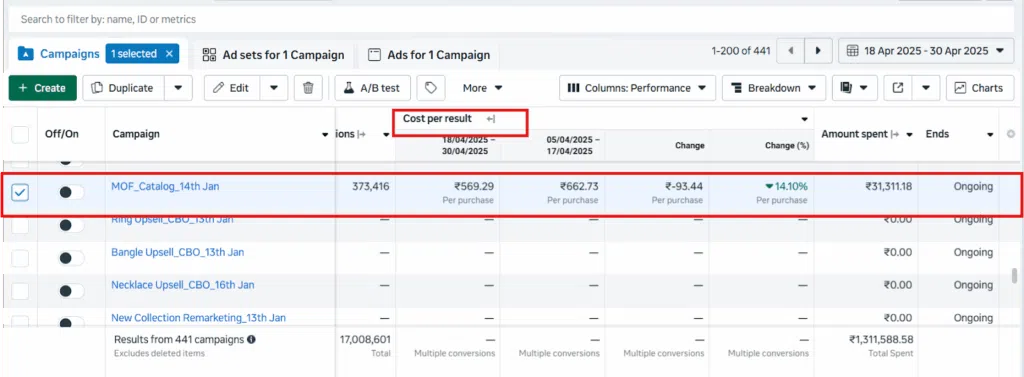
Just by fixing the quality of signals being sent to Meta, Cost Per Purchase (CPP) dropped 14%.
Step 2: Engineer the signals to go beyond “Purchase”
This is where Smars moved from basic tracking to actual Signal Engineering.
Instead of sending a generic Purchase event, they built a full set of custom signals that told Meta exactly what kind of purchase happened:
- New Customer Purchase vs. Repeat Customer Purchase events
- High-AOV, Mid-AOV, and Low-AOV purchase events segmented by order value
- All custom events mapped to both Meta and Google Ads campaigns simultaneously
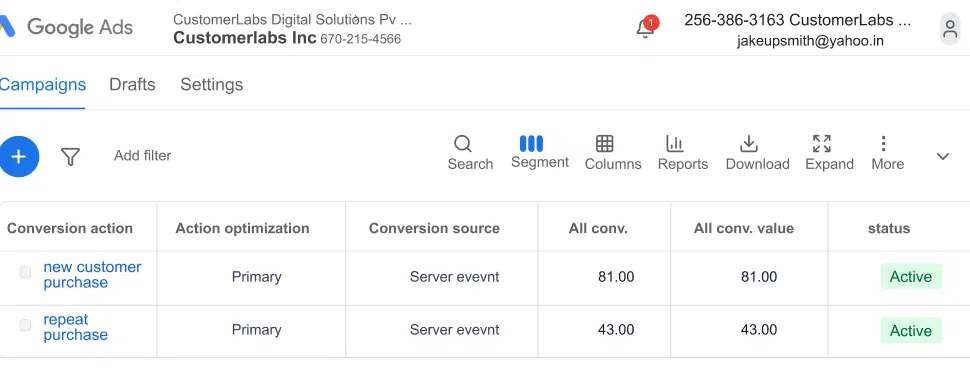
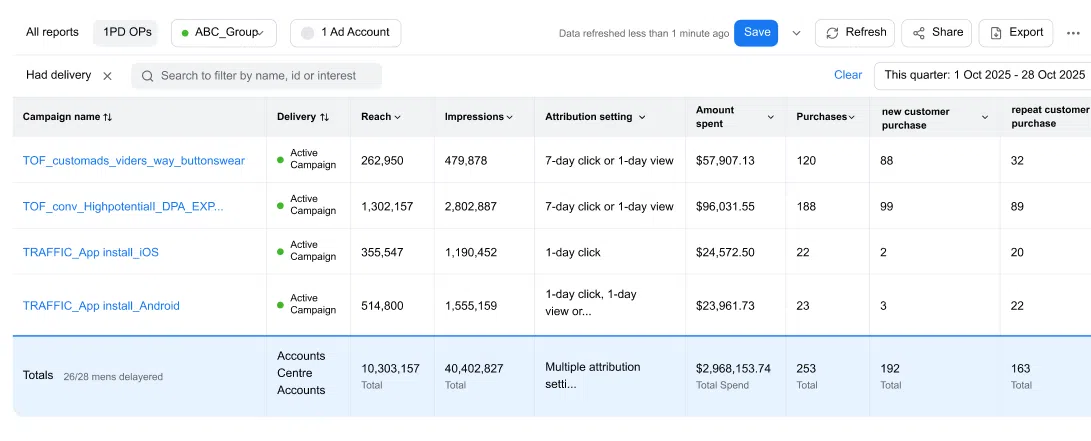
Now, for the first time, Meta’s Andromeda algorithm wasn’t just learning “someone bought something.” It was learning “this kind of person buys for the first time at this order value.”
That’s an entirely different quality of instruction and the algorithm responds accordingly.
Step 3: Configure campaigns to actively target new customers only
With the custom signals live, Smars set up their Meta campaigns with one specific objective: New Customer Purchase.
They selected their hero product catalog, set the conversion goal to their new custom event, and excluded all existing customers, engaged users, and website visitors from targeting.
Meta’s entire budget was now pointed at net-new buyers only, with a signal it could actually learn from.
The results after 7–14 days:
- 247 total conversions tracked
- 212 of those, 86%, were new customers
- CPP reduced by 14% from signal quality improvement alone
- Algorithm trained to spend smart, not just spend more
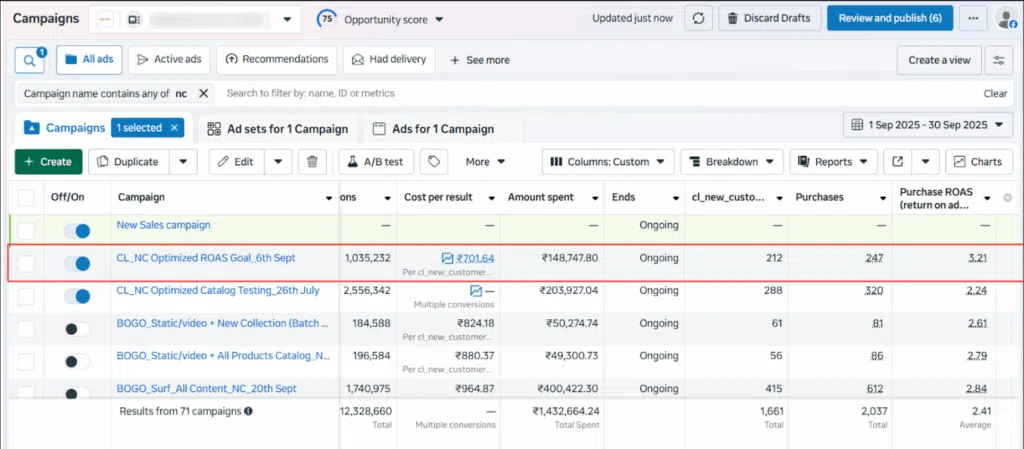
That’s what Signal Engineering looks like in practice. Not a creative overhaul. Not a bigger budget. Three changes to how signals were structured and sent and Meta’s algorithm delivered exactly what Smars asked it to.
This is not just possible for one brand, we did crack it for many brands… give it a read.
Why Do The Default CAPI Setups Fail and What CustomerLabs Do Differently?
The Smars story isn’t an edge case. It’s the rule. And understanding why default CAPI setups fall short is the key to understanding what actually moves the needle.
Every CAPI setup that relies on browser cookies to identify users is still vulnerable to expiration. Safari caps cookies at 7 days. Users clear their browsers.
Incognito sessions produce no cookies at all. Every time a returning customer comes back without a recognized cookie, they look like a brand new, unknown visitor and every data point you had about their previous behavior is effectively orphaned.
For a jewelry brand like Smars, where a customer might browse in January and buy in March, this is catastrophic. The Pixel fired in January. The CAPI event fires in March. With no persistent user identifier connecting them, Meta can’t stitch the journey together.
CustomerLabs solves this with a lifetime first-party server-side cookie, tied to a persistent External ID for each user. As defined in Meta’s official documentation, the External ID is a unique identifier you assign to a user that Meta uses for event matching and unlike browser cookies, it’s stored server-side and never expires.
In practice, this means:
- A customer who first visits in January and converts in March is still recognized as the same user
- Returning buyers are never mistaken for new visitors by Meta’s algorithm
- Your Event Match Quality climbs because you’re not losing user history every time a cookie resets
- Attribution stays accurate across long buying journeys, critical for any US brand where the consideration window spans weeks
- And for brands like Smars, you can actually tell Meta: this person is a new customer, something Shopify’s native CAPI could never do
For US brands spending seriously on Meta catalog ads, retargeting, prospecting; the difference between a 30% match rate and a 70%+ match rate is not a vanity metric. It’s the difference between an algorithm that’s guessing and one that’s learning.
Heard about Signal Engineering or The 1PD Ops Maturity Curve?
Here’s the bigger picture.
Meta’s ad delivery today runs on Andromeda; its next-generation AI-powered ranking and retrieval system.
Andromeda doesn’t target audiences based on demographics the way Meta’s older systems did. It uses deep behavioral signal learning to understand intent at an individual level and it gets smarter the better the conversion data you feed it.
This is the reason Signal Engineering has become the most important skill in performance marketing right now. The brands winning on Meta in 2025 aren’t necessarily the ones with the best creative or the biggest budgets.
They’re the ones whose data infrastructure gives Andromeda the richest, most accurate signal to learn from. Because Andromeda working with quality data is a completely different machine than Andromeda working with fragments and expired cookies.
And this is exactly what the CustomerLabs 1PD Ops Maturity Curve maps out, the journey from broken signals to autonomous growth, and where most brands are stuck right now.
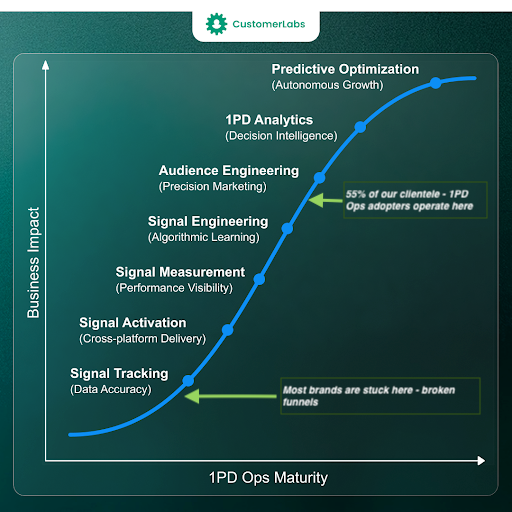
1. Signal Tracking (Data Accuracy)
The floor. And where the curve is blunt: most brands are stuck here with broken funnels. Basic Pixel, maybe a default CAPI setup that fires on checkout events only.
Cookies expire. iOS users are invisible. User identity breaks across sessions and devices. Andromeda is trying to optimize off fragments.
The result is exactly what you’d expect: unpredictable ROAS, bloated CPMs, and an algorithm stuck in a permanent learning phase.
2. Signal Activation (Cross-Platform Delivery)
You’ve fixed the foundation. CAPI is live with proper deduplication. Lifetime server-side cookies and External IDs are in place, so returning customers are recognized across sessions.
Clean, enriched signals are flowing to Meta from your server, not through a browser that Safari can kill in 7 days. This is the stage where you stop bleeding. Every brand needs to be here at minimum.
3. Signal Measurement (Performance Visibility)
Attribution is now reliable enough to actually trust. You know which campaigns are driving new customers vs. repeat buyers.
You can see which creatives are producing high-LTV buyers vs. one-time purchasers. You make budget decisions based on real data rather than inflated Ads Manager numbers and gut feel.
4. Signal Engineering (Algorithmic Learning)
This is where Andromeda starts doing what it was actually built to do. You’re not just sending events, you’re engineering what you send to actively teach the algorithm.
New vs. returning customer flags. CRM enrichment. Offline conversions. Order value segmentation. Andromeda stops guessing who to show your ads to and starts finding your ideal customer with genuine precision.
This is exactly the stage where Smars was operating when they hit 86% new customer purchases. They didn’t get lucky. They engineered the signal, and Andromeda did the rest.
5. Audience Engineering (Precision Marketing)
Here’s a number worth noting from the curve: 55% of CustomerLabs’ 1PD Ops clients operate at this level. (Thanks to our CSM and Sales team for pushing in enough)
You’re building first-party audiences, high-LTV buyers, churned customers, top-decile spenders from your own data, and activating them across Meta and every other ad platform. You stop renting Meta’s audiences and start owning yours.
Your ad targeting is no longer dependent on Meta’s data, it’s powered by yours.
6. 1PD Analytics (Decision Intelligence)
Your first-party data infrastructure is now informing business decisions beyond advertising.
Which customer cohorts have the highest lifetime value? Which acquisition channels produce the best post-purchase behavior?
Marketing data has become a company-wide intelligence asset, not just a number in Ads Manager.
7. Predictive Optimization (Autonomous Growth)
The top of the curve. Campaigns that self-optimize based on predictive signals. Andromeda has a complete, deeply enriched picture of your best customers and it’s proactively finding more of them before they even know they want your product.
iOS updates, cookie deprecations, privacy law changes, none of it disrupts you, because your data infrastructure doesn’t depend on any of it.
Most brands reading this are somewhere between Stage 1 and Stage 3.
The good news: every stage up the curve compounds. Moving from broken Signal Tracking to Signal Engineering doesn’t just improve your CAPI setup, it changes what Andromeda can do for your entire business. Smars is proof of that.
Your competitors are still running on Shopify CAPI and browser cookies. You don’t have to be.
CustomerLabs gets your Meta CAPI live with lifetime server-side cookies, enriched first-party signals, new vs. returning customer tracking, and offline conversions in under 30 minutes. No developer required.
Start your free trial with CustomerLabs or let’s just talk about the opportunities for growth.