WooCommerce Conversion tracking, offline conversion tracking setup…work flawlessly only when powered by the right plugin.
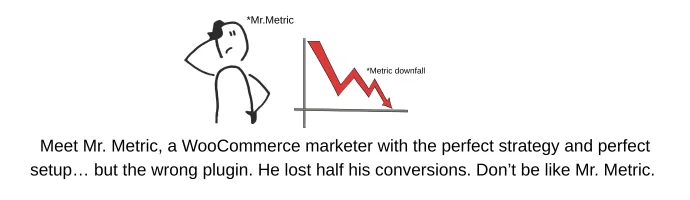
As you see in this picture, many marketers invest in high-performing creatives, clever ad strategies, and advanced campaign setups, yet still struggle with accurate tracking. Why? Because they overlook one crucial element: a reliable tracking plugin that connects every touchpoint of their business system.
In this blog, we’ll walk you through the top 7 plugins that make your tracking more efficient.
7 Best WooCommerce Conversion Tracking Plugins for Google Ads and Meta Ads
-
PixelCat
-
MonsterInsights
-
WooCommerce Conversion Tracking Pro
-
Facebook for WooCommerce
-
Pixel Your Site
-
Conversios
Moving forward,
CustomerLabs 1PD Opss
CustomerLabs 1PD Ops isn’t just another WooCommerce tracking plugin; it’s more like a full data engine that captures every user action, stores it safely, and sends it to your marketing platforms with zero signal loss. If you’re serious about accurate conversion tracking, advanced segmentation, and value-based optimization, this tool is built exactly for you.
Let’s break down what makes CustomerLabs stand out.
Effortless, Automatic Event Tracking (No Signal Loss, No Coding)
Once you connect your WooCommerce store to CustomerLabs, magic happens automatically. It starts tracking everything: product views, category views, add-to-cart, remove from cart, checkout, purchase, and even any custom events you want to define.
-
No code.
-
No developer dependency.
-
No browser limitations.
-
Every signal gets captured server-side, ensuring Meta and Google receive clean, complete data.
Need to track a custom event like Clicked Size Guide or Viewed Offers Page? Just create it with one click. CustomerLabs takes care of the rest.
1P Domain Tracking That Never Gets Blocked
Most plugins still rely on third-party cookies (which keep dying). CustomerLabs uses first-party domain tracking, which is fully privacy-compliant and immune to ad blockers. And you’ll get the result of 1P Domain Tracking.
-
Cookies never expire
-
Cross-session tracking remains intact
-
Your attribution stays clean
Basically, every user interaction is preserved even if they return after weeks.
Store Your Data Forever - Yes, Forever
This is where CustomerLabs becomes a long-term growth engine. You can store all your user data indefinitely and reuse it whenever you want.
Imagine activating:
-
Last year’s Christmas visitors
-
Users who browsed during Diwali
-
Black Friday window shoppers who never converted
With CustomerLabs, you can bring them back with hyper-personalized segments.
Consent? Sorted - Fully Compliant.
Once a user accepts cookies on your store, 1PD Ops stores that consent and attaches it to all first-party events across both online and offline data. It’s fully aligned with Consent Mode v2, ensuring your tracking is always compliant.
If you run both online and offline stores, CustomerLabs even merges these consent signals cleanly.
Plug-and-Play Integrations With All Major Platforms
With CustomerLabs, integrations feel… effortless.
-
Google Ads: Uses Enhanced Conversions to improve match rate and revenue tracking
-
Meta Ads: Tracks conversions and feeds CAPI with extremely high event match quality
-
GA4: Sends server-side events using Google’s Measurement Protocol zero-loss analytics
And if you need any custom integration? CustomerLabs can handle that too.
Advanced Identity Resolution (Stitcher 2.0)
Stitcher 2.0 is CustomerLabs’ secret weapon.
It takes fragmented user identities: anonymous visitor, email subscriber, WhatsApp lead, returning buyer, and merges them into one unified customer profile. This gives you a crystal-clear view of the entire customer journey.
Focused Custom Audience Segmentation
Another amazing feature of CustomerLabs is custom audience segmentation, which allows you to segment audience data based on demographics, behavior, UTM parameters, actions taken, etc.
If you want to target users who:
-
Viewed a product 3+ times
-
Added to cart but didn’t purchase
-
Bought from a specific category
-
Have an AOV above $100
-
Engaged heavily last month, but didn’t buy
CustomerLabs lets you segment all of this in minutes. And you can send these segments straight into Meta or Google for hyper-personalized campaigns.
Optimization Beyond “Purchase” Events
Why optimize purely for purchases…
When can you optimize for high AOV, category-level purchases, or premium buyers?
CustomerLabs lets you go deeper. You can choose to optimize for:
-
High-value shirt buyers
-
Buyers of a particular product group
-
Users with high lifetime value (LTV)
-
Users who purchase high-margin items
-
This is next-level bidding intelligence.
Connect With Marketing Channels - Email, WhatsApp, SMS & More
Your segments don’t just stay inside CustomerLabs.
You can push them to:
-
Email platforms
-
WhatsApp automation tools
-
CRM systems
-
BigQuery & data warehouses
This means your WooCommerce store can run full-funnel personalization, not just ads. The most secret takeaway of this plugin is, we let you know our setup. Here it goes,
1PD Ops Plugin Setup
-
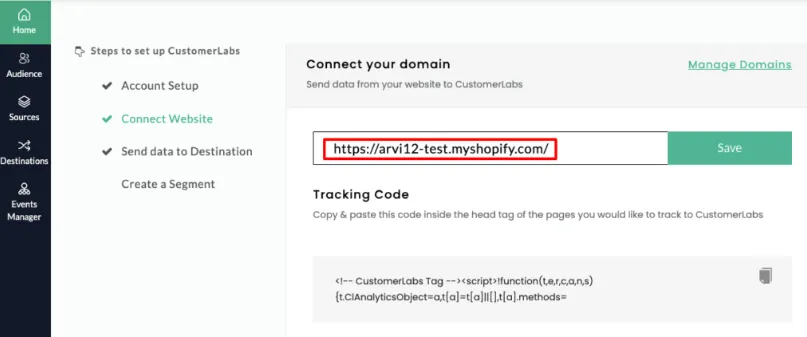
Sign up/log in to the CustomerLabs account
-
On the Home page → Under “Connect website” → Enter your website URL → Click Save
-
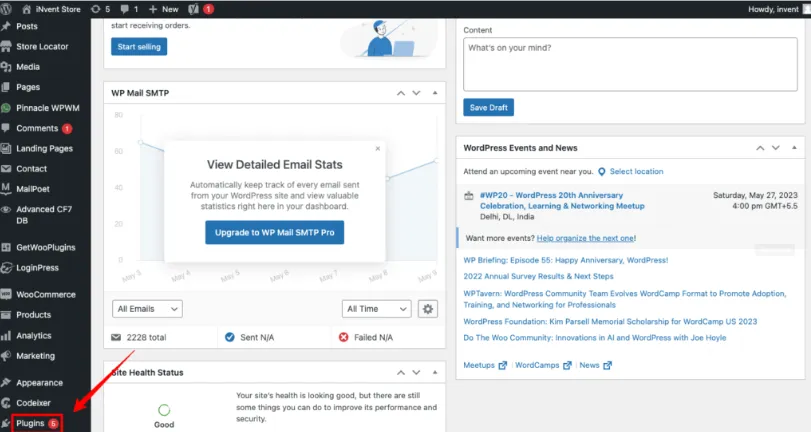
Once your setup is complete, log in to your WooCommerce dashboard.
-
Go to Plugins in the left sidebar, click Add New, and search for “CustomerLabs.” Then install and activate the plugin to proceed.
For a more complete Customerlabs 1PD Ops plugin setup, check out this blog that I have attached.

WooCommerce Conversion Tracking Pro
Next up is WooCommerce Conversion Tracking Pro, an official plugin from WooCommerce designed to help store owners capture conversion events more reliably.
This plugin tracks key WooCommerce actions and sends them to your advertising platforms. While it covers the basics well, it’s primarily built for simple tracking needs.
Here’s what it offers:
Easy platform integrations
It connects smoothly with Meta Ads, Google Ads, Twitter, and Perfect Audience, making it simple to send standard event data without technical work.
Custom integration support
It also allows custom integrations with Bing Ads, though the setup process isn’t very user-friendly.
Standard event tracking for Meta
The plugin can track and send all Meta’s standard conversion events, such as ViewContent, AddToCart, InitiateCheckout, and Purchase, directly to Meta Ads.
Facebook Product Catalog Sync
A standout feature is its ability to feed your WooCommerce products directly into the Facebook Product Catalog for dynamic ads.
Pixel Cat
PixelCat began as a simple Facebook conversion pixel manager, but over time, it has evolved into a lightweight tracking solution for WooCommerce marketers. It comes in both free and pro versions, where the free version covers basic needs, and the premium upgrade unlocks helpful additions like custom audience creation and audience exclusion.
Here’s what PixelCat brings to the table:
Easy Setup
PixelCat offers a straightforward setup process for Meta Pixel, GA4, and Conversions API, making it beginner-friendly and quick to deploy.
Dynamic Ads Support
If you’re using PixelCat’s WooCommerce product feed, the plugin can help you run Meta Dynamic Ads with ease.
Pros
-
One-click integration for Meta Pixel, CAPI, and GA4
-
Supports product feed syncing to Meta for dynamic ads
-
Allows custom audience creation
-
Helps track Meta Ads campaign performance
Cons
-
Google Ads integration is not smooth
-
No first-party domain tracking
-
Limited custom audience segmentation
-
No consent mode compliance
-
Doesn’t support custom event tracking for deeper optimization
MonsterInsight
Next on the list is MonsterInsights, a popular analytics-focused plugin that’s especially useful for WooCommerce marketers who want deeper insights into customer behavior and performance.
Here’s what MonsterInsights brings to your store:
eCommerce Event Tracking
MonsterInsights automatically tracks standard WooCommerce eCommerce events such as product views, add-to-cart actions, checkout steps, and purchases, giving you a clear picture of how users move through your funnel.
Effortless Integrations
The plugin makes it simple to connect your store to GA4 and supports integrations with Google Ads and Meta Ads for improved reporting visibility.
Advanced Tracking Capabilities
Beyond basic events, MonsterInsights can also track affiliate links, focus keywords, custom events via link attributes, scroll depth, video engagement, and other media interactions.
Robust Reporting & Integrations
You also get access to detailed reports and multiple platform integrations, making it a strong tool for analytics-driven marketers.
Pros
-
Excellent for reporting and analytics
-
Supports custom event tracking
-
Easy integration with GA4, Google Ads, and Meta
Cons
-
Browser-side tracking only, resulting in lower Event Match Quality
-
No first-party domain tracking
-
No audience segmentation features
-
Lacks consent mode compliance
-
Cannot store or retain user data long-term
Facebook for WooCommerce
Next on our list is Facebook for WooCommerce, Meta’s official plugin designed to help store owners seamlessly connect their WooCommerce shop with Meta Ads.
Here’s what it offers:
Effortless Meta Integration
With a simple setup flow, this plugin lets you connect your WooCommerce store directly to your Facebook account. It automatically tracks user behavior and key eCommerce events, making it easy to sync your store with Meta’s advertising ecosystem.
Built-In Data Tracking
The plugin sets up both the Meta Pixel and the Conversions API, ensuring accurate tracking of standard Meta events such as ViewContent, AddToCart, InitiateCheckout, and Purchase.
Pros
-
Tracks all standard Meta events with ease
-
Installs both Meta Pixel and Meta Conversions API automatically
Cons
-
Works only with Meta Ads, no support for Google Ads, GA4, or other platforms
-
No first-party domain tracking
-
No custom event tracking capabilities
-
No audience segmentation features
Conversios
Conversios is a dynamic WooCommerce plugin built to simplify digital marketing operations and enhance analytics accuracy. It brings your key marketing platforms together, enabling better tracking, automation, and campaign execution, all from a single interface.
Track Complete User Behavior
Conversios allows you to track the full user journey from first visit to checkout, providing valuable insights into how customers interact with your store.
Seamless Platform Integrations
-
You can easily connect Conversios with:
-
Google Analytics 4 (GA4)
-
Google Ads
-
Meta Pixel & Conversions API
These integrations ensure consistent and reliable data across platforms.
Automated Product Feed to Google Merchant Center
Conversios automates your product feed uploads to Google Merchant Center, eliminating manual updates.
Outcome: Saves time, reduces errors, and keeps your product listings fresh.
Create & Manage Performance Max Campaigns
You can build and manage Performance Max (PMax) campaigns directly inside Conversios.
PMax uses Google’s machine learning to optimize ads across Search, Display, YouTube, and other networks, ensuring maximum visibility and performance.
Pros
-
Supports server-side tracking
-
Ability to send product feeds to Google Merchant Center
-
Smooth integrations with Meta, Google Ads, and GA4
Cons
-
Cannot store or persist data
-
No option to send product feeds to Meta Ads
-
No first-party domain tracking
-
Lacks audience segmentation features
-
Does not support Consent Mode
-
Missing custom event tracking capabilities

PixelYourSite
PixelYourSite helps business owners strengthen their tracking setup by simplifying event tracking, platform integrations, and WooCommerce reporting.
Event tracking and custom events
PixelYourSite allows you to track page views, purchases, form submissions, and any custom event you want to define.
Connect easily
You can seamlessly connect Meta Pixel and implement the Conversions API.
It also supports Google Ads and GA4 for flawless conversion tracking.
Track any script
The plugin lets you add and track any additional script, giving you full flexibility over your setup.
WooCommerce first-party reports
One standout feature is its first-party reporting for WooCommerce, something very few plugins offer.
Separate plugins
PixelYourSite provides additional plugins for:
-
Facebook Product Catalogs
-
Google Merchant Center
-
Google Custom Remarketing
-
Pinterest Catalogs
Pros
-
Supports Google Consent Mode V2
-
Easy automatic event tracking
-
Supports Dynamic Product Ads (DPA)
-
Tracks the conversion value for each event
Cons
-
No first-party domain tracking
-
Lacks audience segmentation
-
Limited advanced custom event tracking
Conclusion
As you’ve seen throughout this blog and clearly in the comparison table, not all conversion tracking plugins are created equal. Most handle only basics like pixel setup or browser-side events, leaving big gaps in attribution, data accuracy, and long-term growth.
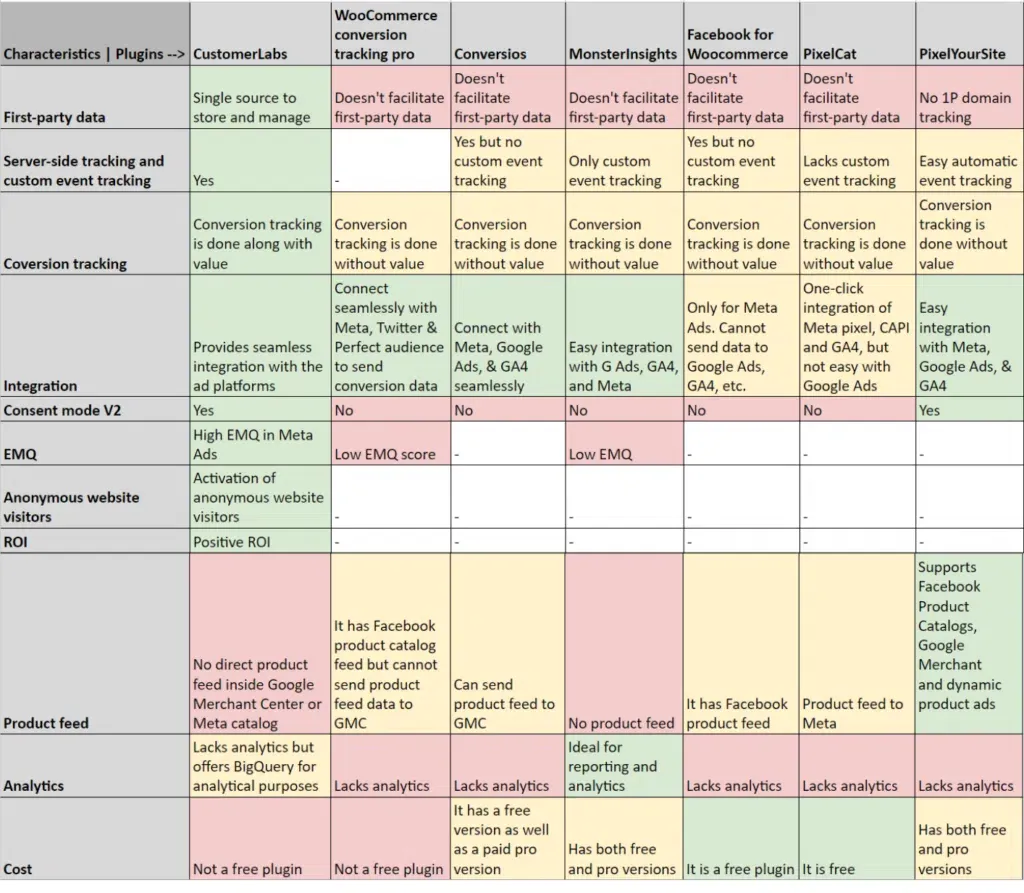
That’s why CustomerLabs 1PD Ops stands out. It’s the only plugin that gives you first-party domain tracking, server-side event delivery, consent mode support, identity resolution, segmentation, and clean value signals across all your ad platforms. In simple terms, it fixes every place where other plugins fall short.
Your tracking plugin isn’t just a tool; it becomes the foundation of your ROAS, your optimization, and your ability to scale. Choose wisely. Pick the one that strengthens your data, not the one that limits it.
If you want reliable attribution and a plugin that grows with your business, Book a Demo with CustomerLabs 1PD Ops and start your free trial.