If you run Google Ads, you have probably seen GCLID disappear on iOS clicks, GBRAID and WBRAID show up in URLs you don’t recognise, and conversion data quietly stop matching what your CRM sees. This guide explains every Google click identifier, when each one fires, why iOS strips them before they reach your site, and how to capture them reliably enough to keep Smart Bidding fed.
In one line: GCLID is Google’s deterministic click identifier – one click, one ID, full attribution. GBRAID is the privacy-preserving identifier for iOS users clicking a Google web ad heading to your iOS app. WBRAID is the privacy-preserving identifier for iOS users clicking an in-app ad that lands on your website.
The rest of this guide covers what those one-line definitions leave out: when each parameter is used, the 2025–2026 changes most teams missed, and what to do when iOS 17 strips the parameter before your page even loads.
At a glance: GCLID, GBRAID, and WBRAID compared
| GCLID | GBRAID | WBRAID | |
| Stands for | Google Click Identifier | Google Browser Ad Identifier | Web Browser Ad Identifier |
| When Google sets it | Every Google Ads click on a non-iOS device, or iOS with ATT consent | iOS click on a Google web property heading to your iOS app | iOS click inside an app heading to your website |
| Tracking precision | User-level, deterministic | Cohort-level, aggregated | Cohort-level, aggregated |
| Eligible for offline conversion import | Yes, full support | Yes, conversion count must be “Every” | Yes, conversion count must be “Every” |
| Simultaneous import with another ID | Yes (paired with GBRAID since Oct 2025) | Yes (paired with GCLID since Oct 2025) | No, import WBRAID alone |
| Stripped by iOS 17 Link Tracking Protection | Yes, Mail, Messages, Safari Private Browsing | Yes, same surfaces | Less affected (click originates inside an app) |
| Case sensitive | No | Yes | Yes |
The last two rows matter most. The case-sensitivity rule trips up almost every team that builds custom capture logic. The iOS 17 row is what no 2023-vintage guide on this topic covers.
What is GCLID?
GCLID, short for Google Click Identifier, is the unique tracking parameter Google Ads automatically appends to your landing page URL whenever someone clicks one of your ads.
A real GCLID URL looks like this:
https://example.com/?gclid=Cj0KCQiA2KitBhCIARIsAPP...EALw_wcBEach GCLID is unique to a single click – no two clicks ever share one. That is what makes it deterministic, and why it is the gold standard when you need to tie one specific click to one specific conversion, whether that happens five minutes later in a checkout flow or three weeks later in a sales call. For a deeper look at how GCLID feeds into attribution, see our guide to GCLID conversion tracking.
When the user lands on your site, GCLID carries:
- Source and medium – so GA4 reports the click as google / cpc rather than direct traffic
- Campaign, ad group, and ad ID for performance at every level of the account
- Keyword and match type so you can see which search terms drove revenue
- Network – separating Search, Display, YouTube, and Performance Max performance
- Landing page and device for downstream segmentation
For GCLID to appear, two things must be true. First, auto-tagging must be enabled in your Google Ads account (on by default in new accounts). Second, your destination URL must accept arbitrary URL parameters, some WordPress security plugins, Cloudflare workers, and custom router middleware strip unknown parameters before the page renders.
GCLID is set on: desktop browsers (all OS), Android (all browsers), iOS with ATT consent, and iOS on Google web properties when the user is signed in with consent.
GCLID is not set when the user is on iOS without ATT consent, when the click passes through a surface affected by iOS 17 Link Tracking Protection (covered below), or when auto-tagging is disabled.
What is GBRAID?
GBRAID is the parameter Google Ads sends instead of GCLID when an iOS user clicks your ad on a Google web property and is heading to your iOS app. It stands for Google Browser Ad Identifier. Unlike GCLID, GBRAID is not user-level, it is a cohort-level signal designed to feed Google’s modeling systems without identifying any individual. That is what makes it ATT-compliant.
See the official GBRAID URL parameter documentation for Google’s full definition.
A real GBRAID URL looks like this:
https://example.com/?gbraid=0AAAAAoUYs8dnyFUYKmISDSbU3aPMF3dAhWhat GBRAID supports:
- Web-to-app and web-to-web attribution on iOS where GCLID cannot be used
- Conversion modeling, which fills in gaps when direct click-to-conversion mapping is not possible
- Offline conversion import with the constraint that the conversion action must count “Every” rather than “One” (the most common cause of upload errors)
- Smart Bidding signals for both Target CPA and Target ROAS
What GBRAID does not support: custom conversion variables in the Google Ads API. If your conversion import logic relies on custom_variables, that path only works for GCLID-attributed conversions.
One critical detail: GBRAID is case-sensitive. Do not lowercase it, uppercase it, or strip characters in your CRM. Store it exactly as Google sent it.
For setup guidance, see our overview of GBRAID and WBRAID offline conversion tracking.
What is WBRAID?
WBRAID stands for Web Browser Ad Identifier. It is what Google appends when an iOS user clicks your ad inside an app and lands on your website. This is the direction several published guides get backwards:
- GBRAID = web → app (click on a Google web property, destination is your iOS app)
- WBRAID = app → web (click inside an app, destination is your website)
A real WBRAID URL looks like this:
https://example.com/?wbraid=Cj0KCQiA-_VuBhDqARIsAEd2HcYx...Both GBRAID and WBRAID behave similarly downstream: both are aggregated rather than user-level, both are case-sensitive, both feed Google’s conversion modeling. The reason there are two parameters is that the modeling logic differs by journey direction. If you can’t remember which is which: WBRAID lands on the Web.
For implementation specifics, see WBRAID offline conversion tracking.
The same offline conversion import rules apply as GBRAID: conversion count must be set to “Every”, custom conversion variables are not supported, and WBRAID is case-sensitive. As of October 2025, WBRAID does not support simultaneous import with another identifier — import WBRAID alone. See the official iOS 14+ campaign measurement guide for Google’s full technical detail.
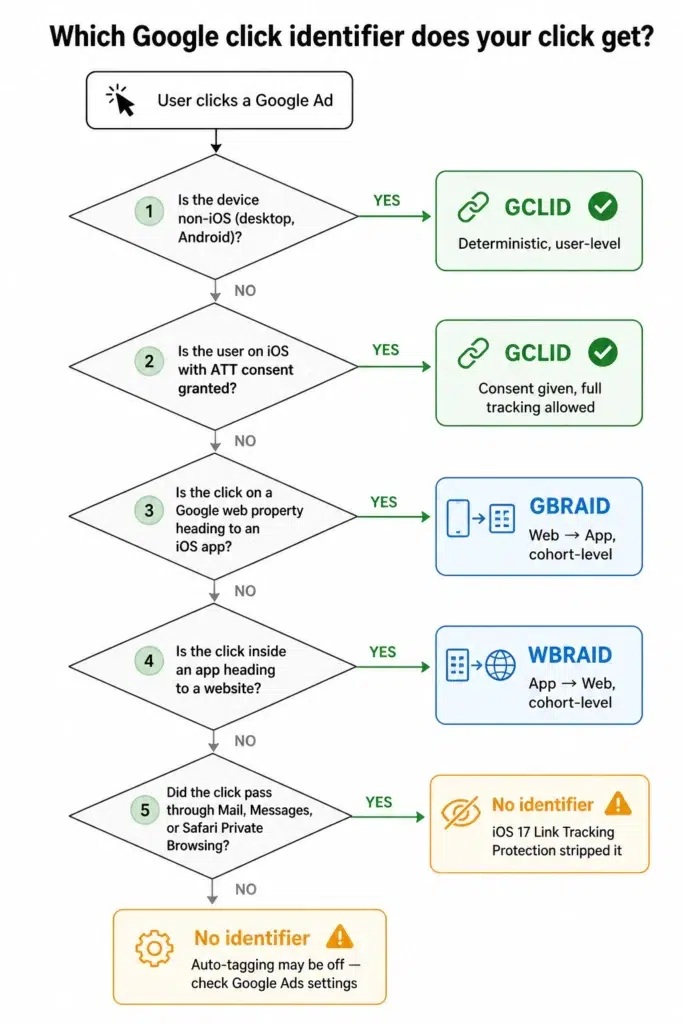
When Does Google Use GCLID, GBRAID, or WBRAID? The Decision Logic
The decision Google makes is mechanical:
- Non-iOS device (desktop, Android)? Google sends GCLID. End of decision tree.
- iOS user with ATT consent? Google sends GCLID even on iOS.
- iOS click on a Google web property heading to your iOS app? Google sends GBRAID.
- iOS click inside an app heading to a website? Google sends WBRAID.
- Click through Mail, Messages, or Safari Private Browsing? iOS 17 Link Tracking Protection may strip the parameter before the page loads.
A note on Android: Android always uses GCLID. There is no Android equivalent of GBRAID or WBRAID. A note on auto-tagging: none of this works without auto-tagging enabled. If you inherited an account with it turned off, that is the first place to look when click IDs are missing across the board.
Our Google Ads conversion tracking setup guide walks through this.
Why GCLID Disappears on iOS, and How iOS 17 Makes it Worse?
The 2021 story is the one most articles still tell: Apple’s App Tracking Transparency (ATT) required apps to ask users for permission to track them across apps and websites. Most users said no. Because GCLID can in theory link a click to a specific user, Google stopped sending it on iOS without ATT consent. GBRAID and WBRAID were the privacy-preserving alternatives Google introduced to keep signal flowing to the bidding models.
The 2026 reality has two more layers on top of that.
The iOS 17 layer (September 2023)
Apple introduced Link Tracking Protection. When a user opens a link in Apple Mail, Apple Messages, or Private Browsing in Safari 17, iOS now actively strips known tracking parameters from the URL before the page loads. GCLID is on the strip list. So is fbclid, msclkid, and others. UTM parameters generally survive, so aggregate channel reporting still works, but the deterministic click identifier does not arrive at your server. A non-trivial slice of your iOS traffic now lands with no click identifier at all, even when GCLID would otherwise have been valid. GBRAID is also affected in those same surfaces.
The iOS 26 layer (September 2025 onwards)
The industry concern is that Apple will extend LTP-style stripping to all Safari sessions rather than just Mail, Messages, and Private Browsing. Apple has not confirmed this, and we have not seen confirmed evidence of a full rollout in the current iOS 26 build. What is confirmed: every major measurement vendor is designing for the case where it does happen. That means designing your architecture for it too.
The implication most guides skip: even when you do everything right with GBRAID and WBRAID, Apple can strip the parameter before the page loads. Server-side and first-party domain tracking become the only reliable recovery path. URL-parameter capture alone will not be enough going forward.
How to Capture GCLID, GBRAID, and WBRAID? The Implementation Guide
There are three layers to capturing these well. Most teams stop at the first and wonder why their conversion match rate is below 70%.
Client-side capture – the basics
The minimum viable setup: a small script that reads click ID parameters off the URL on page load, stores them in localStorage, and writes them into a hidden field on every form so they ride to your CRM with each lead.
const params = new URLSearchParams(window.location.search);

['gclid', 'gbraid', 'wbraid'].forEach(key => {

  const value = params.get(key);

  if (value) {

    localStorage.setItem(key, value);

    document.cookie = `${key}=${value}; path=/; max-age=7776000; SameSite=Lax`;

  }

});
Where this breaks:
- Single-page apps that mount routes client-side may strip query parameters during hydration. The script must fire before the router takes over.
- Cookie consent banners that block scripts until accept. If the user navigates away first, the original landing URL is lost.
- iOS 17 Link Tracking Protection removes the parameter before the page loads. There is nothing for the script to read.
- Safari ITP caps JS-set first-party cookies at 7 days. If your sales cycle is longer than a week, client-side alone will under-attribute.
Server-side capture – What to do When Client-side Breaks?
Server-side tagging means the click ID is read on the server when the page is requested, not in the browser after the page loads. In practice this looks like one of three setups:
- Server-side Google Tag Manager (sGTM), where a container on your own subdomain receives the page request, captures the click ID, and writes a first-party cookie that survives ITP longer than the JS-set version.
- A custom first-party endpoint that your site posts to on every page load, storing click IDs server-side against a session.
- A purpose-built 1PD Ops or signal layer that does both, plus identity resolution, so the same click ID gets stitched to a customer profile when a lead later submits a form, signs up, or buys. This is where CustomerLabs sits in the stack more on that below.
Server-side does not fully solve iOS 17 LTP. If Apple stripped the parameter, your server never sees it either. What server-side does is preserve the parameter through every step after it arrives. In practice, a well-built server-side setup takes iOS click ID recovery from roughly 60% on a client-side-only setup back to the 90%-plus range.
Offline Conversion Import: The 2025–2026 Changes Most Teams Missed
If your sales cycle exceeds the conversion attribution window, or your conversions happen in a CRM rather than on the website, you need to import those conversions back to Google Ads using the click ID. See the full offline conversions in Google Ads documentation for the complete API reference. Two material changes from the past year that most teams have not absorbed:
Change 1: Simultaneous GCLID + GBRAID import (October 2025)
The original rule was that a single conversion import had to specify exactly one of GCLID, GBRAID, or WBRAID. As of early October 2025, GCLID and GBRAID can be imported together on the same conversion event. This matters for web-to-app journeys where you have captured both identifiers from the same user. WBRAID is not part of this change — import WBRAID alone.
Change 2: Data Manager API as the ingestion standard (early 2026)
Google has been migrating first-party data ingestion to the unified Data Manager API. New features like session attributes are gated to Data Manager API users. If your offline conversion pipeline still uses the old endpoints it will continue to work, but you will be locked out of recent improvements.
The detail nobody tells you upfront: when you create a conversion action that will receive GBRAID or WBRAID imports, the conversion count must be set to “Every” rather than “One”. If set to “One”, the API rejects your upload with an error that does not clearly explain why.
Session attributes are an aggregated identifier you can capture browser-side and import alongside (or instead of) GCLID, GBRAID, or WBRAID. The use case is the conversion where everything else is missing. They are not a replacement for click IDs — they are the safety net under everything else.
When GCLID, GBRAID, or WBRAID Stops Appearing, How to Troubleshoot?
When click IDs stop showing up, the cause is almost always one of these seven things, in roughly the order you should check them.
- Auto-tagging is disabled. Google Ads > Admin > Tracking and templates. If auto-tagging is off, no GCLID, no GBRAID, no WBRAID.
- The landing page strips unknown URL parameters. Verify by manually appending ?gclid=test123 to a clean version of the landing URL and watching what reaches analytics. Common culprits: WordPress security plugins, Cloudflare workers, and SPA router middleware.
- iOS 17 Link Tracking Protection. If the click came through Mail, Messages, or Safari Private Browsing on iOS 17+, the parameter was stripped by the browser. There is no fix on your side. The mitigation is server-side capture and first-party context.
- Single-page app routing. Your server response includes the parameter, but the client-side router rewrites the URL during hydration and the parameter is gone before analytics fires. Capture as early in the page lifecycle as possible.
- Cookie consent banner blocking the script. If your CMP delays GTM until after the user acts, and the user navigates away first, the click ID never gets stored. Server-side capture sidesteps this entirely.
- Conversion match rate below 80%. Open Google Ads, click into the conversion action, and check Diagnostics. Match rate is the percentage of imported conversions Google was able to match to a click. Below 80% is a sign something earlier in the chain is broken.
- Wrong identifier in the API call. You can only adjust a conversion by the identifier it was originally created with. GCLID can be adjusted by GCLID; WBRAID and GBRAID conversions can be adjusted by order ID if you set one at conversion creation time.
If you have checked all seven and click IDs are still missing reliably, the issue is almost certainly architectural, your capture layer needs to move server-side.
How CustomerLabs Captures GCLID, GBRAID, and WBRAID End to End
CustomerLabs bridges the gap between “capture the click ID on landing” and “send the right identifier to Google for offline conversion import” without the GTM hacks. The CustomerLabs Google Ads integration uses external user IDs to stitch click IDs to customer profiles across every touchpoint.
What that looks like in practice:
- Auto-captures GCLID, GBRAID, and WBRAID server-side from web and app clicks, including the iOS surfaces where client-side capture is fragile
- Stores each click ID against a unified user profile via identity resolution, so the right identifier is forwarded downstream regardless of whether the conversion happens online, offline, by phone, or in your CRM
- Sends conversions to Google Ads via the Data Manager API with support for the simultaneous GCLID + GBRAID import available since October 2025
- Handles the “Every” conversion count requirement, case-sensitivity of GBRAID and WBRAID, and identifier-mismatch errors automatically
Most teams move the capture layer to CustomerLabs in days, not quarters, and see improved match rates inside the first week.
Book a demo to see the click ID capture flow on your own data.