EMQ is a 0 to 10 score that measures how well the customer information your Pixel and Conversions API send matches Meta’s user graph. Meta labels scores Poor (under 4), OK (4 to 5.9), Good (6 to 7.9), and Great (8+).
The stakes are concrete. With Meta ads attribution down 40 to 60% since iOS 14.5 according to DOJO AI, the gap between a 5 and an 8 is no longer a vanity metric. You have CAPI installed, your score is parked at 5 or 6, and you cannot work out why it will not move.
This guide gives you the priority-tier checklist, a 9-step EMQ checklist, score-band troubleshooting, the EMQ-to-ROAS math, and the first-party data fix.
If you would rather not configure each customer information parameter by hand, CustomerLabs improves EMQ automatically: the 1PD Ops platform enriches your Conversions API events with hashed first-party identifiers from your CRM and eCom, no parameter-by-parameter integration required.
What is Event Match Quality on Meta? (and why it matters more in 2026)
Event Match Quality is Meta’s measure of how well the event parameters you send through Pixel and the Conversions API (CAPI) match a real Meta user.
The score is calculated on the customer information parameters Meta accepts: em (email), ph (phone), fn, ln, ge, db, ct, st, zp, country, external_id, client_ip_address, client_user_agent, fbp, and fbc. Meta scores a dataset on a 0 to 10 scale and applies four labels: Poor (under 4), OK (4 to 5.9), Good (6 to 7.9), and Great (8+).
In Meta’s words”
“Event match quality is calculated by looking at which customer information parameters are received from your server using a Conversions API integration, the quality of the information received and the percent of event instances that are matched to a Meta account. High quality event matching may improve ads attribution and performance.”
Source: Meta Business Help Center.
What EMQ measures (the 0–10 scale)
EMQ measures three things at once:
- which identifiers you send,
- how clean those identifiers are (hashing, normalization, encoding), and
- what percentage of your event volume actually carries those identifiers.
A dataset that sends hashed email on 95% of Purchase events scores higher than one that sends it on 40%.
Coverage is volume-weighted, so a high-volume Page View with thin parameters can drag down a clean Purchase.
The 0 to 10 number you see in Events Manager is the rolled-up dataset score; per-event scores live one click deeper. We will walk through both views in the upcoming sections.
What changed about EMQ in 2026?
Three privacy events compressed into a single moment have raised the floor on what “good” EMQ takes.
- Google retired 10 Privacy Sandbox APIs in October 2025, killing the planned third-party-cookie replacement.
- Safari 26 Advanced Fingerprinting Protection and expanded Link Tracking Protection, which decay fbp and fbc further on Apple devices.
- And Meta’s April 15, 2026 AI enrichment update, which auto-attaches inferred page title, description, page type, product, price, currency, and availability to events, with a 30-day opt-out window.
The result: minimum viable EMQ is rising even for brands that do nothing, so anyone parked at 5 or 6 falls further behind every quarter.
The honest framing the rest of this guide rests on is simple. Meta does not publish per-field EMQ point values. Anyone handing you a “+3 for email, +2 for phone” table is guessing.
The credible model is priority tiers plus real before-and-after data.
What is a good EMQ score?
A good Event Match Quality score on Meta is 6.0 or higher, which Meta labels Good. Scores of 8.0 and above are Great and indicate strong match quality.
Anything under 4 is Poor and signals broken or insufficient customer information being sent through your Pixel or Conversions API.
Meta’s official scoring bands break down as follows:
- Poor: under 4.0
- OK: 4.0 to 5.9
- Good: 6.0 to 7.9
- Great: 8.0 and above
What are Meta’s official scoring bands?
The bands themselves come straight from the Meta Business Help Center.
Treat 6.0 as the floor for “you are not actively losing performance to identifier coverage” and 8.0 as the ceiling worth chasing for performance ad accounts.
Below 4.0 is broken, signals are not arriving, hashing is wrong, or events are not firing on most page views.
Between 4 and 6 you are sending some identifiers but missing the high-tier ones. Between 6 and 8 you are sending most of the high-tier identifiers but losing volume on some events. Above 8 you are competing for marginal points, and even those points still move CPA.
What are the Realistic Benchmarks by event type and setup
Real benchmarks vary by setup and event type. According to industry observation, EMQ scores update roughly every 48 hours, stable improvements take 1 to 2 weeks to register, and ROAS impact lands in 2 to 4 weeks.
That cadence matters when you are troubleshooting: you fix something today, you grade it next week.
How Meta Calculates EMQ Score?
Meta calculates EMQ (Event Match Quality) in a very simple way.
The data you send is matched with the event instances (Probabilistic Matching & Deterministic Matching) to a Meta account within its database.
The event match quality is calculated cumulatively for the entire data you send.
Imagine you send Meta event data for 100 website visitors and you only include email, name, and phone number.
Meta can match most of those users correctly, but since you’re sharing only a few identifiers, your Event Match Quality (EMQ) ends up around 5/10.
Now, let’s say you send data for 500 visitors, where some are known (you have their contact info) and others are anonymous.
For known users, Meta can easily match emails and phone numbers. But for anonymous visitors (who don’t share contact details), Meta can’t find a perfect match, even if you send extra technical identifiers like browser IDs or click IDs.
As a result, your EMQ score may look lower, even though your actual targeting and ad performance can still be strong.
Now, let’s understand the importance or the impact EMQ Score creates on your campaigns.
Why EMQ Matters for Tracking, Attribution, and ROAS?
Remember this,
A high EMQ = stronger signals = better optimization = higher profits
Better Attribution: High EMQ means Meta can trace more conversions back to your ads, no more mysterious “untracked” sales.
Smarter Targeting: Matched events help Meta’s AI identify lookalikes of real buyers, improving audience quality.
Higher ROAS: When Meta gets accurate event data, it optimizes faster directly boosting return on ad spend.
Signal Resilience: With privacy changes limiting browser tracking, EMQ ensures your server-side data continues to feed Meta accurate signals.
Now, it would be clear, it does impact the way your campaigns bring in conversion, especially with the sequential learning that Meta does.
How To Check EMQ Score?
To check your current Event Match Quality Score:
- Navigate to Meta’s event manager by clicking on all tools
- Select Events manager and check the score beside every event.
- That gives the event match quality for every event.
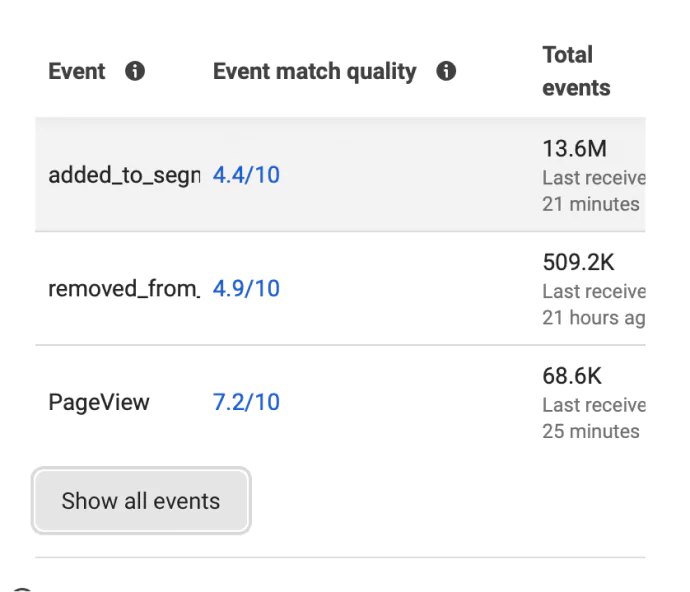
If you click on the rating, it gives you a clear detailed review of why your event match quality has a certain rating and suggestions as to how you can improve it.
Below is the example of how the event match quality is calculated by Meta and the suggestions it gives:
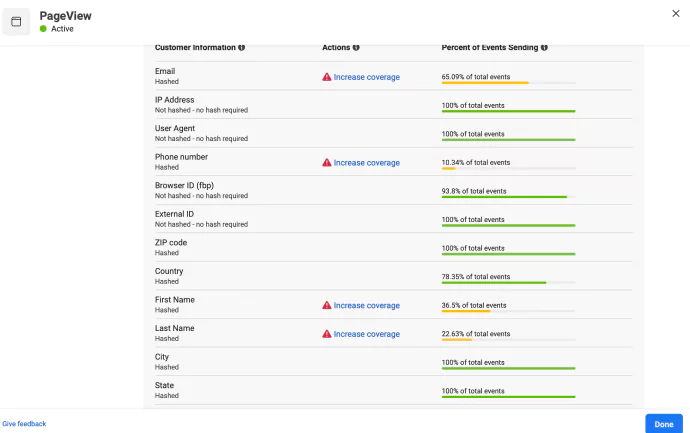
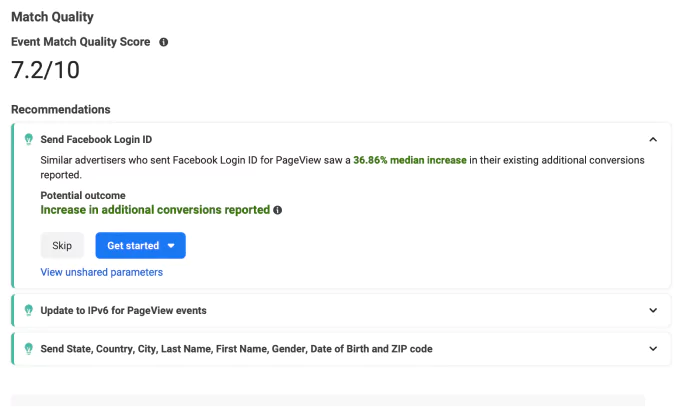
The next section is important, take a screenshot or save it in your PC for reference.
What are the EMQ priority-tier? Checklist of every parameter, ranked by impact
Meta is picky. Don’t think you can send phone numbers and email and get jackpot conversions.
Down below is the list of parameters and their priority.
I’m not saying this, Meta does.
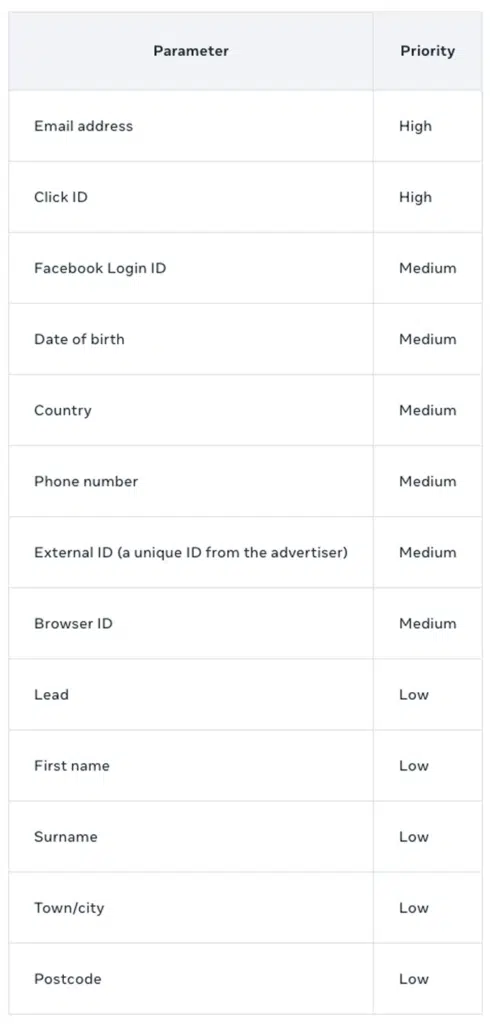
For more detailed information, please refer Meta’s official documentation on customer information parameters.
Hashing rule: em, ph, fn, ln, ge, db, ct, st, zp, country, and external_id are SHA-256 hashed (lowercased and trimmed for email; E.164 for phone). client_ip_address, client_user_agent, fbp, and fbc must NOT be hashed.
Source: Meta’s official doc about Hashing Customer Information. Getting the hashing rule wrong is one of the fastest ways to land in the Poor band.
Next up, get to know the major factors that can influence your EMQ Score.
What are Factors That Affect Event Match Quality?
1. First-Party Data Availability
Sending high-quality first-party data, especially the known information is what improves the event match quality because Facebook is able to match that data accurately with the users.
The more first-party data (emails, phone numbers, purchase history) you collect and sync, the higher the chance Meta can match those users accurately.
And remember, it is not just your known users, you can activate your anonymous users too!
2. Browser vs Server-Side Tracking
Meta’s pixel is the first and foremost tool that sends signals from the browser side to Meta Ads. However, Browser tracking (Pixel) is limited by cookies and privacy policies.
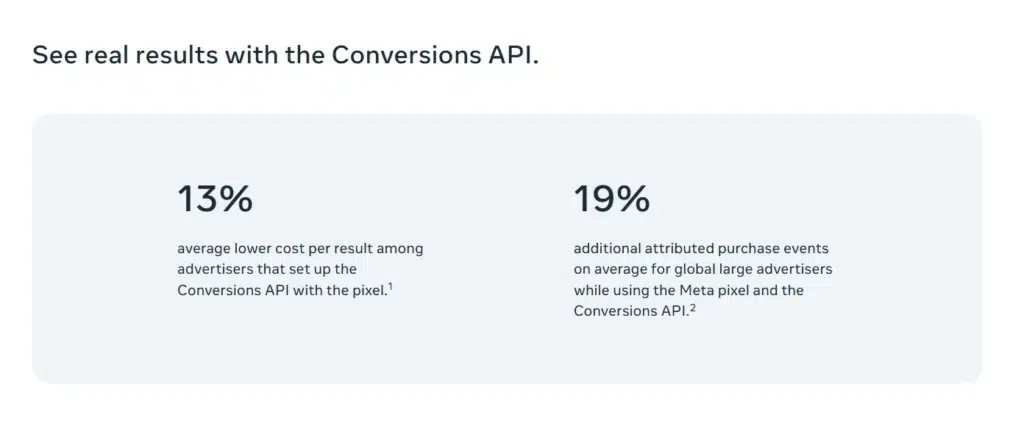
Server-side tracking happens via Meta Conversions API, it ensures you send data directly to Meta even when browsers block it. Plus it is privacy safe, so everything lays on how you optimize CAPI
See the image down below:
If you want to implement CAPI under 30 minutes and that too for free, start your free trial period now.
3. User Data Completeness
Meta’s Event Match Quality score depends heavily on the number and quality of identifiers you send with each event.
Identifiers are simply the data points Meta uses to recognize a user — things like email, phone number, external ID, browser ID, and click ID.
If your events only contain one or two identifiers (for example, just an email), Meta has limited ways to confirm who performed that action. That weakens your EMQ score.
However, when you send multiple identifiers, say, hashed email + phone + external ID + click ID; Meta gets a much clearer picture. This makes it far more confident about matching the event to an actual user in its database.
Here’s how it works in practice:
- Suppose a customer buys something while logged into your site — you can capture their hashed email, phone, and purchase ID.
- For another visitor who browses anonymously, you can still send fbp, fbc, or external ID via your Conversions API.
- By combining both known and anonymous identifiers, you create signal depth, which helps Meta connect more dots and improve attribution accuracy.
Pro tip: You can have external IDs pinned to your offline conversions and send them to ad platforms for more precise conversions.
Talk to those who do it with just a toggle on setup.
4. Signal Loss (Privacy Updates)
Apple’s App Tracking Transparency (ATT) limits cross-app tracking, iOS 17’s Link Tracking Protection strips user-identifying parameters from URLs, and Google Chrome’s third-party cookie phase-out is removing one of the last remaining ways to track users across websites.
Each of these changes cuts off bits of information that used to help Meta identify who took an action leading to incomplete data flow and lower EMQ.
Without mitigation, this means fewer matched events and a distorted view of your ad performance.
How to Improve Your EMQ Score?
Here is how to improve Event Match Quality on Meta, in priority order:
- Send hashed email and hashed phone on every event your CRM and checkout can produce (the highest-impact lift).
- Add a stable external_id (hashed customer ID) so Meta can stitch the same user across devices and sessions.
- Send client_ip_address and client_user_agent unhashed on every server event.
- Recover fbp and fbc server-side from the original page request and forward them on later events.
- Hash all PII with SHA-256, lowercase and trim email, normalize phone to E.164, before sending.
- Run Pixel and CAPI in parallel and deduplicate with a shared event_id.
- Audit parameter coverage in Events Manager weekly; fix the lowest-coverage event first.
- Enrich events with first-party identifiers from your CRM and eCom systems instead of relying on browser-collected data.
- Verify with Meta’s Dataset Quality API in production, not just the Test Events tool.
The unifying logic is simple: more matched parameters, plus cleaner hashing, plus server-side delivery equals higher EMQ. Here is what you can automate, and where your score is most likely stuck right now.
All these steps can be done, just with a toggle on using 1PD Ops.
How CustomerLabs improves EMQ automatically (1PD Ops, not manual plumbing)
Step 1: Connect Your Data Sources
Start by connecting all your data sources; your website, CRM, eCommerce store, and marketing tools by using effective tools like 1PD Ops.
Step 2: Map Events and User Parameters
Map the events you want to send to Meta such as Page View, Add to Cart, Purchase, or any custom conversion event.
Step 3: Enable Meta Conversions API (No Code Setup)
Once your events are mapped, Enable Meta CAPI integration (just with a toggle on)
Sends the event data server-to-server ensuring it bypasses browser restrictions and data loss from iOS or cookie limits.
Step 4: Test and Monitor Event Delivery
Head to Meta Events Manager → Test Events tab to confirm that the data is being received properly.
Step 5: Iterate and Enrich Data Continuously
With tools like 1PD Ops you can enrich new identifiers as users interact with your site.
As more data is unified under a single external ID, your EMQ automatically improves; giving Meta better visibility for optimization and attribution.
Here’s a detailed guide on how you can automate event sharing to Meta’s CAPI without code.
Next up, some tricks that can be kept under your shelves.
What Are The Advanced Strategies to Improve EMQ Score?
1. Use First-Party Data Pipelines
CustomerLabs helps you unify data from CRM, store, and website, building 360° user profiles that sync directly with Meta via server-side APIs.
This setup:
- Increases EMQ by 2–3x.
- Enables anonymous visitor retargeting.
- Creates stronger signal resilience across ad platforms.
2. Server-Side Event Deduplication
Ensure that every event sent via both Pixel and CAPI includes a shared event_id. This prevents double-counting and preserves clean attribution.
Automate this by using tools like 1PD Ops. It automatically syncs event IDs between browser and server, so you never send duplicate data to Meta.
After setup, check that each event appears once, under both Pixel and CAPI — with a “Deduplicated successfully” status.
3. Link EMQ Improvements to ROAS
Use A/B testing in Meta Ads Manager to correlate EMQ improvements with ROAS uplift.
Most brands see 20–40% higher conversion accuracy after boosting EMQ.
Compare ROAS, CPA, and matched conversions before and after implementing the setup to visualize the direct lift.
What “Automatic” Actually Means: The MNMLST Case Study
Mnmlst, a high-value product brand, ditched Shopify CAPI to sustain ROAS through market highs and lows by replacing the native integration with CustomerLabs’ 1PD Ops layer.
The reason that change moved the needle on EMQ specifically: Shopify’s native CAPI integration sends a thin set of customer parameters by default, and routing the same events through CustomerLabs enriches them with hashed first-party identifiers from connected sources.
Before CustomerLabs 1PD Ops
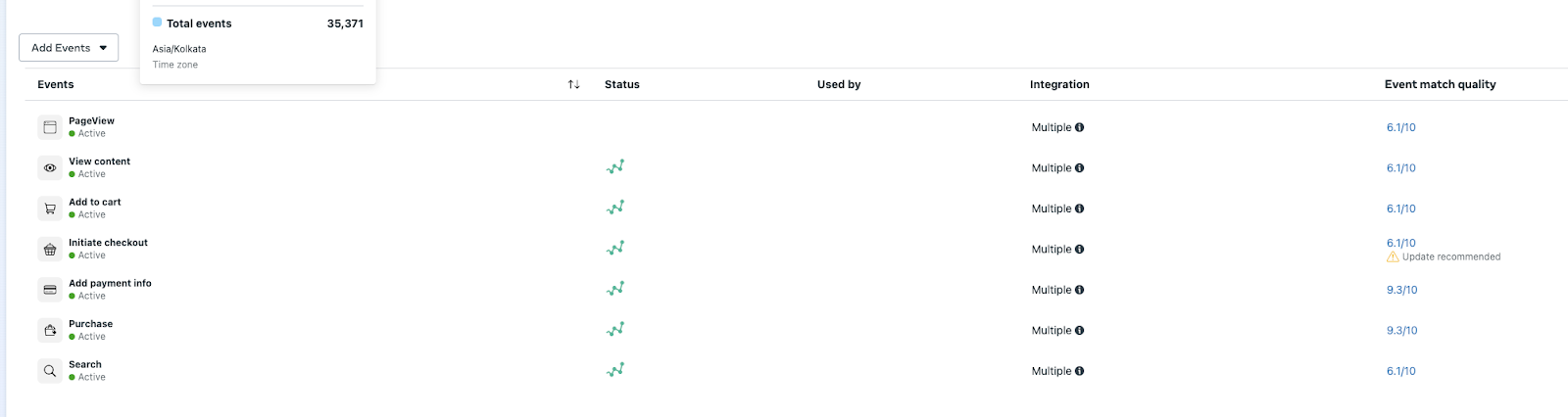
That parameter-set depth is what pushes EMQ above the Shopify-CAPI ceiling. The mechanism is verifiable here; for the specific before-and-after EMQ score, time-to-result, and ROAS numbers, see the full case study at the link.
After CustomerLabs 1PD Ops
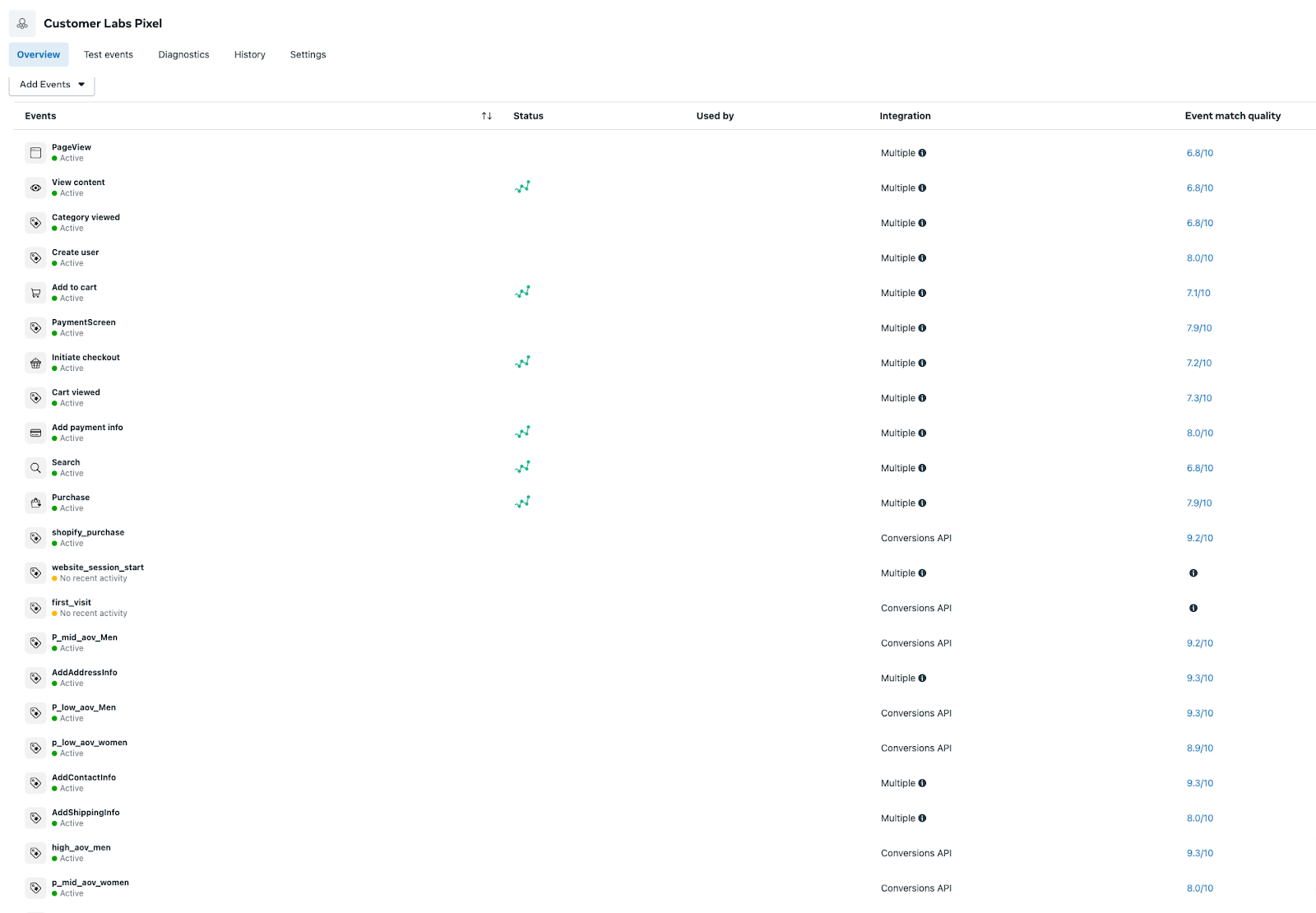
1PD Ops is the operations layer that connects, hashes, enriches, and routes first-party identifiers into Meta’s Conversions API correctly and continuously. It is not a tag manager and it is not a generic data warehouse; it is the layer that runs the priority-tier checklist for you, on every event, every day.
Conclusion
EMQ has a direct impact on conversions. And the data you send has a direct impact on EMQ.
To conclude, instead of compromising on your conversions, implement effective tools like 1PD Ops setup to increase the EMQ (event match quality) score in Facebook. The setup includes proper pixel setup with manual advanced matching turned on and Conversions API to give Facebook the complete picture of the user through the events.
CustomerLabs 1PD Ops helps you improve your event match quality and boost your ad campaign performance with the help of first-party data.
So, what are you waiting for? Get your event match quality to at least 6 and more by sending more data effectively to Meta’s ad platform.
Get started with the setup for free or pick a slot for a free consultation call with our experts.