single php

Google Data Manager API: The New Way to Send First-Party Data

·

·

Google Ads has become insanely good at finding buyers.

And latelyโ€ฆ I feel like Google is also becoming a little more marketer-friendly.

Like, instead of maintaining separate setups for audiences, offline conversions, and different Google products to send data back to Ads, DV 360 or other destinations, they are finally building things that make our jobs easier.

Thatโ€™s why Google just launched the Data Manager API, a simpler way to send first-party audiences and conversion events data into Googleโ€™s ecosystem using one centralized integration.

This guide explains what the Data Manager API is, why Google launched it now, and how to set up the Data Manager API without writing code for the integration.

What is Googleโ€™s Data Manager API?

Data Manager API is Googleโ€™s new one integration for audiences and conversion events; built to reduce messy setups and improve measurement.

Think of the Data Manager API like a single pipe into Googleโ€™s platforms for your first-party data.

So instead of setting up different APIs for audiences and conversions, you can send everything through one centralized connection and route it to the right place (Ads, DV360, etc.).

What can you send through it? 

It mainly supports two things:

  • Audience uploads
  • Conversion events (including offline/CRM conversions)

What products does it support today?

Right now, Google has positioned it to work with Google Ads, Google Analytics, and Display & Video 360 (DV360) and itโ€™s expected to expand to more Google marketing products over time.

Obviously it will. So now letโ€™s understand why Google made this move all of a sudden, and what are the core functions and principles behind it moving forward.

this is a banner image for Google Ads API connection which says connect google ads data manager api without a line of code

Why Google Built the Data Manager API Now (Why this move suddenly?)

Google did not launch this randomly, it is a move they have been building toward all year.

Since early 2025, Google has been pushing advertisers to collect and send first-party data more consistently so their AI bidding systems can optimize more aggressively. 

This was a big theme at Google Marketing Live 2025 (May 21, 2025), where Google announced multiple updates focused on modern measurement and first-party data activation.

And with browser-side tracking getting weaker (cookies, ad blockers, privacy updates), Google needs a more reliable way to receive signals.

So Data Manager API is basically Google saying:  โ€œStop relying only on browser tracking. Send your first-party signals through one stable, privacy-safe pipeline.โ€

Now letโ€™s get into the part that actually matters: What does it do? And why does Google think this is the new โ€œdefaultโ€ way to send first-party data?

In the meantime, read more on how to set up GA4 Enhanced Conversions in Google Analytics

What Data Manager API Actually Does?

Here are the core functions (and the principle behind each one):

1) One centralized intake for first-party data

Earlier, you had different pipelines for conversions, audiences, offline uploads, DV360 and each one came with its own setup and maintenance. 

Now, Data Manager API gives us one central connection into Google.

That means fewer moving parts, fewer silent breaks, and a setup that scales much more cleanly across accounts and teams.

2) Designed for audience activation (without manual uploads)

When it comes to audience lists it gets outdated fast, buyers change, customers purchase again, suppression lists fall behind. We need to keep them refreshed every now and then.

Data Manager API makes it easier to send and refresh audiences using your first-party identifiers like email or phone (where applicable). 

With continuous refresh, targeting stays sharper, retargeting stays relevant, and we do not waste ad spend showing ads to the wrong people.

3)Feeding Offline Conversions beyond website data

Lead submitted is not the final win that we want from a customer. We want  qualified leads, closed deals, paid orders, and backend confirmations.

To complete this loop, we send offline conversions back to Google so that the algorithms understand how our final objective looks like.

With the Google Data Manager API we can send those outcomes from CRMs, POS systems, and backend sources, not just browser events.

When Google sees real outcomes, bidding learns better and optimizes for quality, not volume.

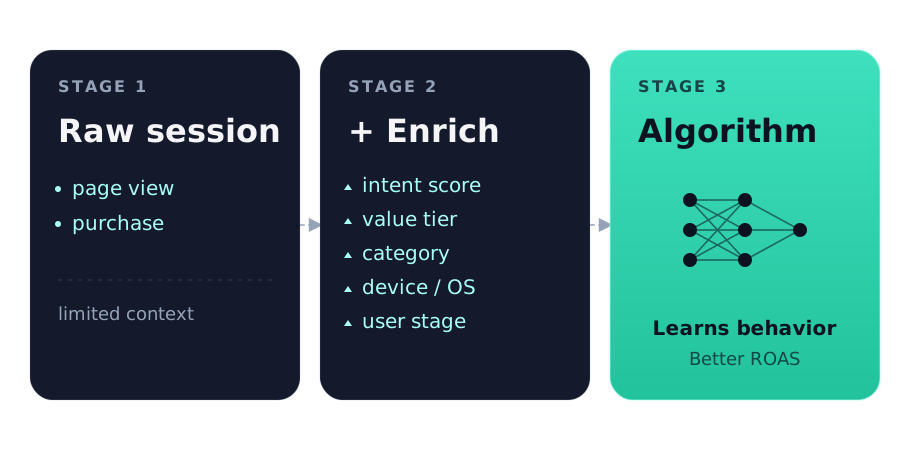
4) Better signals for Googleโ€™s AI optimization

As I said earlier, Googleโ€™s AI bidding is heavily signal-driven. If signals are missing or inconsistent, performance becomes harder to scale. 

Data Manager API improves consistency by making sure first-party conversions, both online and offline data and audiences reach Google more reliably. This setup introduced by Google avoids data gaps created by multiple APIs.

Hence, Googleโ€™s AI algorithms receive better signals, learning becomes faster and performance becomes more predictable.

5) Built for privacy-first data handling

Google knows first-party data only works long-term if itโ€™s handled safely. Thatโ€™s why Data Manager API supports privacy-centric approaches like encrypted identifiers, confidential matching concepts, and access verification.

It makes adoption easier for teams that want better match rates but donโ€™t want to create a compliance headache.

Now letโ€™s look at the difference, before and after data manager API

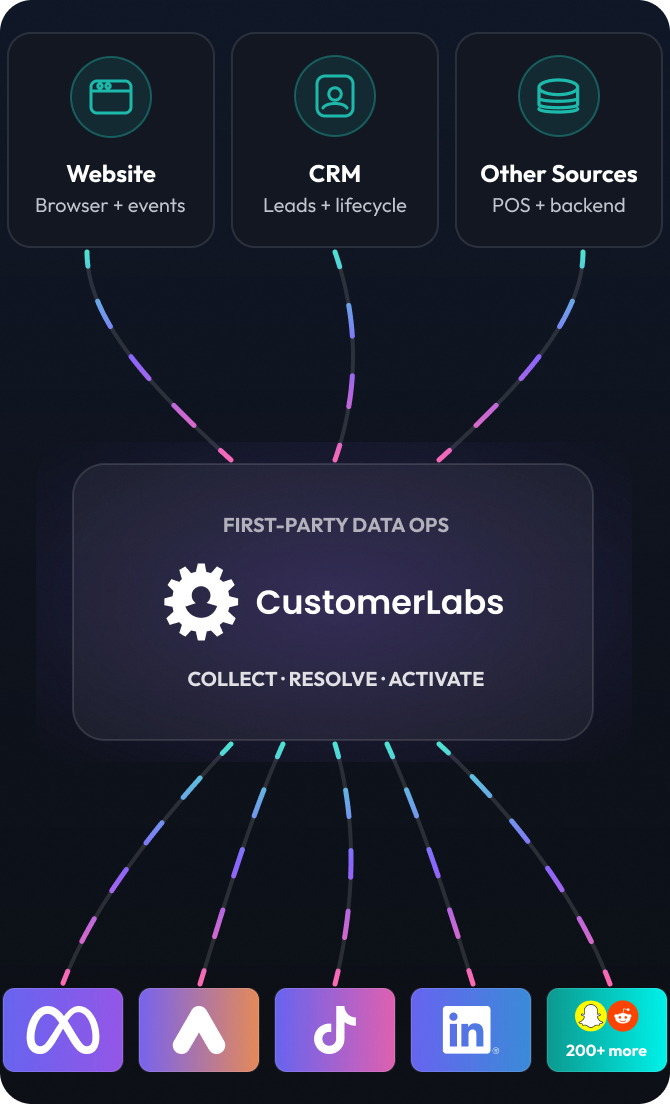
This is Promotional graphic for CRM data integration  with google data manager api which says send crm datat to Google ads, DV360, seamlessly in a single click

A comparison of Data Manager API vs Existing Setups

What you do todayData Manager API approachBenefits
Manual offline conversion uploadsAutomated API syncFaster updates + fewer errors
Multiple integrations for different Google productsSingle centralized connectionLower maintenance + fewer breakpoints
Browser-heavy trackingServer-side/API-driven deliveryMore reliable signals despite browser restrictions
Low-quality shallow conversion signals (form submits)Rich first-party signals (qualified / paid/closed)Better bidding decisions
Privacy-focused featuresPrivacy-focused featuresBetter compliance posture
Hard to scale across accountsDesigned for agencies + partnersRepeatable and scalable deployment

Letโ€™s look at how to set it up easily without a code. Google has given a long setup with api creation and coding.

But if you are not a big fan of coding like me then follow the setup below. 

(P.S. Google has also referred as one of the partners to help marketers with the setup)

How to Set Up Data Manager API using CustomerLabs 1PD Ops

Step 1:  Go to Destinations and find Google Data Manager

Destination new
  • In the search bar, type Data Manager API and select Google Data Manager (labeled inside customerlabs)from the results.
1 22 edited

Note: CustomerLabs uses a dedicated Data Manager API destination to help you track logs and maintain clear visibility over your data flow. This gives you better control over what data is sent, from which sources, and to which Google platforms, making the entire setup easier to monitor and troubleshoot.

Step 2: Enter a Destination ID

  • Youโ€™ll see a setup screen where you can see the auto-generated Destination ID.
5 11
  • Edit the ID, if required and click Save and Enable

Note: once saved, the Destination ID cannot be edited again.

Step 3: Enable Configuration Settings

  • Open Configuration settings and Click Authenticate Google Data Manager
3 16
  • Once done, click Verify Product Link access. After it should say โ€œverification successfulโ€ as shown in the image below.
4 14

Step 4: Choose which sources should send data

  • Click Configure Source Data
  • Turn ON only the sources you want to send
8 4
  • Use edit workflows if you want to customize which workflows are included

Step 5: Choose which events should be sent

  • Open Setup Event workflow
2 18
  • Youโ€™ll see events from website and other sources
  • Enable the events you want to send
  • Disable low-quality events you donโ€™t want Google optimizing on

Step 6: Verify the Setup

  • Confirm conversions are flowing inside the Google ads manager
  • Validate audience list updates
  • Monitor match rates and event volume

The setup is complete and you donโ€™t need a piece code to finish this entire setup. If you want to get your hands on this, you can do so using a 14-day free trial.

(P.S. The official setup documentation is under construction, will publish it soon)

Also read on how to set up WooCommerce Conversion Tracking in Google Analytics (GA4)

This is a banner image about Connecting Google Ads data manager APIs which says use 1pd ops to connect google ads data manager api

Key Use Cases (Where Youโ€™ll Actually Use the Data Manager API)

Google built the Data Manager API for two main jobs: audience activation and conversion measurement.

And in the real world, it shows up in these four use cases.

1) Keep audiences fresh (Customer Match, suppression, retargeting)

Audience lists go stale quickly, especially when uploads are manual. 

Data Manager API makes it easier to refresh audiences regularly so targeting stays relevant and exclusions stay accurate.

2) Send offline conversions back to Google Ads (CRM stages, closed-won, payment confirmed)

Google often sees the click and the form submit but not the final outcome like qualified lead, demo booked, closed-won. 

Sending offline conversions back to Google helps the algorithm learn from real business results, not just shallow events.

3) Optimize campaigns based on quality, not just volume

When Google is trained only on weak signals (like โ€œlead submittedโ€), scaling increases volume but often reduces quality. 

Data Manager API lets you feed stronger outcomes, so bidding aligns better with revenue.

4) Consolidate first-party data workflows into one pipeline (instead of multiple APIs)

Most teams run separate setups for audiences, offline conversions, and different Google products, which is hard to maintain and breaks silently. 

Data Manager API centralizes this into a cleaner, more scalable workflow.

Now letโ€™s talk more about the benefits that we get by integrating Googleโ€™s Data Manager API 

Benefits of Googleโ€™s Data Manager API

The Data Manager API is Google trying to fix a very common problem:  even when conversions happen, Google doesnโ€™t always receive the signal.

And when Google doesnโ€™t receive signals, performance becomes harder to scale.

Hereโ€™s what improves with this update.

1) You lose fewer conversions to browser tracking issues

Cookies drop. Ad blockers interfere. Devices change. So even a correct tracking setup can miss conversions.

With Data Manager API, Google can receive signals more reliably than pure browser-side tracking.

2) Googleโ€™s AI can optimize using real outcomes

Google Ads learns from the data you send. 

If you only send โ€œlead submittedโ€, it will optimize for leads – even if they never close.

When you send deeper outcomes like qualified leads or confirmed purchases, bidding starts aligning better with revenue.

3) Your audiences stop going stale

Audience uploads usually happen once in a while. But customer lists change every day – new buyers come in, old buyers repeat, suppression becomes outdated.

With Data Manager API, audience updates can be sent more consistently, which keeps targeting and exclusions cleaner.

4) Offline conversions start showing up where they actually matter

For many businesses, the real conversion happens inside a CRM or sales pipeline.

If Google doesnโ€™t get that information back, it keeps optimizing toward shallow events. Sending offline outcomes helps Google learn what โ€œgoodโ€ looks like.

The End Note

Googleโ€™s Data Manager API gives advertisers a cleaner way to send first-party audiences and conversion signals into Google through one centralized connection.

But as Google Ads relies more heavily on AI-driven bidding and measurement, the real challenge is no longer โ€œtracking setup.โ€ Itโ€™s ensuring that your best signals like qualified leads, offline outcomes, and high-value customer data actually reach Google consistently, even when browser tracking drops.

By integrating Google Data Manager API with CustomerLabs, brands can bridge this gap without adding complexity. Instead of manual uploads and fragmented workflows, you get a structured way to send better first-party signals into Google Ads and DV360 signals that improve targeting, measurement, and optimization over time.

Start a free trial if you want to set it up yourself. Book a demo, if you want us to map the right events and offline outcomes for your funnel.

Frequently Asked Questions (FAQs)

Google Data Manager API is a centralized API that lets advertisers send first-party audiences and conversion events into Google using a single integration. Instead of maintaining separate setups for audience uploads, offline conversions, and different Google products, Data Manager API acts as one pipeline to route first-party data to platforms like Google Ads, Google Analytics, and Display & Video 360 (DV360). It is designed to improve measurement reliability, reduce setup complexity, and support privacy-first data sharing.
You should use Google Data Manager API to send more reliable first-party signals to Google, especially as browser-based tracking becomes less dependable. Google built this API to help advertisers: Move away from fragmented, browser-heavy tracking Feed stronger online and offline signals into Google Ads Help Googleโ€™s AI bidding systems optimize using real business outcomes In short, it helps Google understand what actually matters to your business, not just surface-level events.
The main benefits of Google Data Manager API include: - Fewer lost conversions due to cookie loss, ad blockers, or browser restrictions - Better AI optimization by sending deeper outcomes like qualified leads or paid orders - Always-fresh audiences with consistent updates instead of manual uploads - Centralized data flow instead of managing multiple Google integrations - Improved privacy posture using encrypted identifiers and privacy-safe matching Overall, it helps advertisers scale performance by ensuring Google receives high-quality, consistent first-party data.
Google Data Manager API is mainly used for audience activation and conversion measurement. Common real-world use cases include: 1. Refreshing Customer Match and retargeting audiences. Keeps audience lists up to date for better targeting and accurate suppression. 2. Sending offline conversions to Google Ads. Pushes CRM outcomes like qualified leads, closed-won deals, or confirmed payments back to Google. 3. Optimizing campaigns for quality, not just volume. Trains Googleโ€™s bidding algorithms using real revenue-driven signals. 4. Replacing multiple APIs with one centralized pipeline Simplifies workflows for teams managing audiences, conversions, and multiple Google products.
- Go to Destinations in CustomerLabs and select Google Data Manager - Create and save a Destination ID - Authenticate and verify Google Data Manager access - Select the data sources you want to send - Enable only high-quality events Google should optimize on - Verify conversions, audience updates, and match rates in Google Ads This approach allows you to manage data flow, visibility, and troubleshooting without engineering effort.
You can send audience lists and conversion events, including offline and CRM-based conversions.
Yes. It supports sending offline outcomes from CRMs, POS systems, and backend sources to Google Ads.
Currently, it supports Google Ads, Google Analytics, and Display & Video 360 (DV360), with more products expected.
Yes. It supports encrypted identifiers, access verification, and privacy-first data handling principles.
It doesnโ€™t remove existing APIs immediately but is positioned as the new default for first-party data activation over time.

Seasoned content marketer, creating impactful content in a wide range of topics relating to Digital marketing, SEO, Food and Cosmetics industry and lately into SaaS technology. Optimizing brands amplify their online presence through strategic storytelling and technical precision. Additionally, has interest into drawing and occasionally poses as a motivational speaker.

The latest news, perspectives, and insights from CustomerLabs

More Blogs

View all
Setting up enhanced conversions for web in google ads
How to Implement Enhanced Conversions for Web in Google Ads

Learn how to implement Enhanced Conversions for Web in Google Ads to boost your campaign performance and improved conversion tracking

Read more
How to integrate crm with google ads
A Guide to Integrating CRM Data with Google Ads

Improve your marketing strategy and conversions through real-time synchronization of CRM with Google Ads.

Read more
Clickfunnels Google Ads Integration Using CustomerLabs CDP blog banner
Clickfunnels Google Ads integration using CustomerLabs

Integrate clickfunnels with Google Ads seamlessly using CustomerLabs 1PD Ops. Enhance ad performance with Clickfunnels Google Ads Integration

Read more

Get started with
CustomerLabs 1PD Ops

Schedule a 1-1 Demo