Meta’s universe just got bigger
Listen up, performance marketers, Meta’s universe just got even bigger.
In the age of AI automation, the latest updates to Advantage+ Sales Campaigns are designed to push ad performance further than ever before.
The revamped Advantage+ Sales Campaign now includes features like Advantage+ On, Advantage+ Off, Advantage+ Creatives, Advantage+ Catalogs, Advantage+ Destinations, and more.
Each one is built to help skyrocket your ROAS and maximize ad performance like never before.
In this blog, we’ll break down how each of these features (Advantage+ On/Off and Status Verification, manual control options) works and what to expect for every dollar you spend. But we’re not stopping at theory, we’ll dig into what actually drives performance in the new Advantage+ ecosystem.
By the end, you’ll know exactly how to make Meta’s latest Advantage+ campaigns work for you, not against your data.
How Is AI Really Influential in Marketing?
Meta says advertisers using its AI-enabled Advantage+ tools (including Sales campaigns) see, on average, $4.52 in revenue for every $1 spent, which is an increase of 22% compared to business-as-usual campaigns.
Like the above statement says, it’s 100% true, the influence of AI on marketing and media has increased like never before, and this makes all impossible things possible.
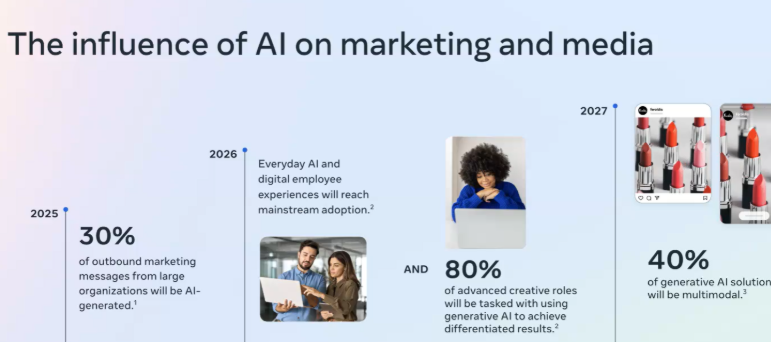
But these AI campaigns lack performance (commented as such by most of the marketers), why? Without this one thing. No matter how advanced the feature is, if you feed poor data, it all falls apart.
Because Meta’s AI can’t optimize campaigns for what it can’t understand. Poor signal quality, missing events, or a broken CAPI setup can quietly kill performance even when everything looks right inside Ads Manager.
Now, let’s explore the features and end-to-end automation of Meta’s Advantage+ Sales Campaigns.
Also read on: Advantage+ Shopping Campaigns and their best practices. Check this out.
How Advantage+ End-to-End Automation Pushes Meta Ads Performance?
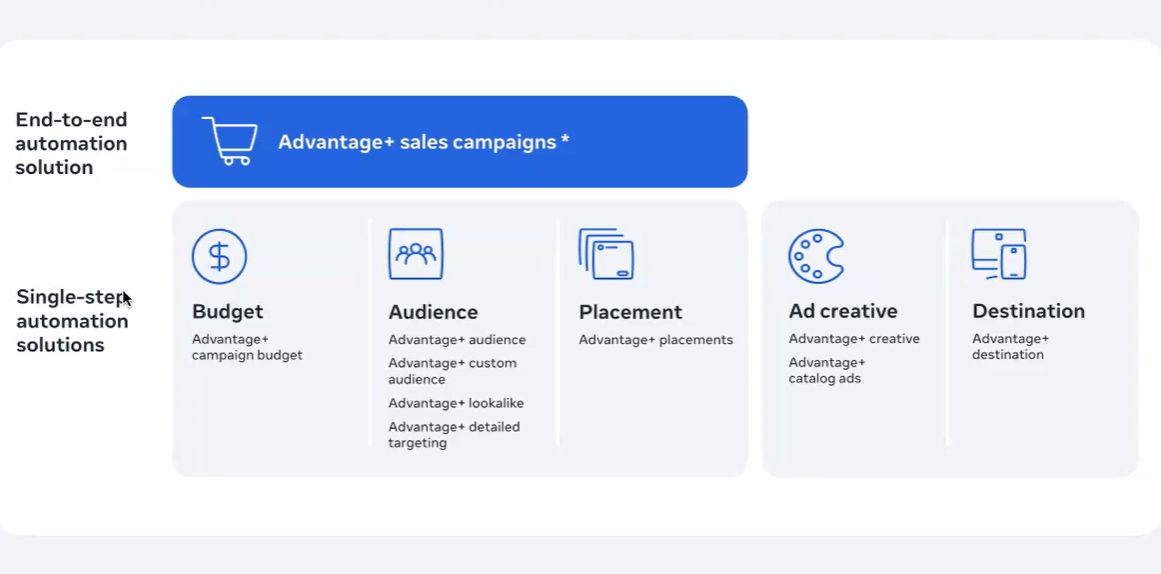
Meta’s Advantage+ Sales Campaigns don’t just automate one part of your setup; they automate everything. From audience targeting and creative testing to placement and budget allocation, every layer of campaign optimization is handled by Meta’s AI.
That’s what end-to-end automation really means: the system continuously learns, adapts, and refines delivery without you lifting a finger.
When you select Sales as a campaign objective in the Advantage+ Sales campaign, Meta instantly activates these automation layers, turning what used to be a manual, multi-step setup into a single, smart system that optimizes in real time.
It’s designed to run faster, make smarter decisions, and reduce human bias in campaign management.
Let’s break down what this automation translates to in terms of performance:
- Better Performance – Machine learning constantly tests, learns, and delivers your best-performing ad combinations without guesswork.
- Increased Efficiency – The system auto-optimizes for new, high-converting creatives while minimizing manual adjustments.
- Greater Scale – Reach wider audiences confidently while staying aligned with privacy preferences and compliance standards.
Advantage+ is essentially Meta’s version of autopilot for performance marketing, smart enough to handle the full journey, from targeting to conversion.
Keep reading to see how this automation reshapes campaign control and how you can make the most of it.
What is the New “Advantage+ On”?
Advantage+ Sales Campaigns include built-in automation for budget, audience, and placements. That’s why your campaign is automatically labeled Advantage+ ON by default. So you don’t have to set everything up manually.
Once Advantage+ ON is enabled, three key systems start working together automatically.
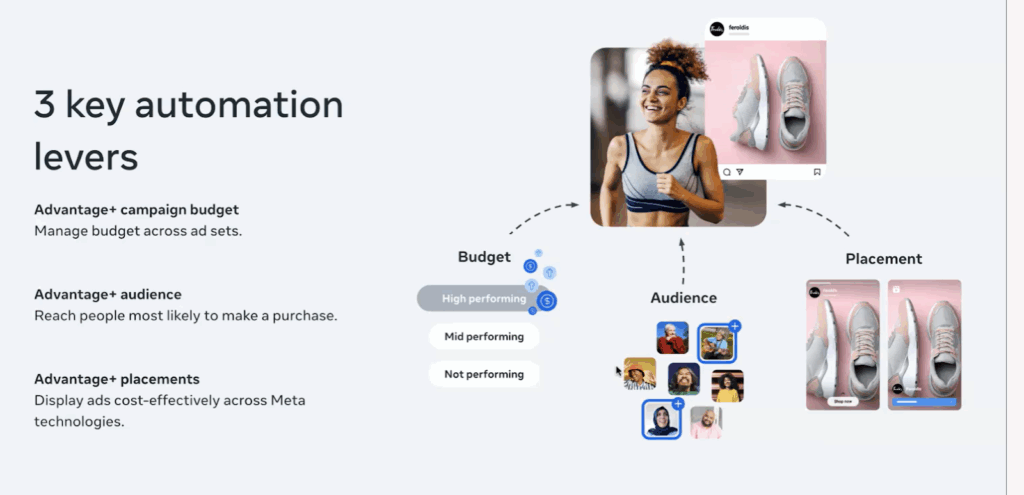
- Advantage+ Campaign Budget: Your budget is constantly optimized, so more spend goes to ad sets that perform well and less to those that don’t.
- Advantage+ Audience: Advantage+ Audience automatically shows your ads to people who are most likely to take action. You can also give it a boost by adding details about the kind of people you want to reach.
- Advantage+Placements: It automatically chooses the best places to show your ads across Facebook, Instagram, Messenger, and the Meta Audience Network.
Next, we’ll be discussing how to verify when your campaign is in Advantage+ On status.
How to check the Advantage+ On Status?
A campaign is marked as Advantage+ when all the ad sets inside that campaign are using Advantage+ features, like campaign, audience, and placements are fully turned on across the campaign.
In the previous section, we looked at a definition of these. Now, let me provide you with more insights.
What Is Advantage+ Campaign Budget and How Does it Work in Ad Budgeting?
- If your campaign has more than one ad set, Meta automatically keeps the Advantage+ campaign budget turned on; it means Meta decides how to split your budget across ad sets.
- But if your campaign has only one ad set, you can choose to use either a campaign-level budget or an ad set-level budget.
Example:
If you’ve got multiple ad sets, Meta’s AI will decide how much budget each one gets. But if there’s only one ad set, you can choose whether you control the budget or let Meta handle it.
What Is Advantage+ Audience and How Does It Power Smarter Meta Targeting?
- Your campaign will automatically be using the Advantage+ audience if at least one ad set has it turned on.
- Meta will apply any location and minimum age limits set in your ad account.
- The new “use as a suggestion” feature helps you to guide Meta on what your business needs are, like age, gender, or custom audience preferences.
- If you untick the use of a suggestion box, Meta stops using your suggestions rather, it follows it has an order completely, and you’ll no longer be using the Advantage+ audience.
Example:
If you want your ads to target a specific age group, let’s say 35 to 45, and if you check the “use as a suggestion box” Meta will take this as a suggestion. Meta will learn your signals and try to understand on its own and will still automate it.
But if you didn’t till them, then it will only target the people between the age group of 35-45.
Automation gets switched off.
Think of Advantage+ Audience like giving Meta a compass, not a map.
You can give Meta some hints like age, gender, or audience type but if you uncheck that box, Meta takes full control and decides on its own who to show your ads to.
What Are Advantage+ Placements and How Do They Find Better Placements for Your Ads?
- When Advantage+ placements are turned on for all ad sets, it means Meta automatically shows your ads across all available placements (like Facebook, Instagram, Messenger, etc.) after analyzing where your audiences are naturally active.
- You can still have account-level placement controls active; those settings will still apply even with Advantage+ placements on.
For instance, think of Advantage+ Placements, let’s say your target audience are highly engaged on Instagram when compared to Facebook.
With the sequence learning in place, Meta’s AI will analyse the event data that you send, goes through the learning phase, understands the audience pattern and showcases the ads in Instagram majorly.
Note: You need to share better data in order to enhance the learning experience of Meta’s AI
I can read you. Let me explain it to you clearly in the upcoming section.
What is the New Campaign Score in Meta Advantage+ Sales Campaigns?
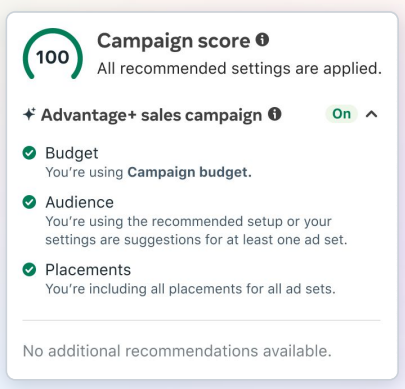
A campaign score is a metric (often a number from 0 – 100) that provides a real-time or post-campaign evaluation of a marketing effort’s potential or performance.
- Your campaign score (0–100) shows how well your campaign is set up before you publish it.
- It also gives you tips and actions to improve your score. When you fix errors, warnings, or follow recommendations, your score goes up.
- This score only applies to that specific campaign; it doesn’t affect your overall account score, which measures how well your entire ad account is performing.
Now let’s flip the switch – what happens when you turn Advantage+ OFF?
What Happens When You Turn Advantage+ Off?
Yes – “Advantage+ Off” is actually a thing. It simply means your campaign is no longer using Meta’s automation to optimize delivery, targeting, and budget in real time.
This usually happens when you start taking back too much manual control, tweaking budgets, narrowing audiences, or restricting placements.
When those manual settings stack up, Meta automatically switches your campaign status to Advantage+ Off, signaling that AI-driven optimization is now limited.
The downside? You’ll have more control, but you’ll lose the automatic learning and smart optimization that help your ads perform better.
You get full control but lose the automatic learning and optimization that help campaigns perform better. It’s like switching from autopilot to manual mid-flight: more control, but more effort (and a higher risk of turbulence).
The good news: Ads Manager will guide you if you want to turn automation back on, helping you restore those AI advantages in just a few steps.
So while manual controls are great for precision or compliance needs, it’s best to use them sparingly, keeping the balance between human strategy and machine intelligence to get the best results from your campaigns.
How to Leverage Audience Segment Reporting for Deeper Insights?
To get the most out of your Advantage+ Sales Campaigns, one of the most powerful tactics is audience segment reporting.
This feature allows you to break down campaign performance based on how different types of audiences engage with your brand, helping you understand which group is driving the most value and where to optimize your budget.
For example, you might use educational content to attract new audiences, conversion-focused offers to nudge engaged users, and personalized recommendations to retain existing customers.
Since original thought is what truly builds authority, running your drafts through a plagiarism checker ensures that your strategy is backed by unique insights rather than recycled ideas.
Also using an Ai humanizer can further refine your content to ensure it maintains a natural, conversational flow that resonates with your audience.
By categorizing your audiences into New, Engaged, and Existing segments, you can tailor messaging, creative, and bidding strategies to match the customer’s stage in their journey.
New Audience
These are users who haven’t interacted with your brand before; they’re discovering your products or services for the first time.
Monitoring how this group performs helps you gauge the efficiency of your prospecting efforts and creative hooks that capture fresh attention.
Engaged Audience
This segment includes people who have interacted with your brand, such as visiting your website, engaging with your social content, or adding products to cart but haven’t purchased yet.
Tracking their behavior gives you insight into how well your mid-funnel strategies are converting warm interest into action.
Existing Customers
These are your repeat buyers or subscribers; individuals who have already purchased or signed up for your services. Analyzing this segment’s performance helps you identify opportunities for upselling, cross-selling, and loyalty-building campaigns.
In short, segment-level insights turn your Advantage+ Sales Campaigns from broad automation into data-driven growth machines, ensuring your ad spend delivers maximum impact across every stage of the customer journey.
Next up, comes the measurement part.
How to Measure The Effectiveness of Advantage+ Sales Campaigns?
Once your Advantage+ Sales Campaigns are up and running, the next step is to measure what’s truly driving performance.
Meta offers testing frameworks that help you compare your automated campaign setup against your existing manual setup so you can make data-backed decisions instead of relying on guesswork.
When designing a test, consider your existing business-as-usual setup and what you want to test. To get started, run a conversion lift test if possible, or use an A/B test as an alternative.
Set up your test to run for 2–4 weeks with a 20% holdout for lift studies. Ensure that the only difference between the two test cells is the variable being tested, keeping all other factors consistent.
So there are two options:
Option 1: Constrained Setup vs Full Automation
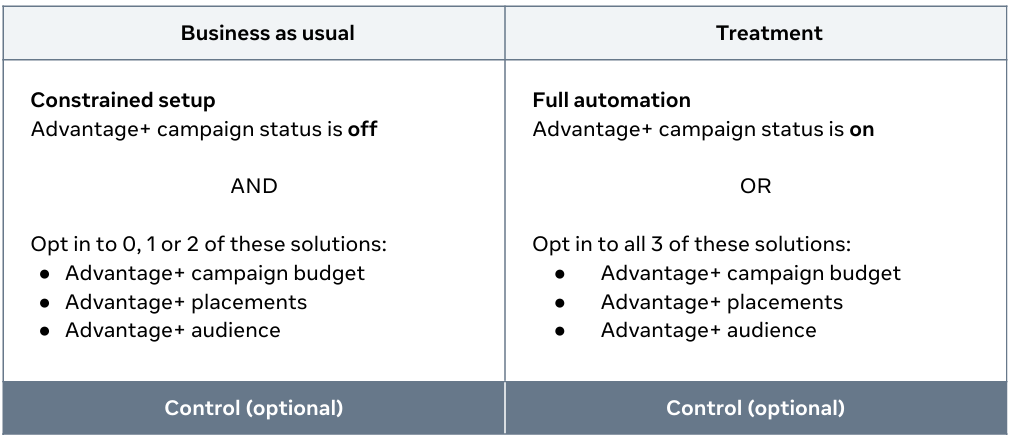
Option 2: Constrained Setup vs Partial Automation
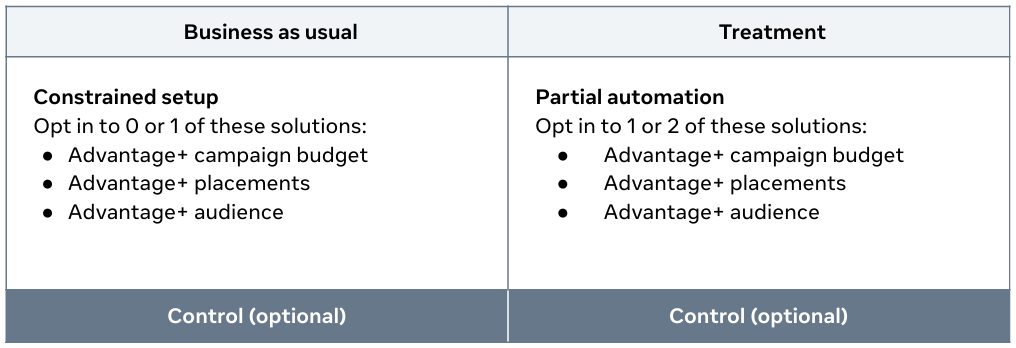
By running structured tests like these, you’ll not only uncover how automation impacts performance but also identify the ideal balance between manual control and Meta’s machine learning.
Once you’ve validated what works best, you can confidently scale your campaigns knowing every optimization is backed by real data, setting the stage for maximizing Advantage+ performance at scale.
So the updates on the features are done, now let’s move your focus towards the data, which is your part.
Why You Need Meta’s Conversions API: The Key to Smarter, Privacy-Safe Ad Performance
Using the Meta Conversions API (CAPI) isn’t required for Advantage+ Sales Campaigns, but it’s highly recommended if you want to track conversion events accurately and improve campaign performance.
The Conversions API helps send data directly from your website or server to Meta, giving the system cleaner, more reliable signals for optimization.
There are three ways to set it up, depending on your business needs
1. Direct Integration
- This method connects CAPI directly to your server code.
- It needs some technical expertise but gives you full control and customization over how your data is sent to Meta.
2. Gateway Integration
- The Conversions API Gateway is a no-code, self-service option that can be set up in under an hour.
- It’s perfect if you want a quick, simple setup without needing a developer.
3. Partner Integration
- If you use platforms like Shopify, WooCommerce, Google, or Salesforce, you can integrate CAPI easily through your Meta Business Partner.
- This is a seamless way to get connected using tools you already work with.
Watch the video down below if you want to set up CAPI under 30 mins
Need help setting up CAPI for your ad account, book a call, let’s get this set done.
If you are smart, you can figure it out yourself, setup CAPI for free
The better your CAPI setup, the stronger your data signals, and the better Meta’s AI can optimize your campaigns.
What are the Best Data Practices to Maximize Advantage+ Sales Campaigns?
When it comes to Advantage+ Sales Campaigns, data quality is everything.
Meta’s AI can only optimize based on the signals you send, and that’s where First-Party Data (1PD) plays a crucial role.
Best Practices for Better Data Quality
To get the best results from your ads, make sure your Conversions API and Pixel is in place (Meta recommends the combo, unless you fall under the sensitive data restriction category). Regular checks help improve performance and give Meta’s system more accurate data to learn from.
Here are four simple best practices to keep your data setup strong
1. Maximize Event Coverage
- Send the same events through both the Meta Pixel and the Conversions API.
- Make sure each event has the same event name and event ID so Meta can recognize and combine them correctly.
2. Increase Event Effectiveness
- Add important customer details (like email, phone number, or location) as parameters.
- This helps Meta match your events with the right user accounts, improving event match quality and ad performance.
3. Deduplicate Events
- Use a unique event ID to make sure the same event isn’t counted twice.
- You can check how many events are being successfully deduplicated in Meta Events Manager.
4. Maintain Fresh Data
- Send your data as soon as events happen in real time or as close to it as possible.
- Fresh data helps Meta’s AI learn faster and make smarter optimization decisions.
Several platforms can execute a first-party data model, but only at 1PD Ops have battle-tested it through countless experiments, proven frameworks, and real-world results.
Let’s conclude
Advantage+ Sales Campaigns aren’t just another Meta update; they’re the foundation of how modern advertising now works. From end-to-end automation to data-driven optimization, every layer of ASC is designed to remove guesswork and make Meta’s AI work harder for you.
AI is only as smart as the data you feed it.
Without clean, consistent first-party data, even the most advanced automation can lose its edge. That’s why your Conversions API setup, event quality, and creative strategy matter just as much as toggling Advantage+ ON.
I hope this journey made one thing clear: it’s not just campaigns that win the show; it’s clean, high-quality data that powers your campaigns and drives ROAS.
1PD Ops is now giving performance marketers a new experience. We’re handpicking 200 marketers for a 14-day free trial, and for more support, the Book a Demo option for anyone who still has questions after the trial.