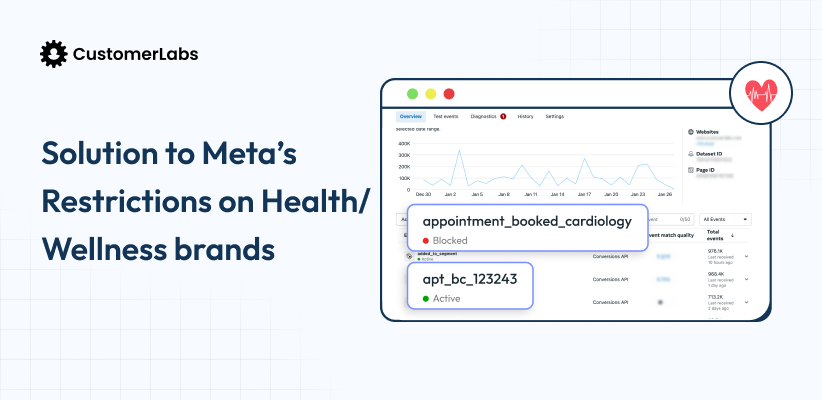
Meta restricts health and wellness ads by classifying ad accounts under its Health & Wellness sensitive category, triggered by Core Setup enforcement. Meaning Meta does not want you to send PHI-linked signals, before/after creatives, and URL parameters that imply health conditions.
The restriction isn’t always an outright ban. Most brands are silently throttled (higher CPM, shrinking reach, broken learning phases) before they even get a disapproval. The fix isn’t creative-only.
You need to fix the signal quality, specifically, moving to server-side first-party data, scrubbing URLs and event names, hashing the personal information using SHA256 and rebuilding what Meta knows about your converters.
A little context
It’s been over a year.
A year since Meta dropped the restriction on health and wellness brands and honestly? If you’re still searching “Meta health wellness ad restrictions” in 2026, I have one question: have you actually fixed it, or are you still going in circles trying to figure out how?
Because over the past 12 months, I’ve seen it all.
Brand owners panicking,
“My ad account got blocked, my events got blocked, my audiences got blocked, Meta is my most profitable channel, what do I do now…on and on.
That part wasn’t surprising. What was surprising was watching people engineer their own “fixes.”
Some shifted pixels. Smart enough move. But quite a few and this is the part that got me, shifted domains. Frequently. Like, every few weeks.
I get it. You’re desperate, you’ll try anything. But shifting domains to escape a data restriction is like tearing down your house and rebuilding it next door because the front door was broken. The bridge was right there. You just didn’t see it.
This blog is the bridge.
We’re going to cover what actually happened, why Meta did it, and more importantly, what the actual fix looks like in 2026. Not workarounds. Not duct tape. The fix.
P.S. I wrote this originally in January 2025 when the restriction had just dropped. A year in, with everything I’ve seen, it was well overdue for an update. Let’s get into it.
How We Got Here: 2025–2026 Meta Health & Wellness Restriction Timeline
Most brands treat this like it came out of nowhere. Well actually, it didn’t.
Core Setup (Pre-2025):
Meta released Core Setup – a framework that gave businesses control over which data they send to Meta.
If you look at Meta’s core setup, it emphasized restrictions on sensitive data, PHI and PII, shared by businesses. It also gave businesses the option to control which data gets sent to Meta.
In Meta’s own words:
“Core setup is a set of data restrictions that can be applied to a Meta Business Tool by you or by Meta.”
It flagged two specific data types as restricted: custom parameters outside Meta’s standard list, and anything appended to a URL after the domain (query strings, product names, tracking params).
January 2025:
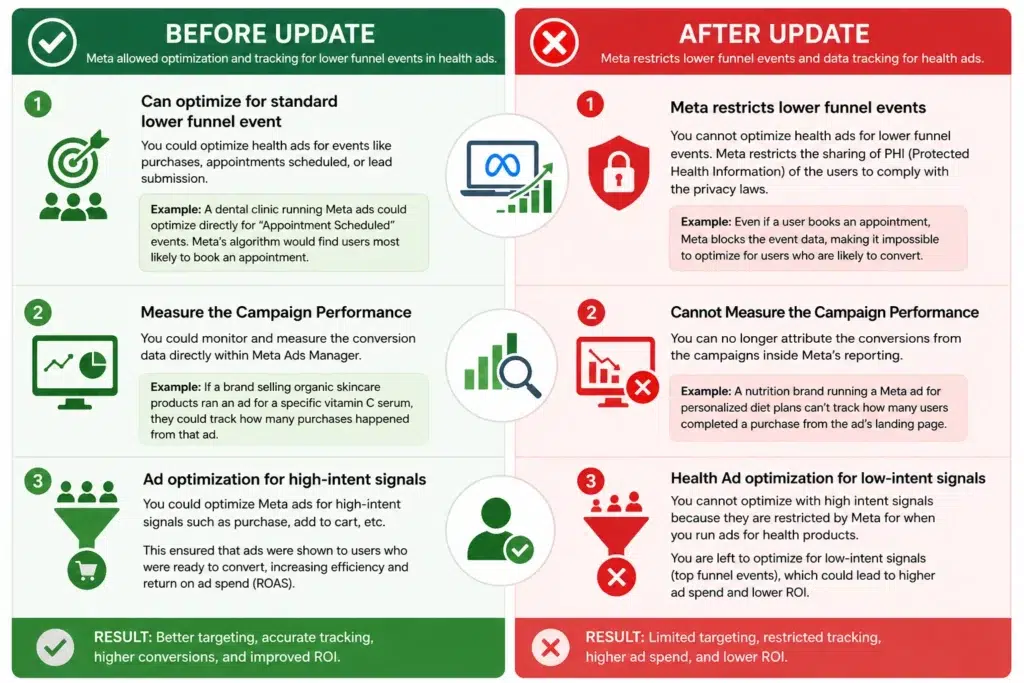
Full enforcement hit health and wellness. Meta began actively classifying accounts under the Health & Wellness sensitive category. Event data started getting blocked. Retargeting audiences stopped populating. Accounts that were running fine for years started hitting walls.
Mid-2025:
Enforcement expanded. Lookalike audiences built on health-related events got restricted. Accounts running ads with before/after imagery or personal attribute language started seeing disapproval at scale, not just on Meta, but cascading into Instagram placements too.
2026 (Now):
Meta’s AI classification is more aggressive, not less. The window to “get away with” weak signals or borderline creativity has closed. And the brands are still thriving? They rebuilt their signal infrastructure, but they didn’t find workarounds.
Fact check
If you have two separate health & wellness, restrictions can be differ from each other. How? Because it happens in three levels.
What are the 3 Levels of Meta Restrictions?
Meta doesn’t restrict you in one sudden move. It happens in layers ,and most brands are already in one without realizing it.
Level 1, Soft Restriction (Silent Kill):
Ads approve. Delivery quietly limits. CPM climbs, reach shrinks, but you’re not getting flagged. This is where most brands sit for weeks thinking performance is just “fluctuating.”
Level 2, Partial Restriction (Performance Breakdown):
Some ads get rejected. Some campaigns underdeliver. Learning phase resets. Retargeting breaks.
Level 3, Hard Restriction (Full Block):
Ads disapprove on submission. Account flagged. Appeals go nowhere.
Here’s the full breakdown of how Meta’s three-tier restriction system works
The important thing to know: you don’t jump to Level 3 overnight. Most brands bleed slowly through Level 1 and 2 before they notice.
Let’s dig more deeper.
Domain-Level Restriction vs. Ad-Level Rejection: Two Different Problems
This is the distinction almost nobody talks about, and it’s the reason so many “fixes” don’t actually fix anything.
Ad-level rejection
is what most people focus on. Your ad gets disapproved. You rewrite it. You resubmit. Sometimes it passes, sometimes it doesn’t. This is Meta’s content policy layer and yes, creative and copy matter here.
Domain-level restriction
is the silent killer. Your ads get approved. They run. But your ROAS tanks. Your retargeting audiences stop growing. Your optimization is stuck because Meta has restricted the event data coming from your domain, not your ad.
Identify which level of restriction you fall under.
Why Your Ads Are Actually Getting Restricted
The Core Setup Connection
This didn’t start in 2025. Core Setup was Meta’s signal. Two data types got restricted early: custom parameters not in Meta’s standard list, and anything in a URL after the domain ,meaning query strings, product names, UTM parameters tied to health-specific terms.
Health and wellness brands that were passing this data through pixel events were already non-compliant before enforcement hit. The January 2025 rollout just made it visible.
Before/After Images and Personal Attribute Language
This cluster of queries is still ranking in positions 8–10 for a reason ,there’s a lot of confusion here.
Meta’s policy on before/after imagery isn’t just about the images themselves. It’s about the implied personal attribute. An image of someone’s skin before and after a treatment implies a health condition. An image of a body before and after weight loss implies a body image issue. Meta’s system is classifying these as personal attribute triggers ,the same category that restricts targeting based on health status.
The practical rules:
- Before/after comparisons showing physical transformation = flagged
- Text overlays on transformation imagery = double-flagged
- User testimonials with condition-specific language on the same creative = almost certain disapproval
- “People who suffer from X” or “struggling with Y” in ad copy = triggers sensitive attribute classification
This applies to your landing page too. Meta scans the destination. An approved ad pointing to a landing page with aggressive transformation claims is still a policy risk.
Sensitive Attribute Language in Copy
Beyond before/after imagery, there’s a broad category of copy patterns that trigger classification:
- Second-person language implying a health condition: “Do you have…”, “If you’re dealing with…”, “For people who struggle with…”
- Outcome claims tied to specific conditions: weight loss numbers, skin improvement percentages, recovery timelines
- Condition-specific targeting combined with any of the above (even if the targeting itself is legal)
Weak Signal Quality
This is the part that most creative-focused fixes miss entirely.
Meta restricts what it doesn’t understand. If your signal quality is low ,if the data coming back from your events is incomplete, pixel-only, or anonymous ,Meta can’t confidently classify your converters. When Meta can’t classify, it defaults to risk-control mode: limited delivery, conservative audience selection, higher CPM.
Better signal quality isn’t just a “nice to have” for optimization. In the health and wellness category, it’s actively protective. Accounts with rich, first-party conversion signals are demonstrably less likely to be soft-restricted because Meta has enough to work with.
URL Parameters and PHI Leakage
This one is technical but important. URL structures that include health-related query strings ,even passively, like /book-appointment?condition=thyroid ,are being read by Meta’s crawlers. The pixel fires on page load. The data goes to Meta. Meta sees the parameter. The account gets flagged.
This isn’t hypothetical. It’s what Core Setup was designed to address. And it’s why scrubbing URLs isn’t optional for health brands ,it’s a baseline requirement.

Which Health Industries and How Meta’s Restrictions Hits them?
The fix is the same across all health and wellness sub-verticals (we’ll get to that). But what gets flagged and how aggressively differs significantly depending on your business type. This matters because it tells you exactly what to watch for before it breaks your campaigns.
Dental Clinics and Telehealth
This is where the flagging is most blunt. Treatment-specific URLs like /book-root-canal or /consult-for-implants carry condition-level PHI the moment they hit Meta’s pixel.
Event names tied to procedure types , even something as innocent as schedule_consultation, can be flagged if Meta’s classifier associates your domain with a specific treatment category.
For appointment-based businesses, this is catastrophic because the entire lower funnel is the appointment event.
Mental Health Providers
Mental health is treated as the most sensitive category in Meta’s classification. Flagging here is aggressive and happens faster than in other verticals.
URL paths containing words like “therapy,” “anxiety,” “depression,” or “counseling” are enough to trigger restrictions even on top-funnel events.
Many mental health advertisers find their entire pixel effectively silenced before they realize what happened.
Supplements and Nutrition Brands
Two problems hit here simultaneously , data compliance and creative compliance. On the data side, product names in URLs (like /ashwagandha-stress-relief) carry implied health claims that trigger PHI classification.
On the creative side, before-and-after imagery tied to weight loss, skin conditions, or physical transformation is separately policed under Meta’s personal attributes policy. Miss either one, and you’re flagged.
Fitness and Wellness Apps
Generally less aggressive flagging than clinical verticals, but attribution gaps are real.
Subscription-based conversion events and in-app actions are vulnerable, particularly when app event parameters carry wellness-context data.
The issue here tends to show up later, ROAS gradually deteriorates as signal quality degrades rather than crashing overnight.
5-Step Playbook to Fix Meta’s Health and Wellness Ad Restrictions
Too many brands treat this as eight separate problems. It’s not. It’s one data flow problem with five fix points and CustomerLabs 1PD Ops handles every one of them without you needing a developer on standby for each campaign.
Here’s the playbook.
Step 1: Remove the Meta Pixel and shift fully to server-side
When the Meta Pixel runs on your site, Meta collects browser-side data you can’t fully control, including URLs, referrer paths, and any parameters that happen to be in the page URL when a user converts.
Removing it and shifting entirely to server-side tracking gives you a single, controlled data pipeline.
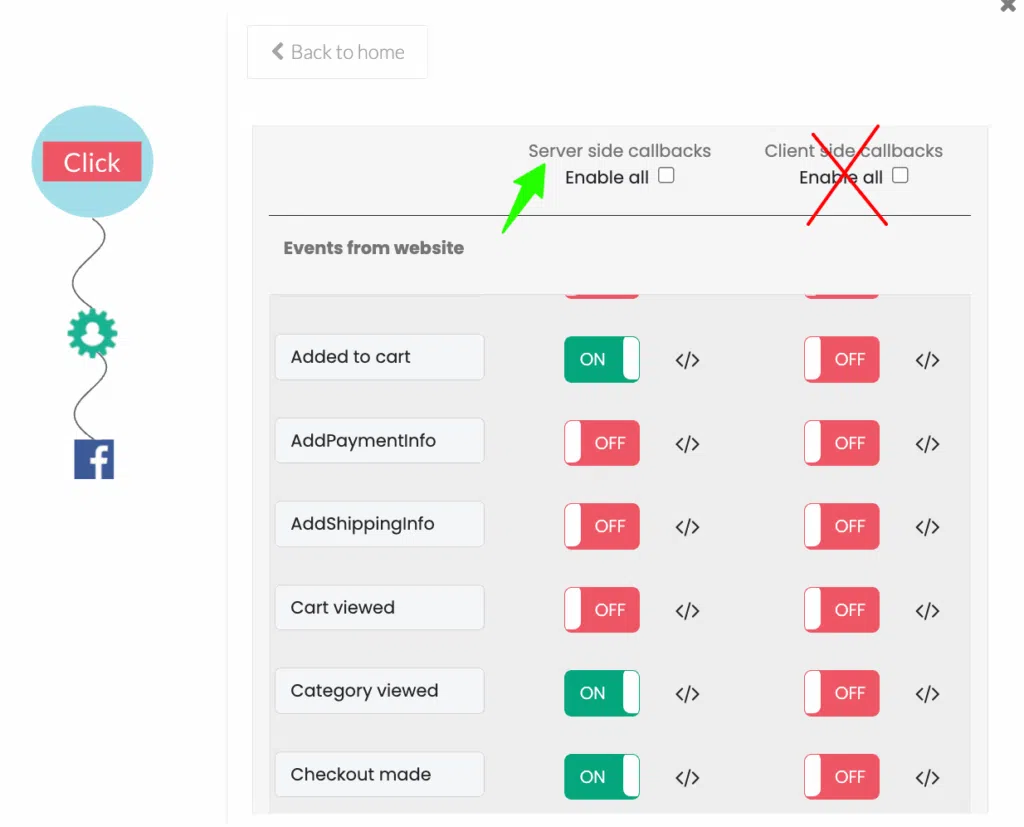
With CustomerLabs, this is a toggle. Client-side events off. Server-side events on. No developer needed.
Step 2: Scrub URLs and query parameters automatically
URLs carry the most obvious PHI triggers ,treatment names, condition keywords, product names with health implications. Before any event fires, sensitive URL paths are replaced with neutral identifiers. /book-fertility-consultation becomes /event123. The tracking signal stays. The flaggable context is gone.
For wellness brands running on Shopify, this is where default Shopify CAPI falls short. Shopify’s native CAPI was built for e-commerce, not for health and wellness data sensitivity. It doesn’t scrub URLs or apply the kind of selective filtering that Meta’s restrictions require. You need a layer above it.
Step 3: Rename events with dynamic neutral labels
Meta doesn’t need to know that your event is “Book Dental Implant Consult” to optimize for it. Rename it event_01.
You maintain the internal mapping so you know what it represents. Meta gets the signal without the context that triggers restriction. Full-funnel optimization intact, zero PHI exposure.
Step 4: Hash PII properly and collect with explicit consent
Descriptive values ,product names, condition names, treatment types ,should never appear in event parameters. PII like name and email can still be used for audience matching, but only when collected with explicit consent and hashed to Meta’s specifications before it leaves your server.
CustomerLabs handles the hashing automatically as part of the server-side payload.
Step 5: Build first-party audiences for retargeting without PHI
Use first-party data from email sign-ups, website visits, and on-platform interactions to build custom audiences. Segment based on anonymous engagement signals ,page visit depth, content category, time on site ,rather than health-specific attributes.
Real-time compliance monitoring detects and blocks restricted terms automatically, so your campaigns stay clean without a manual audit every time you launch something new.
How to Send Clean Data to Meta Using CustomerLabs 1PD Ops?
I’ve talked about what needs to happen. Here’s what it looks like when you actually do it, specifically inside CustomerLabs.
Step 1: Connect your source
You connect your data source to the CustomerLabs platform first.
- Go to Destinations → search Facebook → create a new pixel and connect it.
Even if your account already has restrictions, what’s essential is what gets sent from you to Meta.
Step 2: Two toggles that do the heavy lifting
Once you’re inside the configuration settings, there are two toggles that matter:
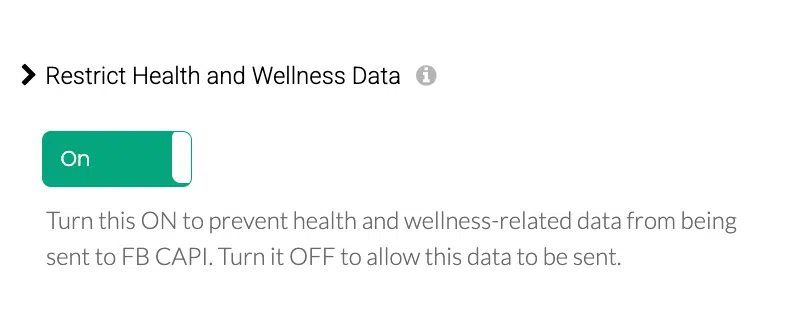
Toggle 1, Send data via server side. This stops data from going directly from the browser. Everything routes through server-side only. This kicks in automatically after 48 hours ,no manual push needed.
Toggle 2, Health & Wellness restriction toggle. This one specifically filters out sensitive information before it ever reaches Meta. If there’s anything in your data that could be flagged as health-sensitive, this toggle ensures it doesn’t go through. Full stop.
Step 3: Event workflow, only server-side events go out
In the event workflow, whatever you’ve been collecting ,category views, add to cart, leads, purchases ,only the server-side version of those events gets sent forward. Browser-side data gets turned off. CustomerLabs handles the routing.
Step 4: Neutralize event names (for Level 2 restrictions)
If your standard events are getting blocked ,purchase, add to cart, lead ,CustomerLabs renames them before they hit Meta. Add to Cart becomes add_1. Purchase becomes purchase_1. Meta still gets the optimization signal. It just doesn’t see the event name that triggered the restriction.
Step 5: Domain scrubbing (for Level 3 restrictions)
If your domain itself is blocked ,the worst-case scenario ,CustomerLabs scrubs the domain and sends data under a different domain identity. Your data still flows. Meta still sees conversion signals. The flagged domain is no longer the one in the picture.
That’s the full stack. Signal quality fixed. Event names neutralized. Domain issues handled. All without going near a developer.
This is nothing I know, so keep reading.

+ 2.9 ROAS, purchase events 9.3 EMQ
Ad account up and running the very next day after getting blocked by Meta
Personal Wellness & Lifestyle brand: Stable 2.9 ROAS through full event restriction
In early 2025, this fast-growing personal wellness and lifestyle brand, a DTC brand with a strong recurring-order customer base, came to CustomerLabs with a common but painful situation: their bottom-funnel conversion events were fully blocked.
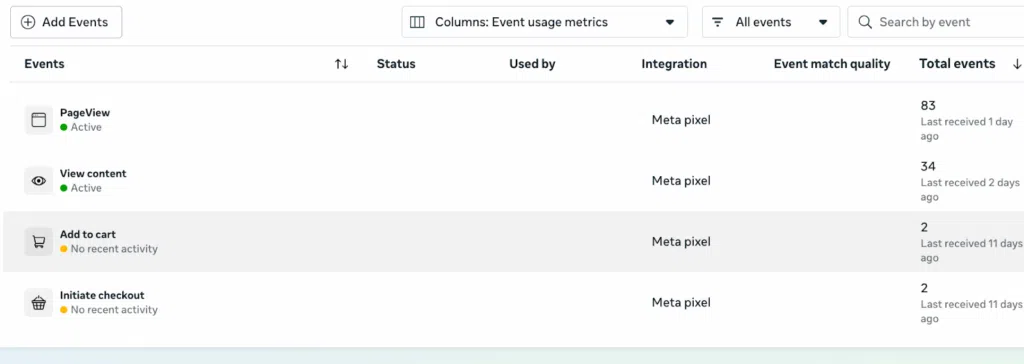
This is what their event dashboard looked like when they came in:
Their product URLs were passing PHI directly to Meta wellness-category product names embedded in the URL path, exactly what Meta’s core setup flags. Shopify’s native CAPI, which they were relying on, couldn’t handle the filtering. The purchase event was gone. The add-to-cart signal was gone. Meta’s algorithm was flying blind.
What CustomerLabs did in three steps:
Toggle on URL scrubbing.
A single toggle in the CustomerLabs dashboard activated automatic URL scrubbing; stripping product names and wellness-category path identifiers from all events before they reached Meta. No dev work. No campaign downtime.
Switch to 100% server-side tracking.
All client-side events were turned off. Every conversion signal now flows server-side, with PHI filtering applied before the payload leaves the server. The brand’s full-funnel event stack; ViewContent, AddToCart, InitiateCheckout, Purchase was rebuilt entirely on the server side.
Rename events to neutral labels.
Every event was renamed with a neutral identifier. Meta received the optimization signals without any of the wellness context that was triggering the blocks. The full funnel was now flowing cleanly, compliantly.
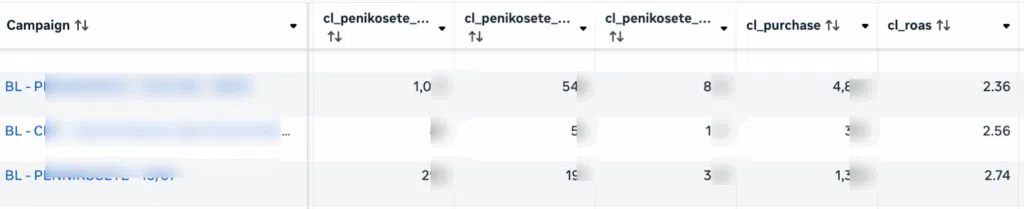
The result:
ROAS stabilized at 2.5 to 2.9; held through the restriction period. Beyond ROAS, the brand now has product-level campaign reporting inside Meta Ads Manager, giving them visibility into which campaigns are driving sales at the product level and control over spend allocation they didn’t have before.

More brands, same story
The First-Party Data Imperative
First party data is crucial and helps your businesses offer more trust to your customers. In addition to that, 1PD has offered 2.9X Higher revenue uplift achieved by brands deploying all four sophisticated activations.

This is an example of how you can collect your user data
There are two data samples you must notice; 1. The event data collected from your website or any other source, and 2. The event data requested by the destination – in this case Meta.
Event collected data
{
  "event_from": "website",
  "p1": "FS_ALL",
  "p2": {
    "additional_info": {
      "browser": "Chrome 132",
      "continent": "Asia",
      "country": "XXXXXX",
      "ip_address": "###.xx.xx.xxx",
      "latitude": "xx.xxxxxx",
      "longitude": "xx.xxxxxx",
      "mobile_desktop": "Other",
      "platform": "Windows 10",
      "postal_code": "111111",
      "screen_size": "1280 x 720",
      "time_zone": "xxxx/xxxx",
      "user_agent": "Mozilla/5.0 (Windows NT 10.0; Win64; x64) AppleWebKit/537.36 (KHTML, like Gecko) Chrome/132.0.0.0 Safari/537.36"
    },
    "browser": "Chrome xxx",
    "browser_language": "en-US",
    "city": "xxxxxxxxx",
    "continent": "xxxx",
    "country": "xxxxxxxxxx",
    "cuid": "undefined",
    "enabled_integrations": [
      "google_adwords_####",
      "google_analytics_gtag_####",
      "google_sheets_####",
      "bigquery_####",
      "facebook_####"
    ],
    "env": "app",
    "event": "FS_ALL",
    "event_datetime": "2025-01-25T10:57:02Z",
    "event_from": "website",
    "event_name": "FS_ALL",
    "external_ids": {
      "customerlabs_user_id": "cl###################-###-####-bdcf-###########",
      "default": "[email protected]",
      "google_analytics__client_id": "##########.##########",
      "google_analytics__session_id": "##########",
      "identify_by_email": "[email protected]",
      "identify_by_phone": "11101111111"
    },
    "gid": "clxxxxxxxxxxxx-xxxx-xxxx-xxxx-xxxxxxxxxx",
    "group": {},
    "group_external_ids": "{}",
    "group_name": "",
    "group_segments": {},
    "identified": "false",
    "ip": "xxx.xx.xx.xxx",
    "isp": "nil",
    "latitude": "xx.xxxx",
    "link": "https://yourdomain.com/",
    "longitude": "xx.xxxx",
    "mid": "clxxxxxxxxxxxx-xxxx-xxxx-xxxx-xxxxxxxxxx",
    "mobile_desktop": "Other",
    "other_params": {
      "user-agent": "Mozilla/5.0 (Windows NT 10.0; Win64; x64) AppleWebKit/537.36 (KHTML, like Gecko) Chrome/132.0.0.0 Safari/537.36"
    },
    "platform": "Windows 10",
    "postal_code": "111111111",
    "products": [],
    "screen_size": "1280 x 720",
    "segments": {},
    "sid": "CL-########-####-#####-####",
    "src": "www.google.com",
    "src_typ": "Organic",
    "state": "xxxxxxxxxx",
    "time_zone": "xxxxx/xxxxxxx",
    "title": "Mental Health Provider",
    "traits": {
      "email": "[email protected]",
      "first_name": "name",
      "last_name": " name",
      "phone": "(111) 011-1111"
    },
    "type": "pageview",
    "uid": "cl###################################",
    "user_additional_info": "{}",
    "utm": {
      "utm_cl_referrer_path": "www.google.com/",
      "utm_cl_sub_domain": "www.google.com",
      "utm_medium": "Organic Search",
      "utm_source": "www.google.com"
    },
    "v_typ": "New",
    "version": "null",
    "webhook_doc_id": ""
  },
  "p3": [],
  "p4": false,
  "p5": "default"
}
The below is an example of how Facebook requests data, and you must send it:
Destination requested data
{
  "action_source": "website",
  "custom_data": {},
  "event_id": "clxxxxxxxxxxxx-xxxx-xxxx-xxxx-xxxxxxxxxx",
  "event_name": "FS_ALL",
  "event_source_url": "https://yourdomain.com/",
  "event_time": 1737802682,
  "user_data": {
    "anon_id": "clxxxxxxxxxxxx-xxxx-xxxx-xxxx-xxxxxxxxxx",
    "client_ip_address": "xxx.xx.xx.xxx",
    "client_user_agent": "Mozilla/5.0 (Windows NT 10.0; Win64; x64) AppleWebKit/537.36 (KHTML, like Gecko) Chrome/132.0.0.0 Safari/537.36",
    "country": [
      "eb3102a6cb586765d01fad324523ec0bc67b9efd6a2d9589c135adfedf7922cc"
    ],
    "ct": [
      "2a495a6770e82baef293e553a9f5e45575902f50a4011356eceead37492e7507"
    ],
    "em": [
      "548577f3141e55e478f02286898e066db90ca261471949f68e4b25231a1537a9"
    ],
    "external_id": [
      "e63c0ad6c4ef1f2707d2df69c31e2d622341070ce28a91b75de111b7ae6b9227"
    ],
    "fn": [
      "6dce69facae598b79f7aab72a638381e6a79594b33ea60a89d34d02171fbc44a"
    ],
    "ln": [
      "2f48b881ea7073f1c6f083b296a360bd4c9cf51edaacba1cd9c34d8ae3d994ec"
    ],
    "ph": [
      "43ae9cc8445fe3f7a5f434ec7c8a6835c4e1a95d564c68722eb482b3d5bbe3fa"
    ],
    "st": [
      "2a495a6770e82baef293e553a9f5e45575902f50a4011356eceead37492e7507"
    ],
    "zp": [
      "b762f726481f40a3331227db78ea41f3009dc5f1dc86fd231e1f59183488fefc"
    ]
  }
}
The Bottom Line
Health and wellness ads aren’t banned. They’re just held to a higher evidentiary standard.
Meta is asking one question about your account constantly: do I understand your converters well enough to trust your data?
If the answer is no, because your signals are weak, your URLs are leaking PHI, your events are named after conditions, or your creative is implying diagnoses, Meta defaults to restriction mode.
The brands that are scaling in this category in 2026 aren’t the ones who found clever workarounds. They’re the ones who fixed the signal.
That’s the bridge.
If your Meta ads are getting restricted and you’re not sure which level you’re at or whether it’s a domain-level data issue or an ad-level creative issue, that’s the diagnosis you need first. Start there.
Talk to our experts about what’s actually happening with your account or just signup, create the setup for free.