TL;DR: HubSpot attribution reporting often misses anonymous visits, AI referrals, remarketing touches, and funnel-stage progression. So the dashboard can look complete while still leaving out the real customer journey. First-party data helps close those gaps and makes the signal more trustworthy.
I keep seeing this come up in Reddit threads, HubSpot Community posts, and marketing groups. The details change, but the complaint is usually the same: the dashboard looks complete, but the story behind it feels wrong.
Here’s a simple example.
Tom runs a nutrition club. He has 500 members, makes about $80K a month, and spends $15K a month on ads across Meta, Google, and LinkedIn.
Last month, his HubSpot report looked fine at first glance. It showed 400 leads from ads, 3 new paying members, and 38% of traffic sitting in “Direct.” That looked good enough to take into a meeting.
So Tom made a call. He saw that ads only produced one member, so he cut spending.
The problem was that the report was missing part of the journey. Two of those three members actually came from ChatGPT, but HubSpot had buried them inside the “Direct” bucket. Tom cut the wrong thing because the data looked complete when it wasn’t.
That gap - between a report that looks finished and a journey that’s mostly missing - is the whole subject here.
These gaps keep showing up.
What You’re Losing in HubSpot Attribution Reporting
These aren’t theoretical limitations. They’re the issues that show up over and over, from real people staring at reports that don’t match reality.
1. Why Does Last-Touch Attribution in HubSpot Erase Every Campaign That Built the Deal?
HubSpot’s standard reports, the ones most marketers open every week, run on last-touch attribution by default. The channel that captured the final click before conversion gets 100% of the credit. Every channel that runs before it gets nothing.
Here is what that looks like in practice. A prospect discovers your brand through a LinkedIn post. They click a Meta retargeting ad three days later. They respond to a nurture email a week after that. They finally search your brand name on Google and convert.
HubSpot’s report: Google - 1 conversion. LinkedIn - 0. Meta - 0. Email - 0.
The channels that built awareness, created intent, and kept the prospect warm are invisible. Your performance reports show Google working and everything else doing nothing. Budget shifts to Google. LinkedIn, Meta remarketing, and email spend gets cut or deprioritised.
Two months later the pipeline drops. Nobody connects it back to the campaigns that were building demand because the report never gave them any credit.
This is not a setup problem. It is the default behaviour of HubSpot’s standard reporting model.
2. Why Does HubSpot Lock the Original Source at the First Visit Even When It’s Wrong?
This is a separate problem from last-touch attribution.
Here’s how it works. HubSpot’s tracking cookie captures a visitor’s session from their very first website visit. Whatever channel brought them that first time gets written into the Original Source field. From that point forward, it cannot be edited, overridden, or updated ever.
The problem is that “first session” and “first meaningful touch” are often completely different things.
A prospect clicks a branded Google search and lands on your homepage. They bounce in 30 seconds. Two weeks later they click a Meta ad, read your case study, and fill the form. HubSpot’s Original Source: Organic Search.
The Meta ad that actually drove the conversion has no record anywhere. The organic search that got a 30-second bounce gets permanent credit for the deal.
This means even if you know the data is wrong even if the paid campaign that closed the deal is sitting right there in your Ads Manager, you cannot correct the HubSpot contact record to reflect it. The wrong source is the permanent source.
And it gets worse, marketers running remarketing funnels consistently see their best mid-funnel channels produce zero attributed conversions in HubSpot. Not because they did not work because HubSpot’s data model was never built to record what happens between the first visit and the last one.
3. Why Do My AI Referrals Go Untracked in HubSpot?
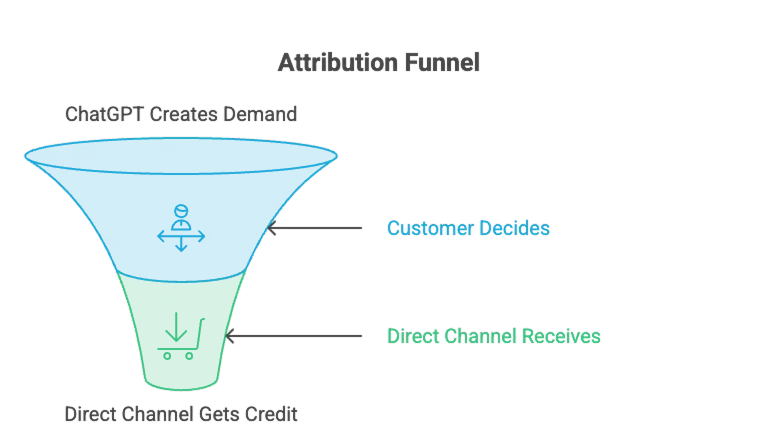
People ask ChatGPT and Perplexity for recommendations and click straight through to sites. For content-led brands that’s already 5 - 12% of leads, and it tends to convert well. The problem is that around 70% of AI referral traffic gets counted as “Direct,” and most brands can’t attribute it at all. ChatGPT only began passing UTM parameters in mid-2025, and still drops them on mobile.
That’s what happened with Tom. He got 45 visitors from ChatGPT, but HubSpot filed all of them under “Direct.” Those visitors were converting better than his ads, but he had no easy way to see it.
4. Why Is So Much of My HubSpot Traffic Showing as Direct?
A lot of teams see 30 - 40% of traffic sitting in “Direct.” That usually means the traffic could not be attributed properly. It can include missing UTMs, tracking that fired too late, same-site navigation, and app clicks.
When a visitor moves from your blog subdomain to your main domain, say from blog.yourbrand.com to yourbrand.com, the browser referrer resets. HubSpot sees no referrer and stamps the session as Direct. The visitor didn’t type your URL. They clicked an internal link. But the report treats it like they did.
It’s one of the most common threads in the HubSpot community.
The trap isn’t that the numbers look wrong. It’s that they look right. So teams optimize around them for weeks before realizing the bucket was three different things wearing one label - a slice of AI referrals, a slice of internal navigation, and the small part that’s genuinely direct.
5. Why Can’t I See MQL to SQL Attribution in HubSpot Multi-Touch Reports?
Teams switch on multi-touch expecting to see the whole journey, but first, most teams can’t. Multi-touch attribution in HubSpot is locked behind Marketing Hub Enterprise. Brands on Starter or Professional don’t have access to it at all. And for those who do, HubSpot’s multi-touch is built around closed revenue only.
Marketers, though, do not optimize only for closed deals. They optimize for progression: visitor → lead → MQL → SQL → customer.
When those transitions aren’t visible, you can see which channels influenced revenue, but not which channels helped move through the funnel.
6. How Do AI Agents and Automations Corrupt HubSpot Attribution Data?
Everyone’s wiring AI agents and automations into the CRM now - tools that read and write records, update properties, move lifecycle stages. The problem is that these tools can also modify attribution-related fields without anyone noticing.
For example, an automated workflow might update a lifecycle stage or overwrite a source property, making it look like a prospect took an action they never actually took.
Your attribution can’t tell a real prospect’s intent from a bot doing housekeeping, and nothing flags the swap. The signal gets corrupted from the inside. Over time, these small changes make attribution less reliable. The report still looks correct, but the story behind the data becomes harder to trust.
Each of these issues creates a small attribution gap on its own. Together, they create a much bigger problem: the customer journey you’re using to make decisions is incomplete.
Fixing attribution isn’t about choosing a different attribution model. It’s about capturing the complete journey and sending cleaner signals back to your marketing platforms.
What Marketers Actually Expect From Attribution Reporting
A marketer doesn’t want a single source or a single conversion touchpoint. They want to see the complete path a customer took before converting.
A complete attribution report should show:
- Every touchpoint, not just the last click
- Anonymous behavior before form submission
- AI referrals as their own channel
- Remarketing visits alongside acquisition channels
- MQL → SQL → Customer progression
- The same journey reached Meta, Google, and other ad platforms
How CustomerLabs Completes HubSpot Attribution Reporting
Do you know every gap has a fix?
Of course, yes, CustomerLabs acts as a first-party data layer that helps capture the signals HubSpot misses and sends cleaner data back to your ad platforms.
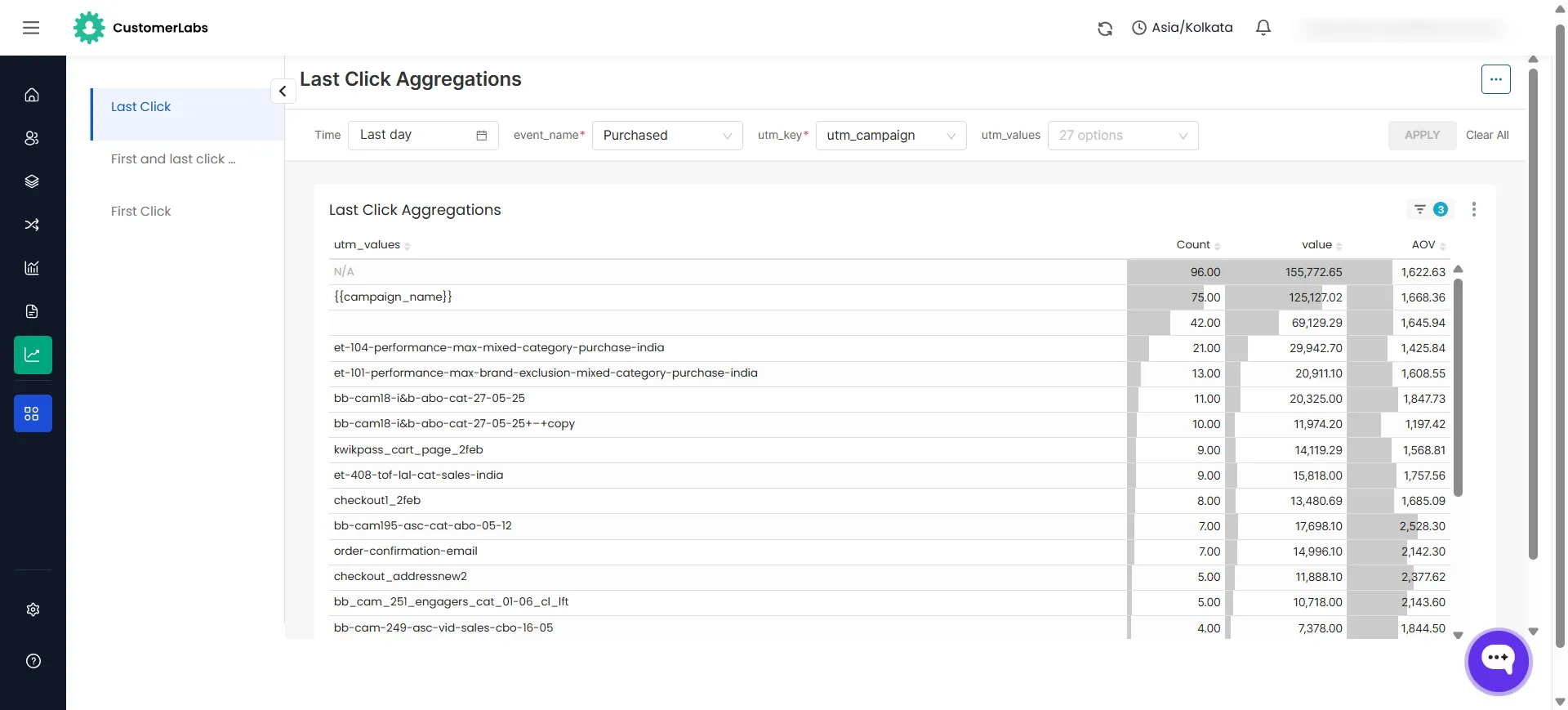
1. Every Channel That Contributed Now Gets the Credit It Earned
HubSpot’s default reports credit one channel and erase the rest. CustomerLabs captures every touch from first click to conversion and attaches the complete sequence to the HubSpot contact record.
When the marketer opens their report, they see the real story: LinkedIn introduced them, Meta remarketed on day 3, a nurture email brought them back on day 8, Google closed them on day 11. Every channel visible. Every channel is accountable. The awareness spend that looked worthless now has attribution attached to it.
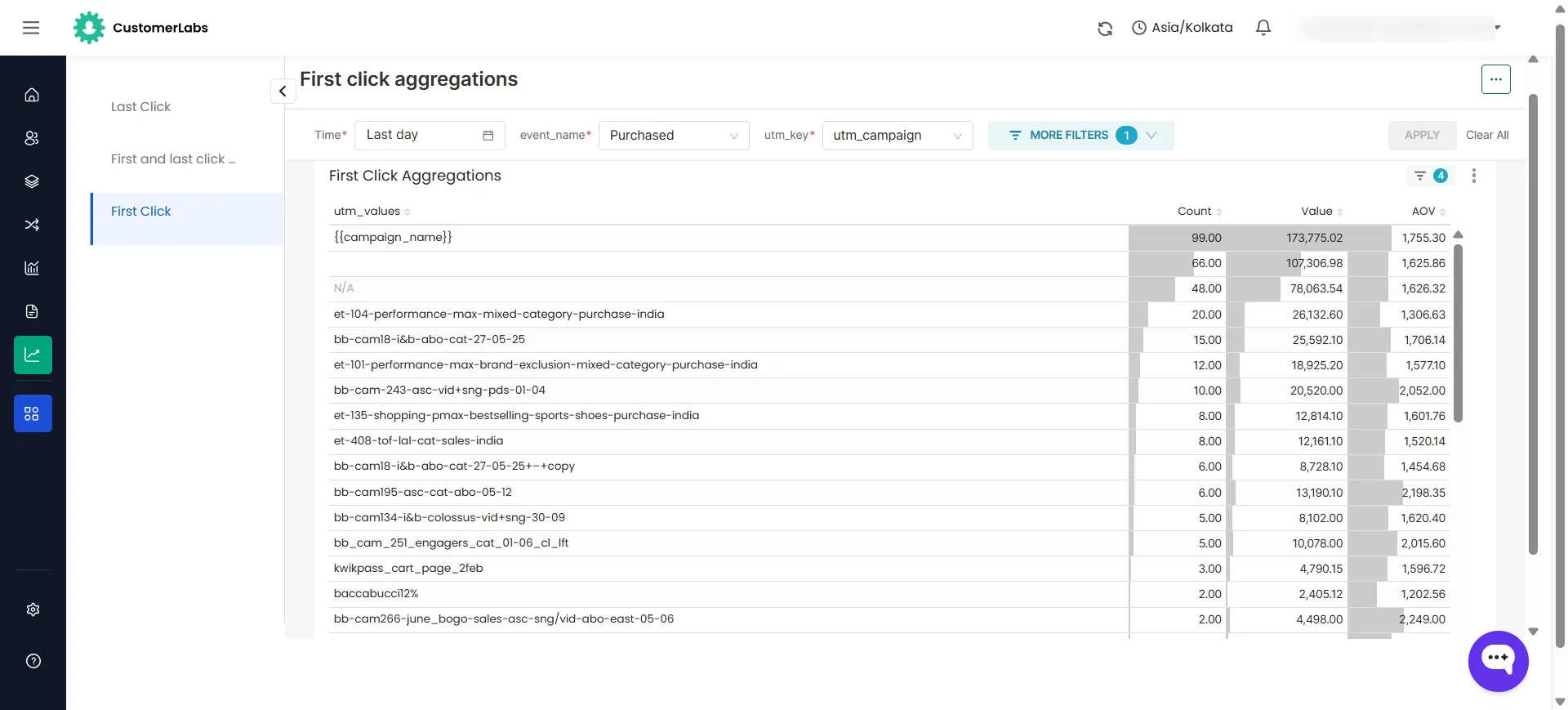
This also means click IDs survive the full journey. CustomerLabs captures FBCLID, GCLID, and TTCLID server-side at first touch, and stores them against the contact record. When that lead closes 45 days later, the original click ID is still there, ready to be sent back to Meta, Google, or LinkedIn as a matched offline conversion.
2. The Correct Source and Every Remarketing Touch Is Now in the Record
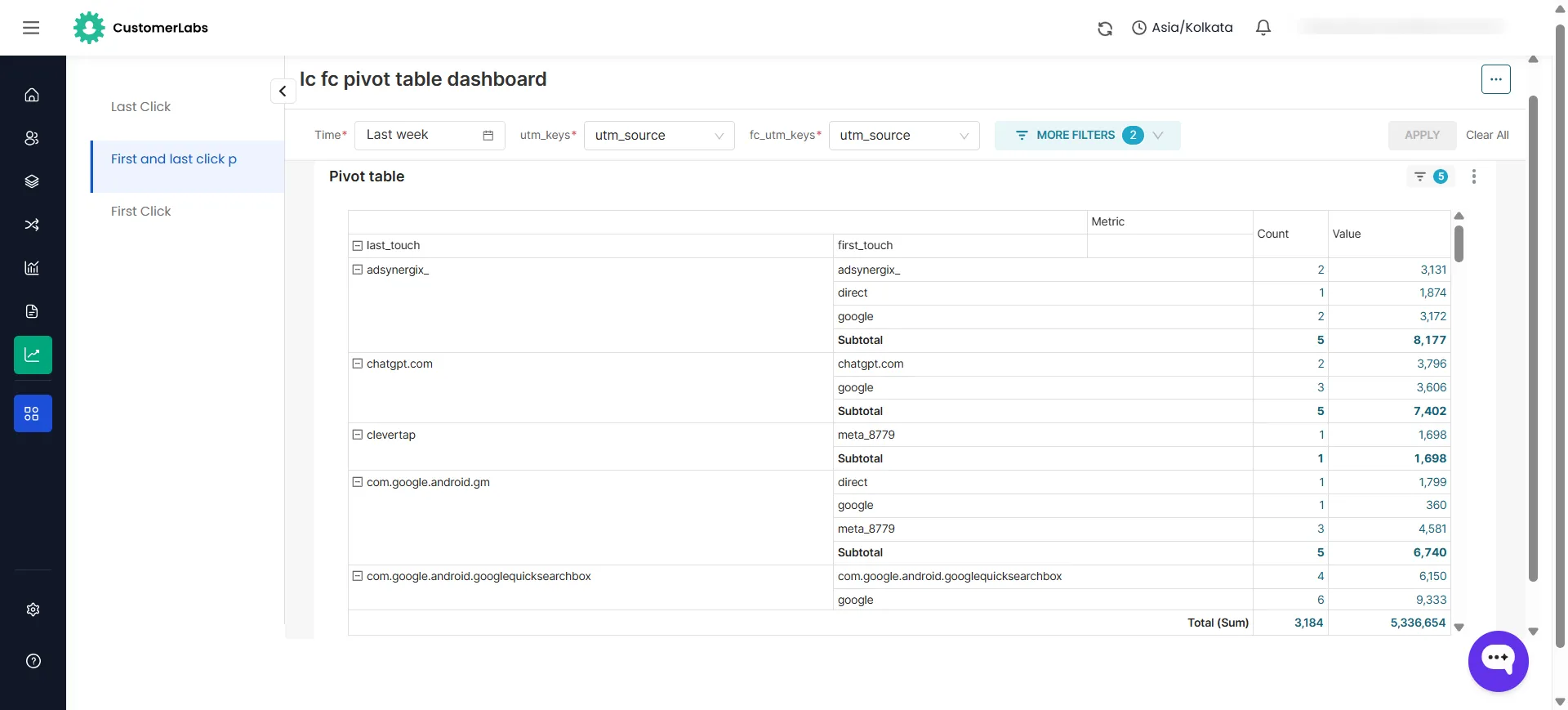
CustomerLabs captures the correct original source, the first meaningful paid click, not the accidental session and stores it as a custom property in the HubSpot contact record that reflects reality, not whatever session happened to load the cookie first.
CustomerLabs’ Identity Resolution assigns a persistent first-party identity from the very first landing, across all devices, browsers, and channels.
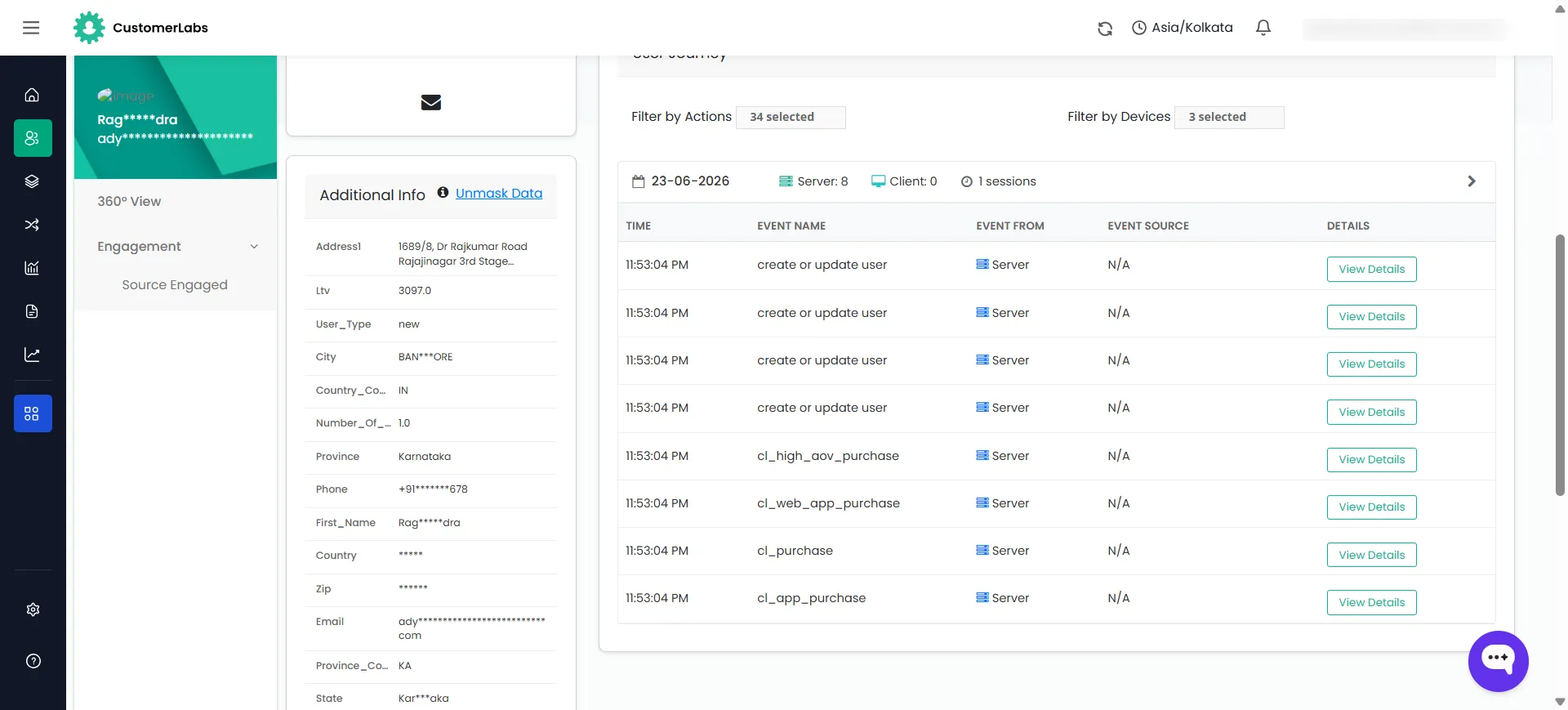
What your team sees is not a frozen first-touch stamp but the full sequence:
Google Ad introduced them → they left → Meta remarketing brought them back on day 3 → LinkedIn retargeting brought them back on day 8 → branded search closed them on day 11.
Every campaign and every channel is visible and accountable. The remarketing spend that was doing the real work now shows up in the record with the credit it earned. Budget decisions stop being made against a report that erased half the journey.
3. AI Traffic Now Appears as Its Own Channel
70% of ChatGPT traffic lands in Direct with no way to identify it.
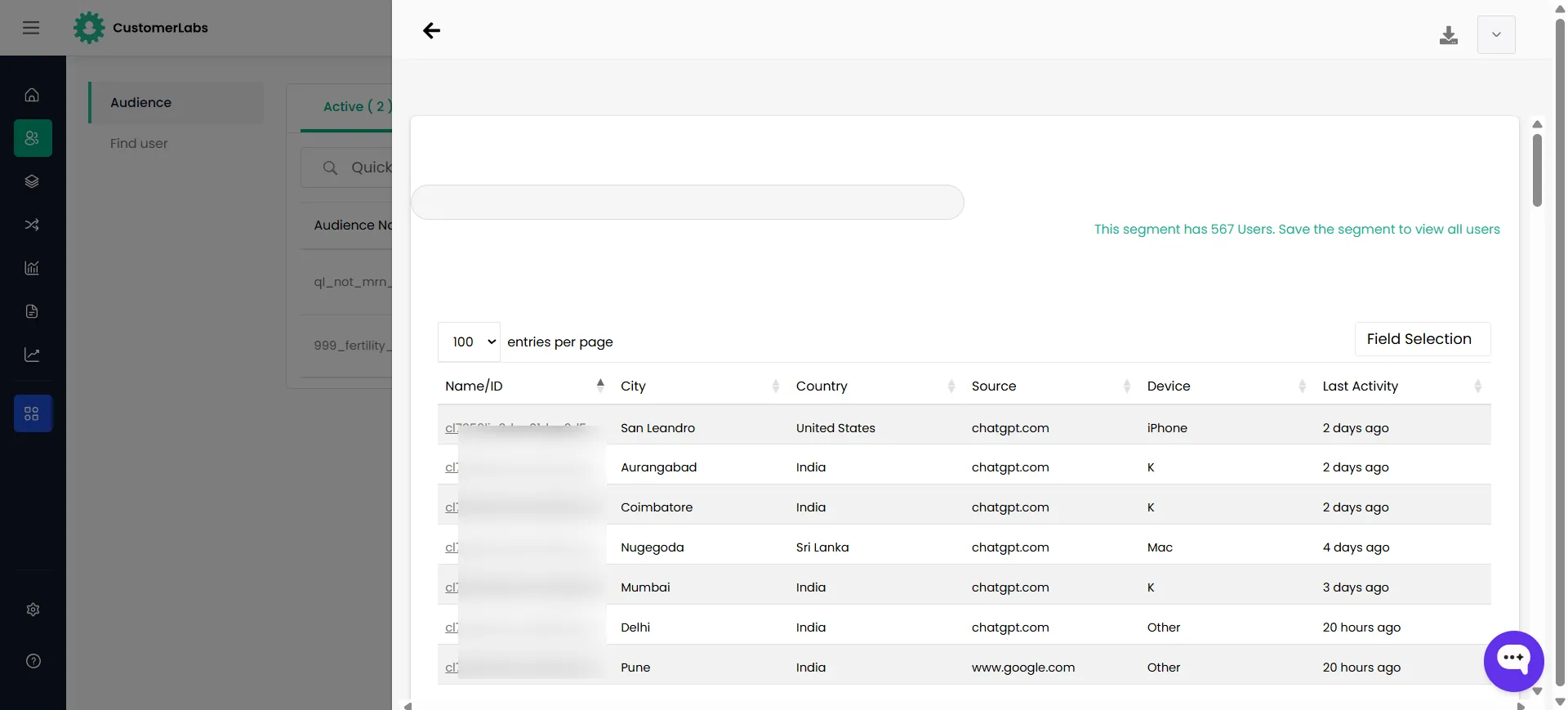
CustomerLabs parses referral data server-side - reading the signals that browser-based tracking cannot access. ChatGPT, Perplexity, Claude, Gemini - each source gets identified and logged as a distinct channel before the session is recorded in HubSpot. That channel gets its own attribution, its own conversion data, and its own line in your reporting.
This changes budget conversations completely. A content team that has been publishing consistently for two years suddenly has data showing that ChatGPT is sending 45 visitors a month with a conversion rate higher than paid search. That’s not a lucky accident - it’s a compounding content asset. Without server-side referral parsing, that insight never surfaces. The content investment gets deprioritised because it looks like it produces nothing measurable.
After CustomerLabs: “Direct: 38%” becomes “ChatGPT: 12%, Perplexity: 4%, Direct: 8%.” Three budget decisions change immediately based on data that was always there but never visible.
4. Direct Drops From 35 - 40% to 8 - 12%, What’s Left Is Actually Direct
Direct is where broken tracking goes to hide.
CustomerLabs implements cross-domain tracking and server-side event capture that stops attribution data from leaking into the Direct bucket. Same-site navigation between subdomains gets stitched - a visitor moving from your blog to your pricing page no longer creates a new Direct session. App-to-browser handoffs preserve the original source. UTMs that go missing on redirects get recovered from the stored first-party session data rather than defaulting to Direct.
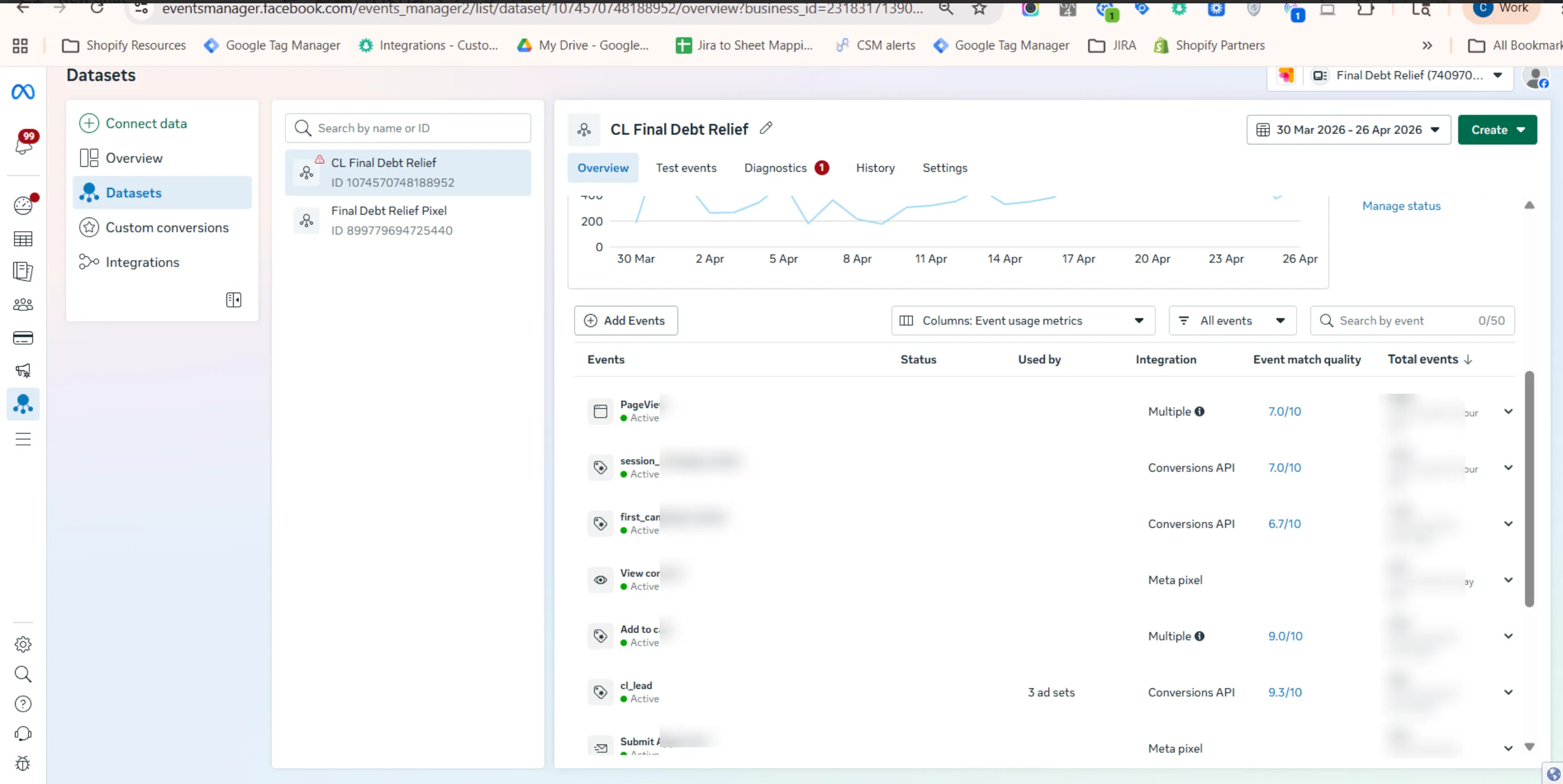
Let’s see one of our clients, who has the same cross-domain identity problem, and how CustomerLabs helped in viewing the complete events.
Final Debt’s Event Match Quality score lifted to 7 in Meta Events Manager
Brand’s Problem - A single user completing Final Debt’s multi-domain funnel appeared as multiple different users, inflating Direct traffic and fragmenting attribution.
What is the cause - When users moved from the main domain to the eligibility subdomain, the session reset. No shared identifier existed across domains, so the same person was counted twice and their journey split into disconnected sessions.
Our Solution - CustomerLabs passed its persistent identity layer (CLUID) across both domains. The user’s full journey, lead submission, eligibility checks, qualified actions, connected under one profile. Attribution became accurate and Meta received cleaner, higher-quality signals for optimisation.
The result was cleaner attribution, more reliable conversion tracking, and higher-quality signals sent back to Meta for optimization.
“Cleaner cross-domain identity also meant richer, more complete events reaching Meta.”
The implementation also lifted Final Debt’s Event Match Quality score to 7 in Meta Events Manager, moving them from poor signal quality into the range Meta considers good for campaign optimisation.
5. MQL, SQL, and Closed Won Now Reach Meta, Google, and LinkedIn as Real Signals
Meta and Google only know about the form fill. Everything that happens after, qualification, pipeline progression, closed deal never reaches them.
CustomerLabs reads HubSpot lifecycle stage changes in real time and fires each one like Lead, MQL, SQL, Closed Won to Meta CAPI, Google Enhanced Conversions, LinkedIn CAPI, and TikTok Events API simultaneously. Each event carries the original click ID, hashed email, and phone for identity matching.
The algorithm stops optimising for people who fill forms and starts optimising for people who close. Most brands see CPL drop 20–30% within six weeks — not because of spending or creative changes, but because the signal finally matched the actual business goal.
6. Bot and Automation Activity Is Separated From Real Customer Behaviour
AI agents and automations are silently rewriting your attribution data and nothing flags it.
CustomerLabs separates non-human activity from real customer behaviour. Zapier overwrites, HubSpot workflow triggers, AI agent property updates, all logged as system activity, not customer intent. The attribution record reflects only what the real person did.
The downstream impact is straightforward: cleaner reports, cleaner ad platform signals, and an algorithm training from actual buying behaviour, not bot housekeeping that happened to look like intent.
HubSpot manages your leads and pipeline beautifully. What it can’t do is capture the full journey that created them, CustomerLabs adds the signal layer that makes the Journey Aware Bidding complete, accurate, and ready for the reports your team decides from and the ad platforms optimising on the same data.