Typeform is loved for its clean, conversational UI that feels natural to users. It reduces friction, increases completion rates, and makes data collection simple for marketers.
Because of this, Typeform is a popular choice for Google Ads lead generation funnels. The traffic comes in warm, and Typeform usually converts it better than traditional long forms.
But when it comes to Google Ads conversion tracking, especially for teams running high-intent funnels, two major issues show up:
- Most Typeform setups do not reliably pass Google Ads identifiers
- Offline conversions never make it back to Google Ads
This guide explains how Typeform and CustomerLabs work together to close these gaps without adding complexity to your lead-gen workflow.
The Tracking Challenge Marketers Face with Typeform and Google Ads
Here are the practical challenges performance teams encounter:
1. You can’t connect actual revenue or qualified leads back to Google Ads
A user completes a Typeform, your team closes the deal later via call, WhatsApp, or CRM. Google Ads does not know which campaign produced this outcome.
You lose optimization power.
2. Lead quality becomes impossible to measure in Google Ads
Out of 10 leads, maybe 7 are unqualified. Without sending this qualification data back to Google Ads:
- You keep paying for low-quality traffic
- Smart Bidding continues optimizing toward the wrong indicators
3. You can’t identify which keywords or audiences aren’t working
Without accurate conversion signals, Google Ads cannot tell:
- Which audience segment is converting
- Which keyword is wasting budget
- Which ad group needs scaling
- Which campaign should be optimized or shut down
4. Budget adjustments become blind decisions
If conversion tracking is incomplete, then:
- Increasing budget can scale the wrong campaigns
- Reducing budget can cut campaigns that are actually driving revenue
5. Offline conversions are never attributed
Most Typeform leads go through:
- Sales calls
- WhatsApp follow-ups
- Demo bookings
- In-person visits (for clinics/agencies)
- CRM pipelines
If these downstream conversions don’t sync back to Google Ads, the feedback loop remains open and optimization suffers.
These issues emerge not because Typeform is inadequate, but because client-side tracking is no longer reliable, and Typeform’s hosted domain breaks first-party attribution.
How CustomerLabs Complements Typeform for Accurate Google Ads Tracking
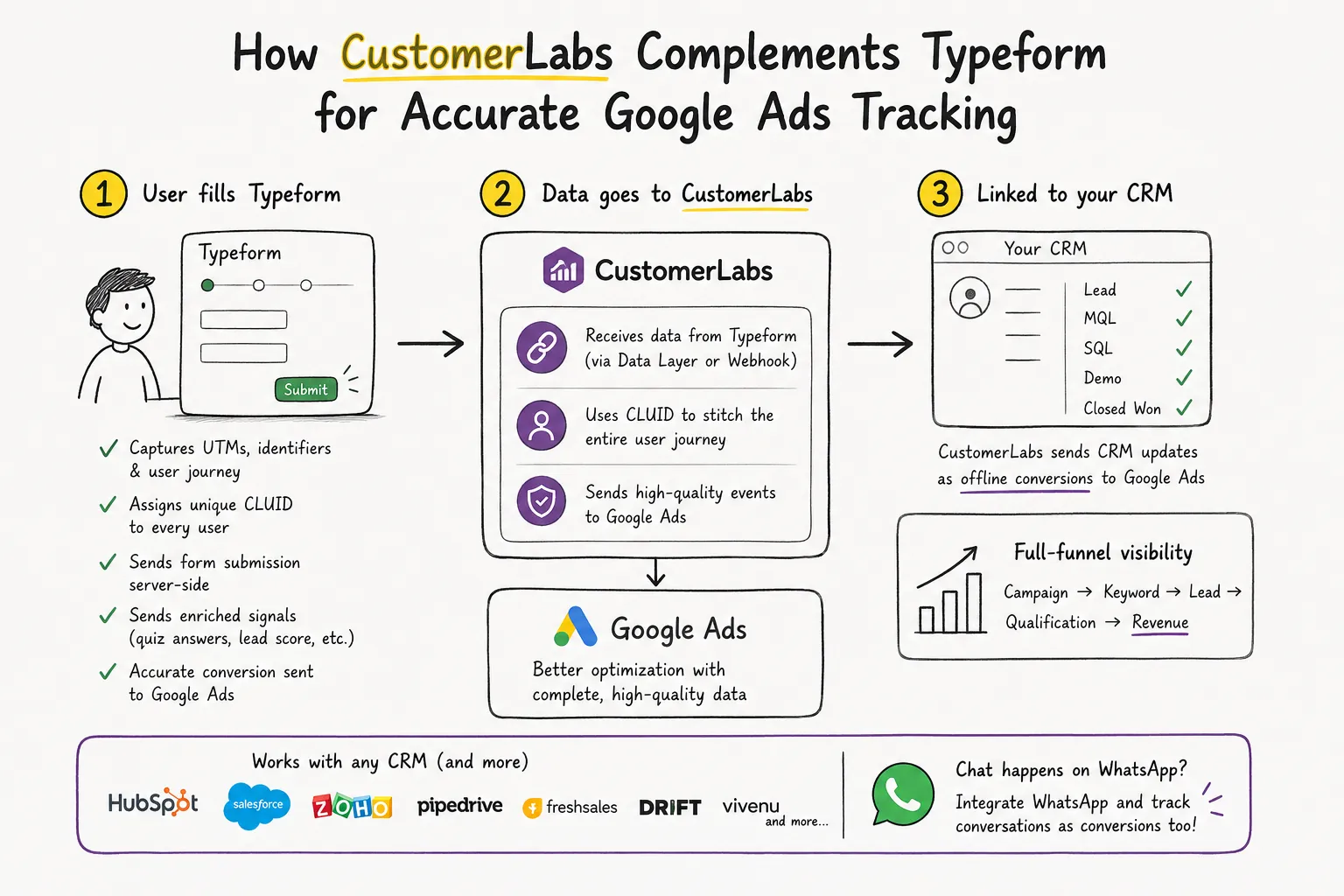
CustomerLabs acts as the tracking layer that Typeform alone cannot provide. Here’s the workflow in simple terms:
1. User fills the Typeform
CustomerLabs ensures that every Typeform submission becomes an accurate online conversion inside Google Ads:
- UTMs, identifiers, and user journey details are captured
- Every user is assigned a unique CLUID, which becomes the anchor ID for the entire journey
- The form submit event is sent server-side for higher reliability
- Quiz answers, lead scores, and multi-step progress can be added as enriched signals
- Google Ads receives complete, high-quality events for Smart Bidding
2. Data is sent to CustomerLabs
Two ways to connect Typeform and CustomerLabs. You can choose based on your technical resources.
- Data Layer Push (best for teams with dev support): This is the industry-standard approach. Captured lead details are pushed into the data layer and sent to CustomerLabs.
- CLUID Hidden Field (for no-dev teams): Add a webhook in Typeform, send all responses to CustomerLabs.
Check out this guide, if you want to connect Typeform to CustomerLabs.
3. CustomerLabs links Typeform submission to your CRM
Typeform responses carry the CLUID + identifiers into your CRM. When the lead progresses (MQL, SQL, Demo, Closed Won), CustomerLabs sends these CRM updates as offline conversions to Google Ads.
This gives Google Ads full-funnel visibility:
Campaign → Keyword → Lead → Qualification → Revenue
This dramatically improves tCPA, tROAS, lead quality and budget efficiency. Offline conversions complete the feedback loop that has been missing for Typeform-based funnels.
You can connect any CRM like HubSpot, Salesforce, Zoho, Drift, Freshsales, Pipedrive, Vivenu or any CRM with webhook support.
Not just that, these days businesses direct their leads to WhatsApp and continue chatting there. You can integrate WhatsApp as well.
How This Setup Increases Conversion Rates and Lowers CPA
Google Ads receives higher-quality signals
- Instead of tracking only basic form submits, Google Ads gets qualified and revenue-linked conversions.
- This helps Smart Bidding move away from click-based optimization toward real lead quality.
- The platform now prioritizes traffic that behaves like your best customers.
No more lost conversions from iOS or blocked cookies
- Server-side tracking ensures conversions still fire even when client-side pixels fail.
- This reduces data loss from browser restrictions, tracking prevention, and device limitations.
- Your reports become more consistent, leading to better optimization decisions.
Optimization moves toward high-intent users
- You can send quiz outputs, scoring data, and multi-step progress from your Typeform.
- Google Ads uses these signals to identify users who show higher intent early.
- Campaigns automatically shift spend toward stronger segments and keywords.
Offline conversions strengthen Smart Bidding
- Calls, demos, and closed deals sync back to Google Ads with the correct identifiers.
- This gives Google Ads visibility into what truly drives business outcomes.
- tCPA and tROAS improve significantly because the algorithm finally gets full-funnel data.
Accurate attribution leads to smarter budget decisions
- Marketers can clearly see which campaigns generate revenue and which drain the budget.
- Better attribution improves scaling decisions and reduces wasted ad spend.
- Teams gain confidence because Google Ads is optimizing with complete, reliable data.
Conclusion
Typeform already delivers one of the best user experiences for lead capture and qualification. But without accurate tracking, Google Ads can’t optimize or understand which campaigns work.
CustomerLabs fills this gap by delivering full-funnel online and offline attribution, giving marketers a complete performance view.
If you rely on Typeform for lead generation, this setup ensures your Google Ads strategy performs at its full potential.
Book a free consultation call with our 1PD Ops experts or start a free trial, follow the document and finish the entire setup.