If you are reading this, you have probably already felt the frustration.
Let’s say, your dashboard shows you generated 450 fresh leads this week at a beautiful $14 CAC. On the GoHighLevel side, your workflows are running smoothly, forms are getting filled, and everything looks perfect.
Then the sales data catches up.
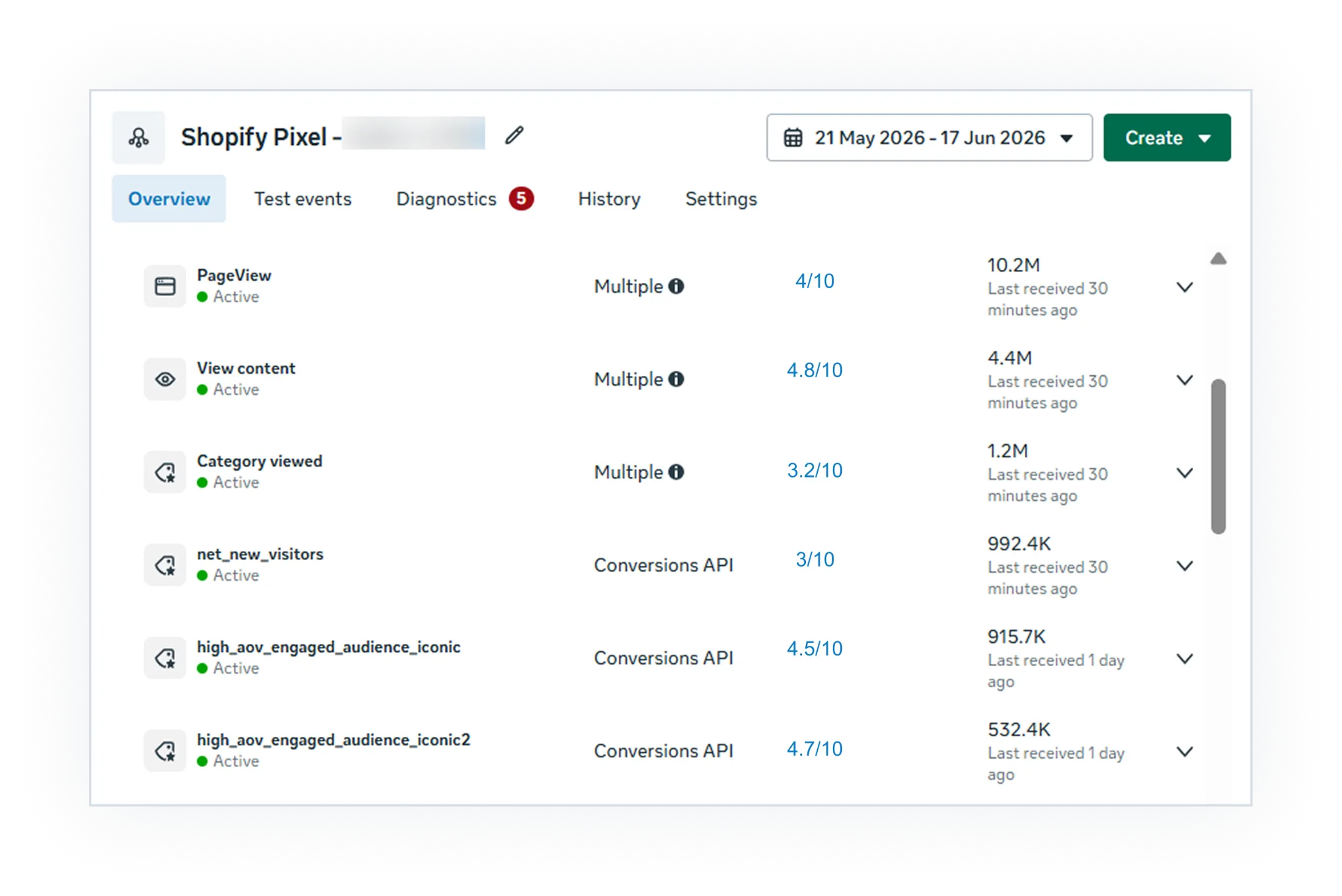
You look closer and realize that a massive chunk of those submissions are junk leads, and your final down-funnel conversion rate is sitting at a dismal 1.2%. When you open Meta Events Manager to figure out why the quality is so bad, you find the root cause: an Event Match Quality (EMQ) score trapped at a low 3/10.
Your ad campaigns feel like they are shooting in the dark because your GoHighLevel Meta Conversions API integration is quietly dropping the exact click IDs Meta needs to optimize for actual intent.
The signal is getting to Meta, but it’s arriving completely stripped of context. Without that context, Meta can’t link a high-quality down-funnel conversion back to a specific ad click. The algorithm is forced to optimize for cheap, low-intent form fills just to hit its numbers, running through your ad budget on junk traffic.
If your GoHighLevel to Meta Conversions API setup is flatlining your lead quality, it’s almost always because the raw GHL path sends Meta basic server text like names and emails, but strips away the critical browser session identifiers (fbclid, fbc, fbp, IP, and user agent).
The permanent fix is to route your data through an identity layer, CustomerLabs, that stitches the browser session back to the CRM record before it ever hits Meta.
Let’s look at exactly where this tracking breaks, and how we can fix it permanently to stop buying low-intent leads.
Why Are Your GoHighLevel Web Conversions Dropping?
When a user lands on a GoHighLevel funnel and submits a form, two structural tracking failures quietly dismantle your ad performance behind the scenes:
1. The cross-domain cookie wipe
GoHighLevel setups frequently move users around from your main website to a subdomain, or through a standalone booking widget. Because traditional tracking cookies are strictly domain-scoped, they rarely survive these transitions.
For example, a user clicks your Meta ad and lands on your main educational site, myagency.com. They browse the page, click a button to book a strategy call, and are instantly redirected to your GoHighLevel funnel hosted on a subdomain like booking.myagency.com or a GHL domain like highlevel.com/v2/preview/widget.
During that exact hop, traditional browser cookies break. The user who clicked your ad on page one looks like a completely anonymous, untraceable visitor by the time they hit page three. The click parameter (fbclid) that started everything gets wiped before they ever hit “submit.”
2. The thin-data trigger trap
This issue frequently catches marketers who did everything right on paper by setting up GHL’s native backend webhooks to send lead data directly to Meta.
The catch?
That backend webhook bypasses the user’s browser session entirely. You end up sending Meta a dry, server-only data package that drops the precise parameters required for matching users:
- fbclid / fbc: The Facebook click ID and its corresponding browser cookie parameter.
- fbp: Meta’s browser cookie identifier.
- User-Agent & IP address: Essential browser fingerprint details.
But the biggest missing piece in this data package is the External ID (external_id).
According to Meta’s official Conversions API documentation, the external_id is any unique ID from your CRM system (like a GHL contact ID or account number) used to distinctively identify a user. Meta highly recommends sending this parameter because it provides a reliable, deterministic anchor to match server events with browser events.
Here is where the standard GHL connection breaks down: while GHL might pass an email or phone number, it rarely matches and binds a consistent external_id between the frontend browser pixel and the backend webhook event.
When Meta receives a server conversion containing just a name and an email address with zero original click context (fbclid, fbp, fbc) and no unifying external_id to link it to the browser session, it cannot confidently match that event to a specific ad click. This triggers a bad trifecta: low EMQ scores, dropped attribution, and an ad algorithm that refuses to optimize.
Let me tell you one thing….
GoHighLevel does natively support Meta CAPI. The platform isn’t missing a feature; rather, its native integration naturally leaks browser context at these specific cross-domain and webhook junctions. Meta then grades your data quality based on the exact parameters that leaked.
Do you know what EMQ is? Event Match Quality (EMQ) is Meta’s grading scale (from 0 to 10) evaluating how well your Conversions API data matches real Facebook accounts.
- Below 4/10: Poor data health.
- 6/10 and Above: The target zone for healthy optimization.
The Data Impact: Sending an email address alone usually caps your score at a 5 or 6. Adding phone numbers and locations can push you to 7. However, appending the fbc/fbclid click ID yields the single largest rating boost. This is why payloads missing browser parameters stall out in the 3 to 4 range.
Why CustomerLabs Is the Infrastructure Bridge (Not Another Pixel)
Instead of forcing a direct, fragile link between GoHighLevel and Meta, CustomerLabs sits directly in the middle as a real-time identity resolution bridge. It captures the fleeting browser context before it leaks, holds onto it, and fuses it with the CRM data coming from GHL’s backend.
We didn’t just build another simple tracking script. CustomerLabs holds an official Patent specifically for our advanced Event Match Quality (EMQ) optimization.
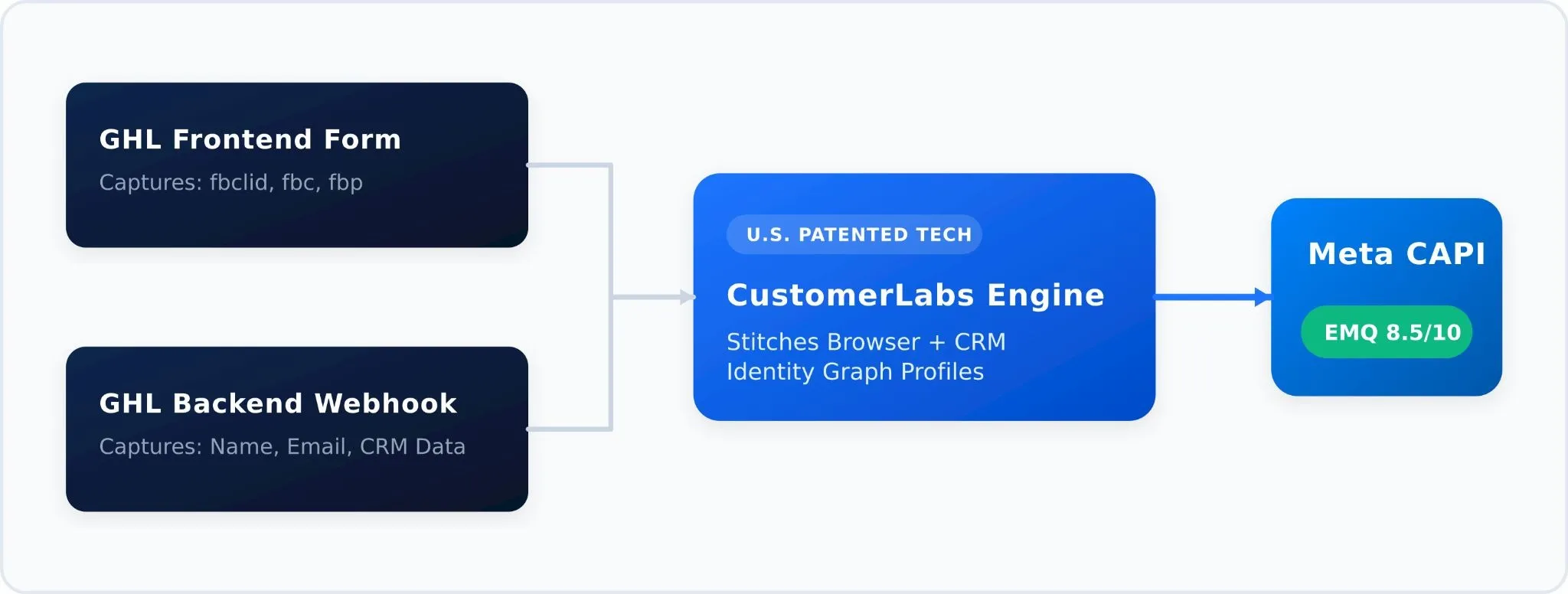
It closes the gap in three moves:
- Stitches the Profile: It tracks the anonymous visitor’s pre-form behaviors and click parameters (fbclid, fbp, fbc) in the browser before cross-domain hops can erase them.
- Merges CRM Data: When GHL fires the lead data from the backend, CustomerLabs instantly matches and fuses that server payload with the original browser history.
- Enriches the Delivery: It sends a clean, deduplicated data package to Meta via a trusted first-party domain, packing the complete click context required to push your EMQ past 7.
Let’s look at how to get this built. We will split this into two quick phases.
Phase 1: Activating Meta CAPI with CustomerLabs
First, you build a secure server-to-server highway. Inside CustomerLabs, this is achieved by authenticating your Meta account via a native OAuth connection under the Destinations dashboard.
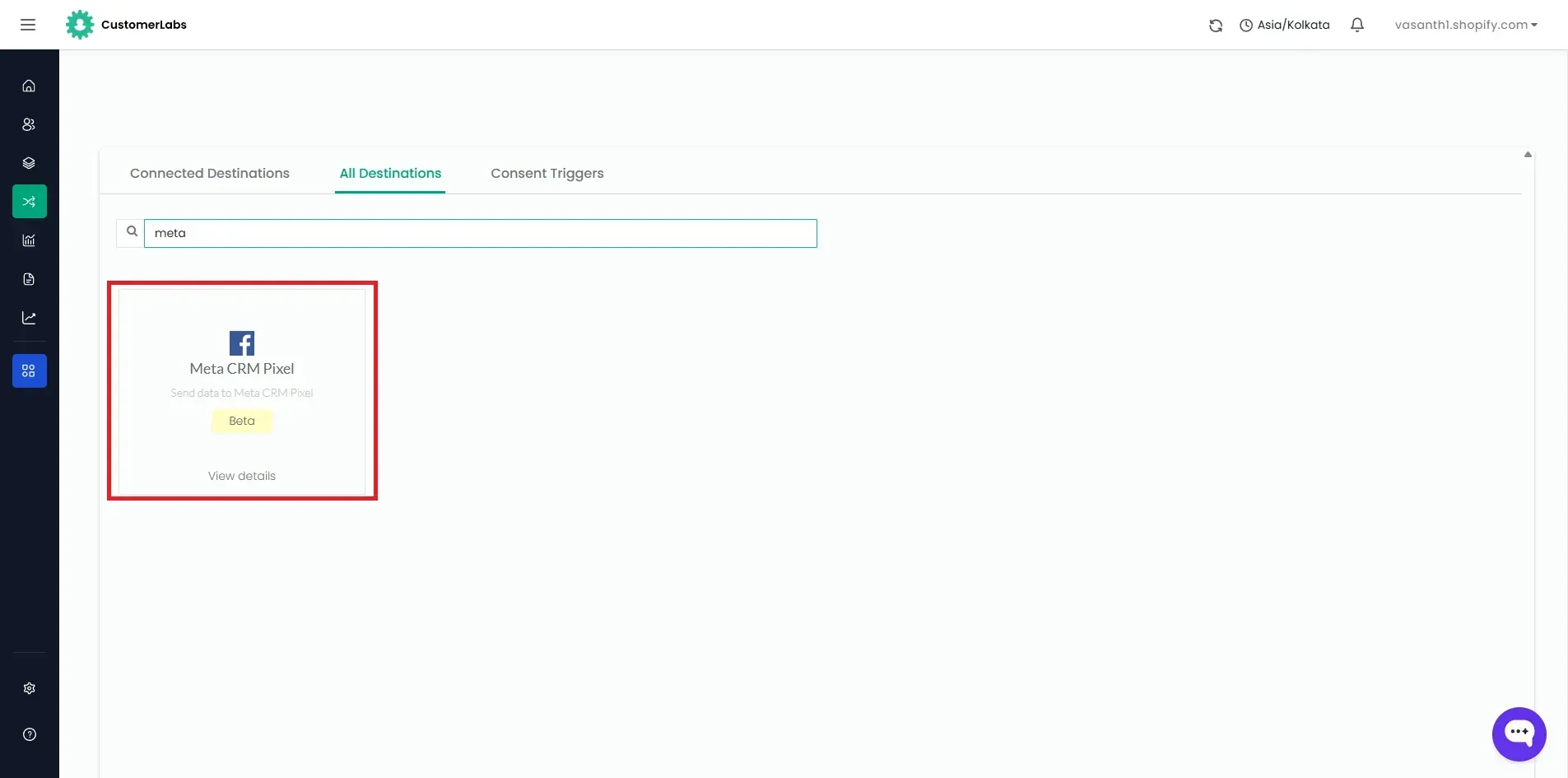
Once connected, you activate Server-Side Data streaming, map your unique Meta Pixel ID, and select the target conversion events (such as Lead or CompleteRegistration) that you wish to optimize. CustomerLabs takes over from there, formatting all incoming payloads to match Meta’s exact algorithmic requirements.
Phase 2: Connecting GoHighLevel to CustomerLabs
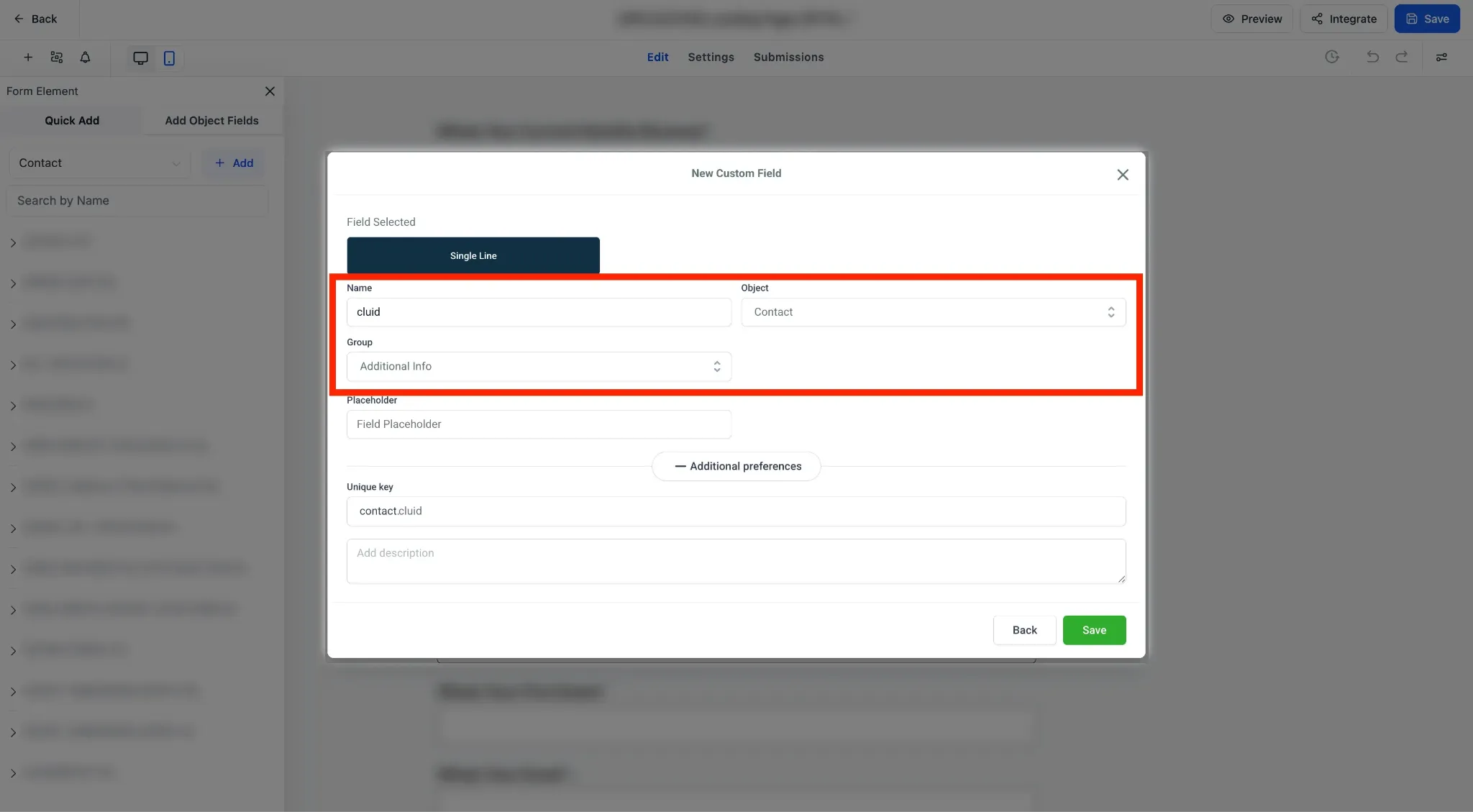
Next, you connect GoHighLevel so its conversion data carries the unique thread that makes identity stitching possible: the CustomerLabs User ID (cluid).
1. The Hidden Identifier
You configure a custom integration parameter for cluid inside CustomerLabs, then add a matching Hidden Field named exactly cluid into your GoHighLevel Form Builder. When a user visits your funnel, the frontend script automatically drops their tracking token into this hidden field.
2. The Webhook Pass
You set up a standard GoHighLevel automation workflow triggered by form submissions that executes a POST Webhook action. This webhook routes the form data along with the custom cluid payload block directly to your CustomerLabs custom source URL.
Once the webhook executes, the cluid matches the backend CRM contact to the frontend browser cookies, combining them into one enriched event payload. That cluid is the thread that ties it all together: the browser session that captured the click ID and the backend webhook that carries the CRM record now share one identity, so CustomerLabs can fuse them into a single, complete event for Meta.
For exact click-by-click field configurations, payload keys, and webhook paths, please refer to our official GoHighLevel Integration Documentation to get your tracking operational in under ten minutes.
What Success Looks Like in Meta
Once the bridge is live, CustomerLabs begins streaming the enriched payloads to Meta server-side. You can actively monitor this transformation inside your Meta Events Manager dataset.
Within 24 to 48 hours of routing data through the identity layer, your event dashboard will show a distinct shift.
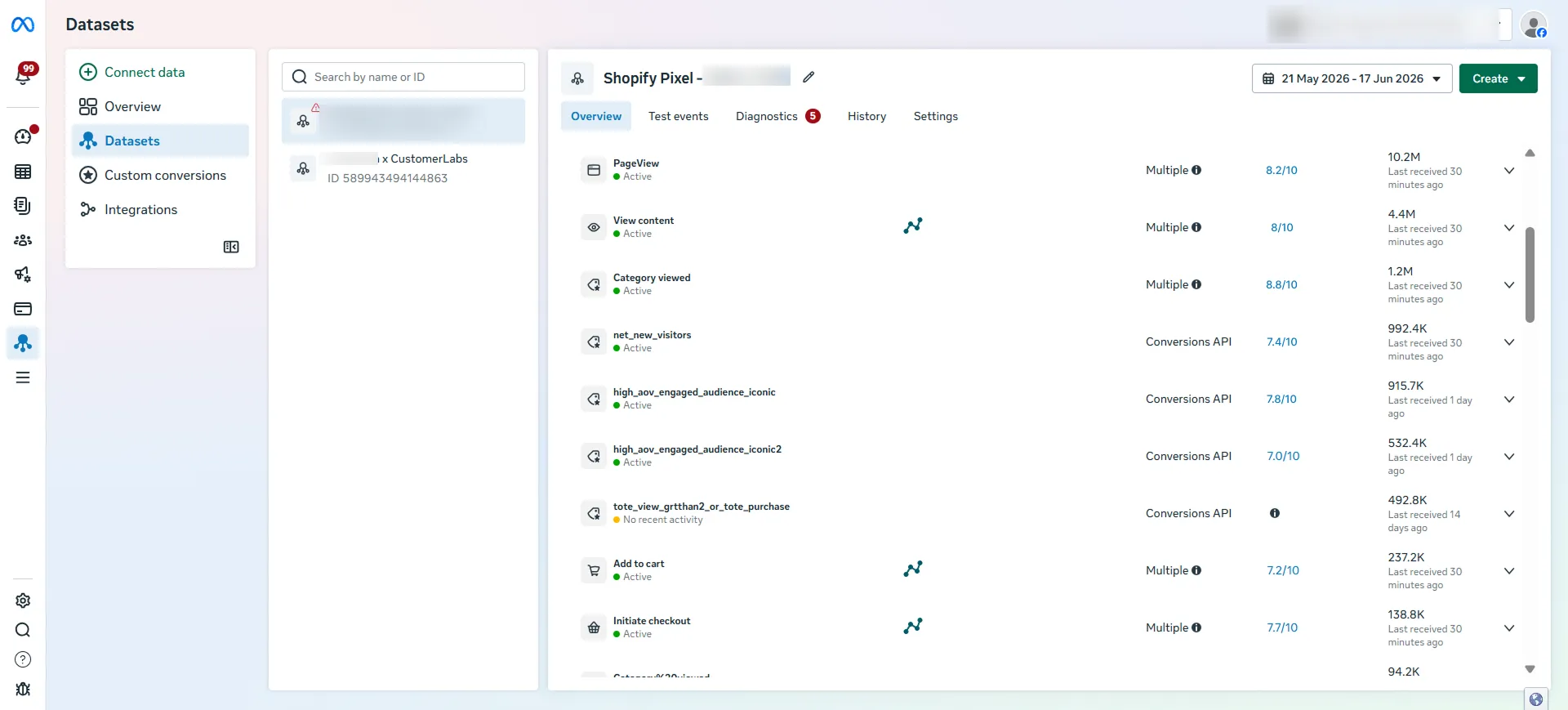
A healthy, high-matching Meta CAPI signal using server-side parameter enrichment.
Instead of warning flags and a “Poor” 3/10 rating, your Event Match Quality score will climb into the green “Good” or “Great” zones (typically hitting 7/10 to 9/10). This visual bump confirms that Meta is now successfully matching your offline GHL conversions back to the exact profiles who clicked your ads.
Stop Guessing, Protect Your Ad Spend
Relying entirely on fragmented frontend pixels or raw GHL webhooks forces Meta’s optimization algorithms to guess who your real buyers are. And when Meta has to guess, it guesses using your marketing budget.
Routing your lead data through CustomerLabs cleans up the entire pipeline. The browser session and the CRM record tie together into a single, deduplicated event. Your EMQ score climbs out of the basement and moves past 7, your conversion reporting balances across platforms instead of contradicting itself, and you can finally scale your ad spend against numbers you can trust.
The conversion event was always firing inside your funnel. It just wasn’t arriving at Meta in one piece. Fix the connection, and let the ad algorithms work the way they were designed to.