One of our clients put it perfectly:
“I told my performance marketing team to find net new visitors and you’d better be sure they’re actually new. You should be able to track them and nail them down as truly net new.”
Simple ask. Most teams still can’t do it. They just think they can.
You bump the budget on Meta and Google, traffic climbs, everyone nods. Now ask yourself the one question that ruins the party: is a single one of those visitors actually new?
You don’t know. And “you don’t know” is an expensive place to be running an acquisition from.
A net new visitor is someone landing on your website for the very first time, no prior session, no existing cookie, no history with your brand.

Let’s walk through why you can’t see them today, and then build the signal that makes Meta and Google go find them for you.
The Problem: You’re Paying To Reach New People, And You Can’t Prove You Are
Every business wants to grow by reaching new people. Expand into a new market, pour money into ads, the entire point is introducing your brand to people who’ve never heard of it.
But if you can’t tell whether new people are actually discovering you, what exactly are you buying?
Website traffic goes up. User numbers go up. It feels like progress. It isn’t, necessarily. Those numbers won’t tell you whether the audience is genuinely new or just the same familiar faces wandering back for another look.
So you keep funding acquisition campaigns with no idea whether you’re expanding your reach or paying, on a loop, to reach the crowd you already had. Without visibility into how many first-time visitors are actually discovering your brand, you can’t measure whether your growth efforts are doing anything at all.
From what you have read so far in this section, there is one problem that stands out.
I will say it out loud. “You cannot measure it”
That leaves you with three very specific headaches:
- No way to identify which campaigns are bringing in first-time visitors.
- Campaigns that keep showing ads to the same audience, driving up frequency and acquisition costs while everyone congratulates themselves on “reach.”
- No clear understanding of whether your spend is expanding your audience or simply reaching your existing visitors again.
Before you can solve any of this, you need one thing you almost certainly don’t have yet: a clear baseline of how many net new visitors are landing on your site, and which campaigns are driving them. No baseline, no truth. And this isn’t bad luck, it happens for a few very specific reasons.

Why Can’t You Measure? Why The Usual Fixes Flop
Three roots.
- Traffic blends new and returning into one meaningless number.
- The ad platforms, Meta’s Advantage+, Google’s Smart Bidding are built to buy the cheapest conversion, and since returning customers are roughly 50% likelier to convert, the algorithm cheerfully spends your “prospecting” budget on people who already know you.
- And most businesses never capture a first-visit signal at all, so there’s nothing to measure against in the first place.
How Marketers Usually Try To Fix It (And Why It Doesn’t Stick)
When marketers spot the leak, they reach for the familiar toolkit. Each move feels smart. Each one quietly falls over:
- They stare at GA4’s “new vs. returning” report. Lovely chart. The ad platforms never see it, so it does exactly nothing to change who your ads chase.
- They upload a customer list to exclude. Great, until next week’s buyers make it stale, it misses half your recent customers, and the browser pixel drops a chunk of it anyway.
- They trust Advantage+ or Smart Bidding to “find new customers” on their own. Left unsupervised, they optimize toward the cheapest conversion, which is your existing audience.
- They lean on the browser pixel. It loses 30–40% of conversions, so the platform is literally learning from broken data.
Every one of these either watches the problem or blocks it after the fact. None of them teaches the platform, as it happens, who is genuinely new.
That’s the whole game. And it’s the part they all miss. The fix isn’t a prettier report or a longer exclusion list. It’s signal engineering.
The Right Way To Fix Is Signal Engineering
Hearing this word for the first time? Probably you should first learn and understand what Signal Engineering is.
Instead of watching traffic or blocking lists after the damage is done, you engineer a first-party signal, a Net New Visitor event that fires the second someone visits for the first time and you send it straight to the ad platforms so they actually learn who’s new.
That’s what signal engineering means in practice: you don’t report on the past, you feed the machine a live signal it can act on.
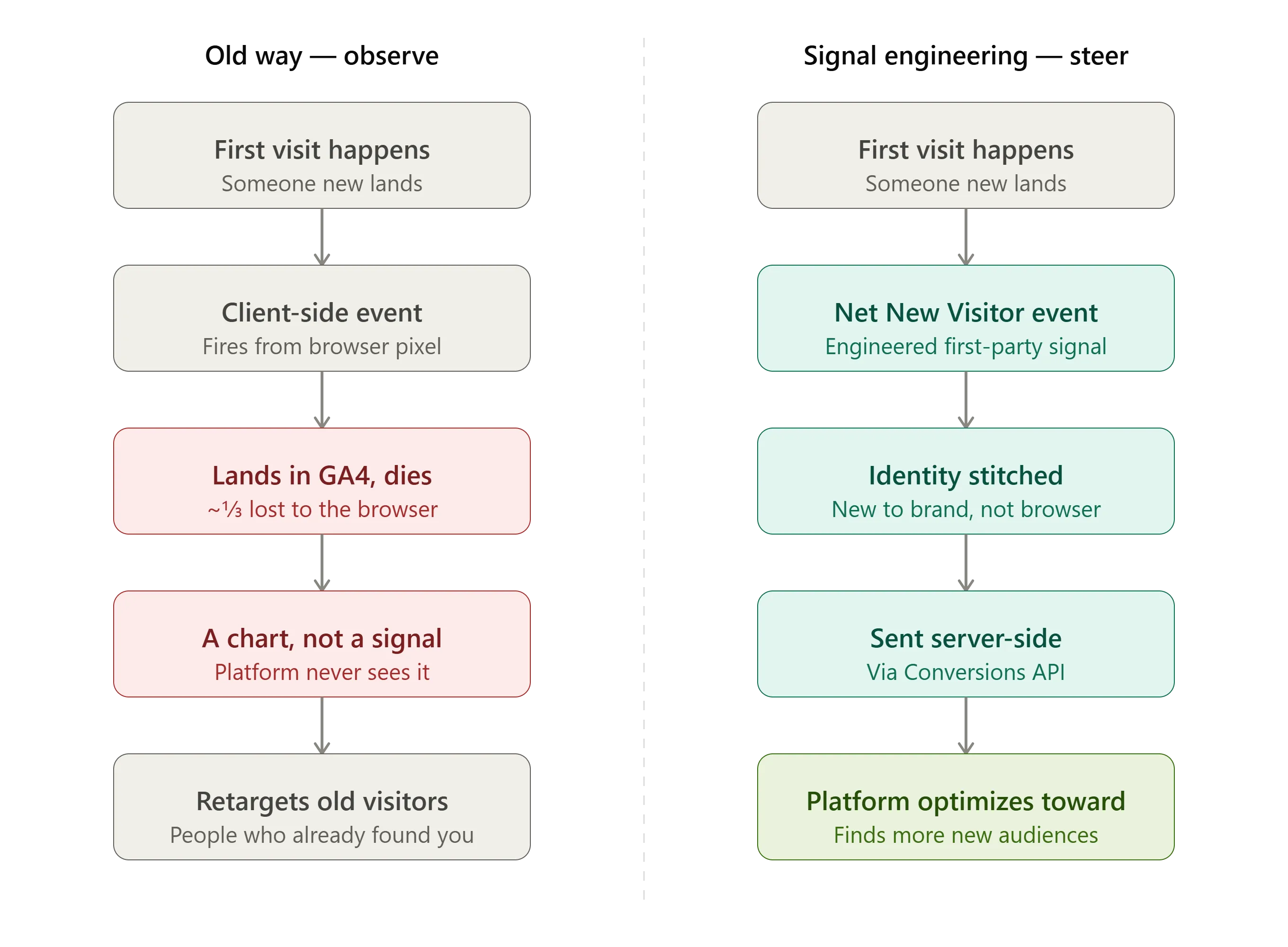
Old way: observe and exclude after the fact.
Signal-engineering way: teach the platform, in real time, which direction “new” is, so it learns which audiences are most likely to discover your brand for the first time, instead of endlessly retargeting the people who already found you.

Right about now,
A Sharp Marketer Is Thinking: “I Can Already Fire A First-Session Event In GTM. What’s The Difference?”
Only for those smart ones. Listen up.
A client-side custom event lands in GA4 and dies there, a number in a report the ad platform never sees. It’s also riding the browser pixel, so a third of it evaporates before it arrives.
Signal engineering does three things that event can’t:
- It sends the signal server-side through the Conversions API, so it actually shows up.
- It stitches identity across sessions and devices, so “new” means new to your brand, not new to that browser.
- It hands the platform a live conversion signal it optimizes toward, rather than a chart it optimizes around.
Same idea. Opposite outcome. One watches. One steers.
To pull this off, you need first-party data infrastructure that can spot first-time visitors and send the Net New Visitor event to your ad platforms. Here are the steps.
Step 1 — Engineer the Net New Visitor signal
The Net New Visitor event is available in CustomerLabs and fires only when a user visits your website for the first time. It captures everything you need to attribute and act on that first touch:
| Field | What it records |
|---|---|
| Event Name | Net New Visitor (First Campaign Details) |
| Signal Type | Behavioural, First Visit |
| Trigger | User lands on the website with no prior session or cookie |
| Measurement Scope | All traffic sources — paid, organic, direct, referral |
| Data Captured | Campaign name, source, medium, landing page, timestamp |
| Timestamp | Date and time of the first visit |
| CustomerLabs User ID | Unique identifier assigned on first touch |
| Session ID | Session-level identifier for the first visit |
One clean event that says: a brand-new person just walked in, and here’s how they got here.
Now, you might’ve caught the contradiction: if a net new visitor has no cookie and no history, how is CustomerLabs assigning them a persistent ID and swearing they’re truly new?
Good, you’re paying attention.
The honest answer: “net new” is a confidence call, not a fingerprint. First-party server-side tracking stitches identity across the signals a browser pixel throws away, which catches far more returning visitors than a client-side cookie ever will, so the pool it labels “new” is dramatically cleaner.
But cleared cookies, incognito, and a brand-new device with no logged-in identity can still slip through as false positives. That’s exactly why you set a baseline and watch the trend instead of trusting any single day’s count. You’re not chasing a perfect headcount of humanity.
You’re building a measurement you can trust enough to move budget on a bar GA4 and a stale exclusion list never clear.
But a signal is only worth something if the platforms actually receive it. Which is exactly where most setups fall apart.
Not sure whether your “new” visitors are actually new? Book a demo and we’ll show you the Net New Visitor event firing live on your own site.
Step 2 — Send it first-party and server-side
Skip the browser pixel and send the signal server-side through the Conversions API. Accounts with a proper CAPI setup see 117% increase in the revenue, simply because the platform finally sees the full picture.
Before you let this signal steer real money, make sure it’s arriving clean.
Step 3 — Validate the signal (check data quality and mandatory parameters)
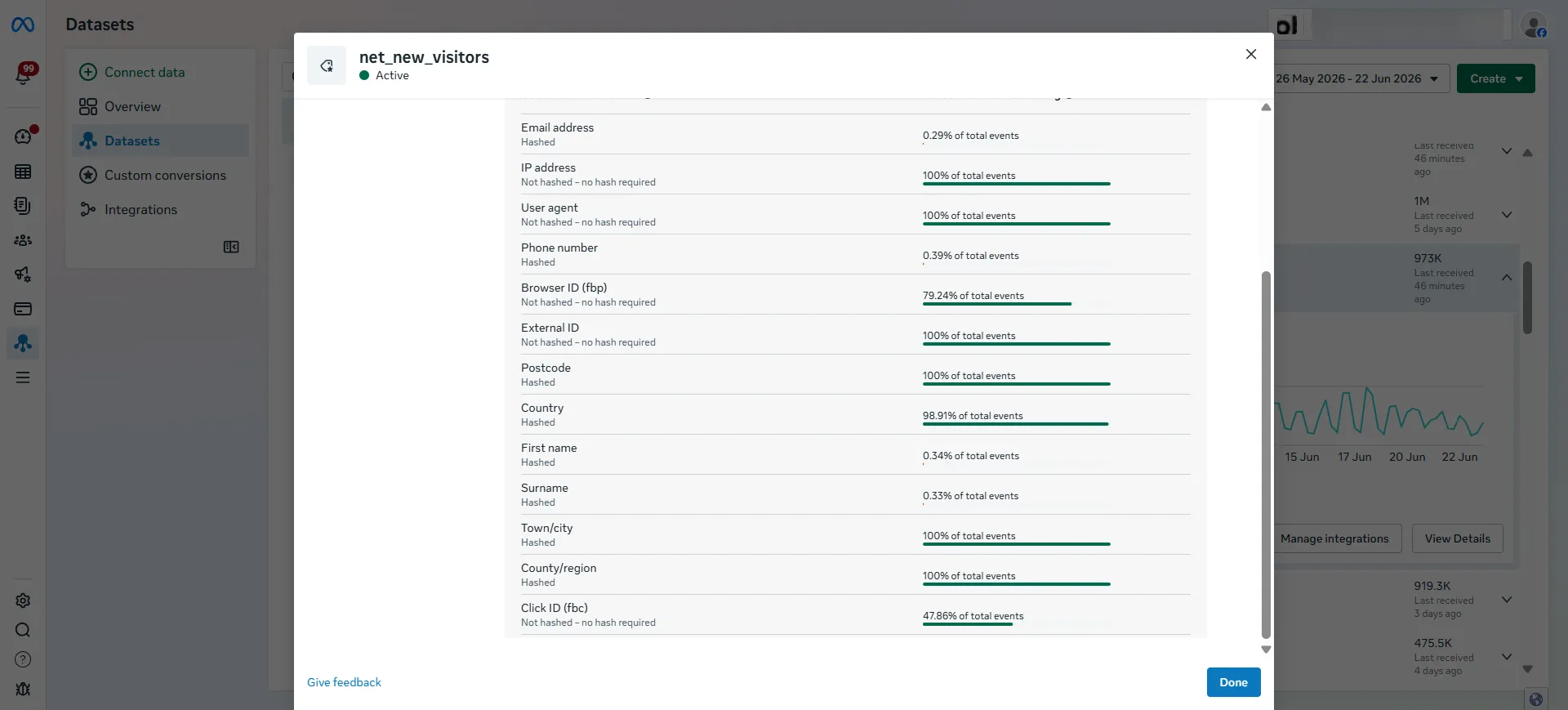
Validate first. Check the Net New Visitor event in Meta Events Manager to confirm every required parameter and identifier is coming through correctly.
Do the same in Google Ads before you use the event for reporting.
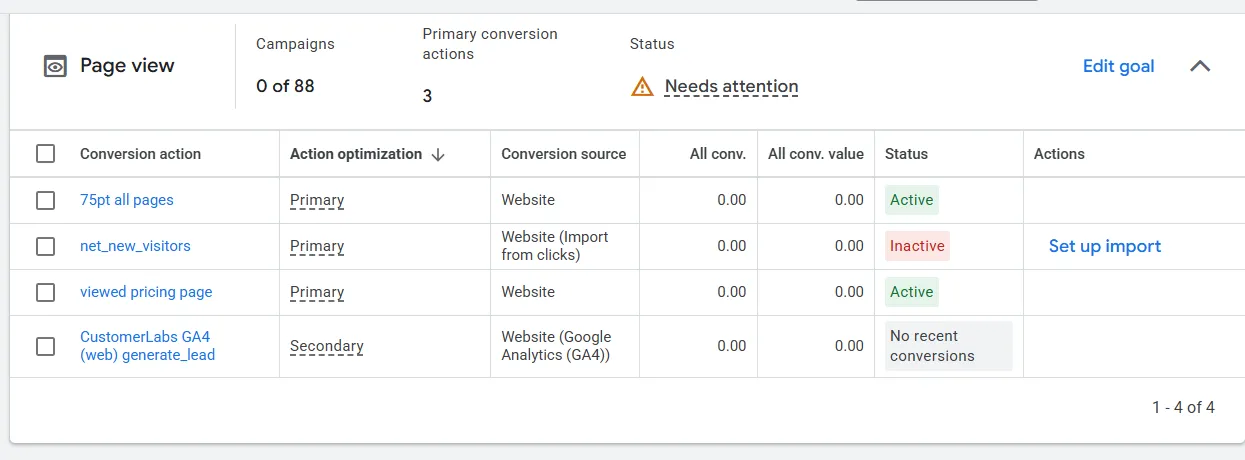
You want steady event volume, populated identifiers, and no missing mandatory fields. Once it’s clean, let it run long enough to show you what “normal” looks like.
Step 4 — Set your baseline
You probably have zero history on net new visitors, so start measuring the day the event goes live. First-time visits bounce around day to day, so don’t lose your mind over 48 hours of data. The method:
- Start tracking the day after your Net New Visitor event goes live.
- Measure net new visitors for 7–21 days.
- Average the daily count across that window.
- That average is your net new visitor baseline.
From here on, every time you scale, spend or launch a campaign, you compare against this baseline to see whether you’re truly reaching more first-time visitors or just paying more to reach the same ones.
Step 5 — Add Net New Visitor to your campaign reporting
Put the signal where you actually make decisions. In Meta, add the Net New Visitor event to your Ads Reporting as a custom metric, so you can see which campaigns, ad sets, and ads bring the most first-time visitors.
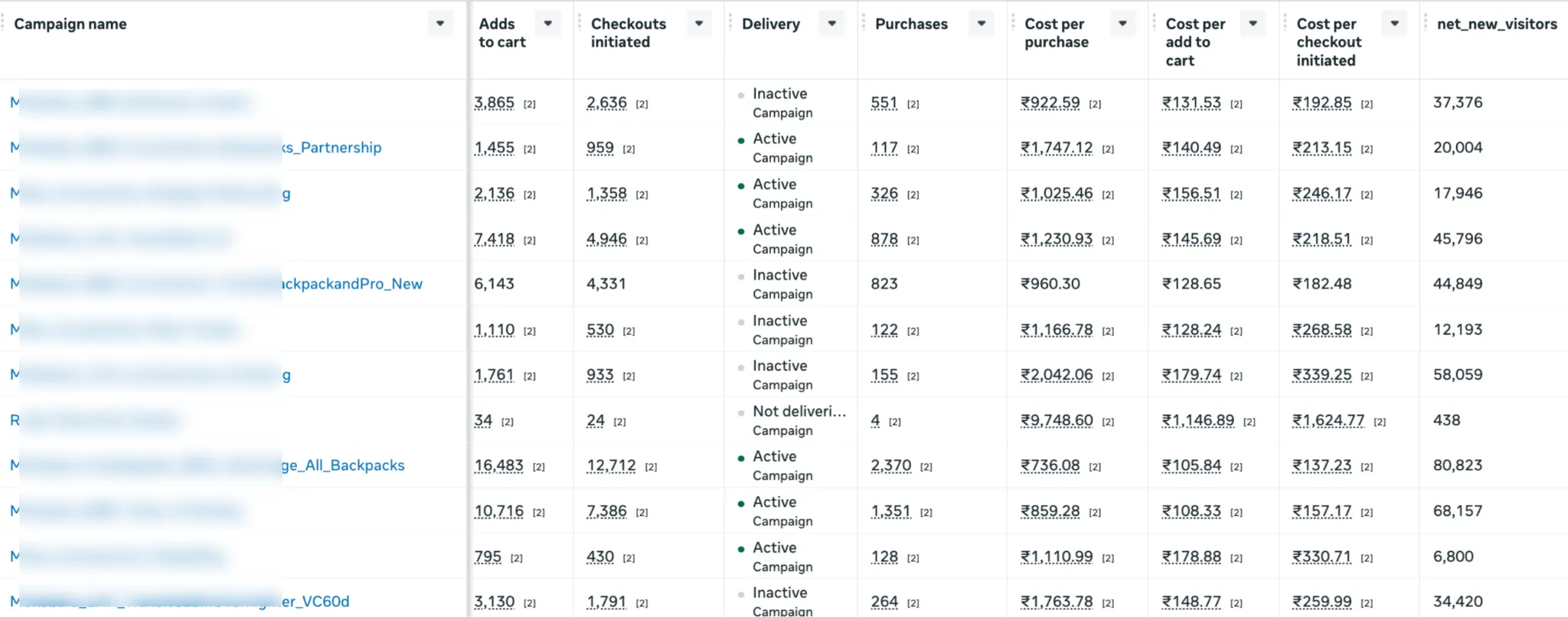
In Google Ads, add the Net New Visitor metric to your reports the same way. (Follow your platform setup guide for the exact clicks.) Now you can see, per campaign, who’s genuinely driving new people and push that signal back for prospecting.
Step 6 — Activate on Meta
Meta swapped its old existing-customer budget cap for a Customer Lifecycle Strategy setting at the ad-set level. Define your existing customers once at the account level, then flip on “Acquire new customers only” for the ad sets you want kept pure.
Want a hard guarantee? Add your existing-customer list under Controls, which are hard rules. Your Net New Visitor signal is what points Meta or Google at “new” in the first place.
Step 7 — Activate on Google
Google Ads gives Smart Bidding its own new-customer switches. “New customers only” mode stops showing ads to existing customers entirely; the newer “new prospects” mode zeroes in on people still in the discovery phase.
Or set a new-customer value rule: if a first-timer spends $89 and you assign a $50 new-customer value, Google treats that conversion as worth $139 and bids harder for more like them.
Just remember, these modes are only as smart as your existing-customer definition and a clean, first-party Net New Visitor signal is what keeps them from overpaying for people you already have.
With the signal live on both platforms, the last move is to make it a habit: compare each campaign to your baseline and shift budget toward the ones that keep bringing net-new visitors. That’s the method. So does it actually move the numbers?
With CustomerLabs, you can easily integrate ad platforms like Meta, Google, Whatsapp, TikTok, LinkedIn, SnapChat, Bing, etc., just with the help of a few toggles.

The Impact: The $9,748-Per-Purchase Campaign Nobody Caught
A US D2C brand was pouring budget into Meta and Google acquisition campaigns. Traffic was climbing. Everyone felt good about it.
Then someone actually looked at the numbers, really looked.
Same dashboard energy. Wildly different decisions.
The problem: Rising traffic told them nothing. They couldn’t tell whether growth was new visitors discovering the brand or the same returning shoppers getting counted again and again. “Traffic up 40%” is a great slide and a terrible decision-making metric.
The cause: Ad platforms optimize toward whatever event you feed them. Feed them “all traffic” and they’ll happily send you cheap returning visitors who were going to buy anyway, then take the credit. Without a net new visitor signal, the acquisition budget was flying blind.
The solution: They implemented the Net New Visitor event through CustomerLabs, establishing a baseline and measuring first-time visitors across every acquisition channel, not sessions, not clicks. Actual new humans.
The result: They doubled down on the $16-per-cart winners, killed the incinerator, and reallocated the freed-up budget. Same spend. Sharper aim.
| Metric | Before (optimizing for “all traffic”) | After (optimizing for Net New Visitor) |
|---|---|---|
| What the platform optimized toward | Sessions & clicks (returning shoppers included) | First-time visitors only |
| % of “growth” that was actually new | Unknown | Measured & baselined |
| Cost per new-visitor acquisition | Invisible | Visible per campaign |
| Best campaign’s cost per add-to-cart | Buried in the average | $16 — surfaced and scaled |
| Worst campaign | Looked “fine” (traffic was up!) | $1,146/purchase, 438 visitors — killed |
| Budget allocation | Spread evenly on vibes | Shifted toward proven acquisition engines |
| Media efficiency | Flat | Same spend, sharper aim |
Conclusion
You can’t grow by talking to the same people louder. The shift is simple: stop watching traffic and blocking lists, and start engineering the signal. Tracking net new visitors gives you a reliable way to measure audience growth beyond raw traffic, set a baseline, watch it over time, find the campaigns that bring in new audiences, and put your money where the new people are.
The loop is repeatable: engineer the signal, validate it, set a baseline, activate, optimize. It turns prospecting from a hopeful guess into a system. If you want the first-party Net New Visitor signal that makes it work, that’s exactly what signal engineering at CustomerLabs is built for.
Want to see it running on your own campaigns? Book a demo and we’ll show you the Net New Visitor signal live on your data, not a slide.
Rather just poke at it yourself? Start a free trial and engineer your first signal before your next standup.