If you log into Meta Ads Manager on a Monday morning and see $20,000 in revenue, but your BigCommerce payout logs only show $14,000… where did that extra $6,000 actually come from?
OMG….It didn’t exist.
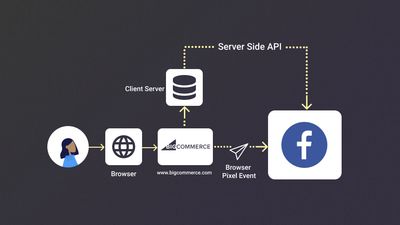
If you are using BigCommerce as your storefront engine, you are probably sitting on your cleanest source of truth for raw order data. So what falls through the cracks between your store backend and Meta’s ad algorithm?
Native browser tracking is lying to your ad account.
Client-side pixel blocks, mismatched event IDs, and leaky cookies cause Meta to report phantom purchases while your Event Match Quality (EMQ) drops into the floor. When your signals break, Meta’s algorithm bids blindly, wasting your ad budget on non-buyers while making your ROAS look artificially inflated.
Let’s unpack why native BigCommerce Meta tracking breaks, and walk through the exact 15-minute fix to get your attribution back on track.
The Real Reason Your BigCommerce Meta Events Are Ruining Your Conversion Signals
If you rely solely on the native BigCommerce Facebook app or a basic browser pixel, your tracking is almost certainly suffering from one (or all) of these failure modes:
1. The _fbc Click ID Leak (Where 30 - 40% of Match Rate Dies)
When a shopper clicks your Facebook ad, Meta appends a Click ID (fbclid) to the URL, which gets stored in an _fbc cookie.
Here’s the catch: ITP and mobile ad-blockers purge or cap client-side cookies within 24 hours. When the user comes back two days later on their iPhone to finally buy, Meta gets the purchase event but the connective tissue tying it back to the ad click is gone.
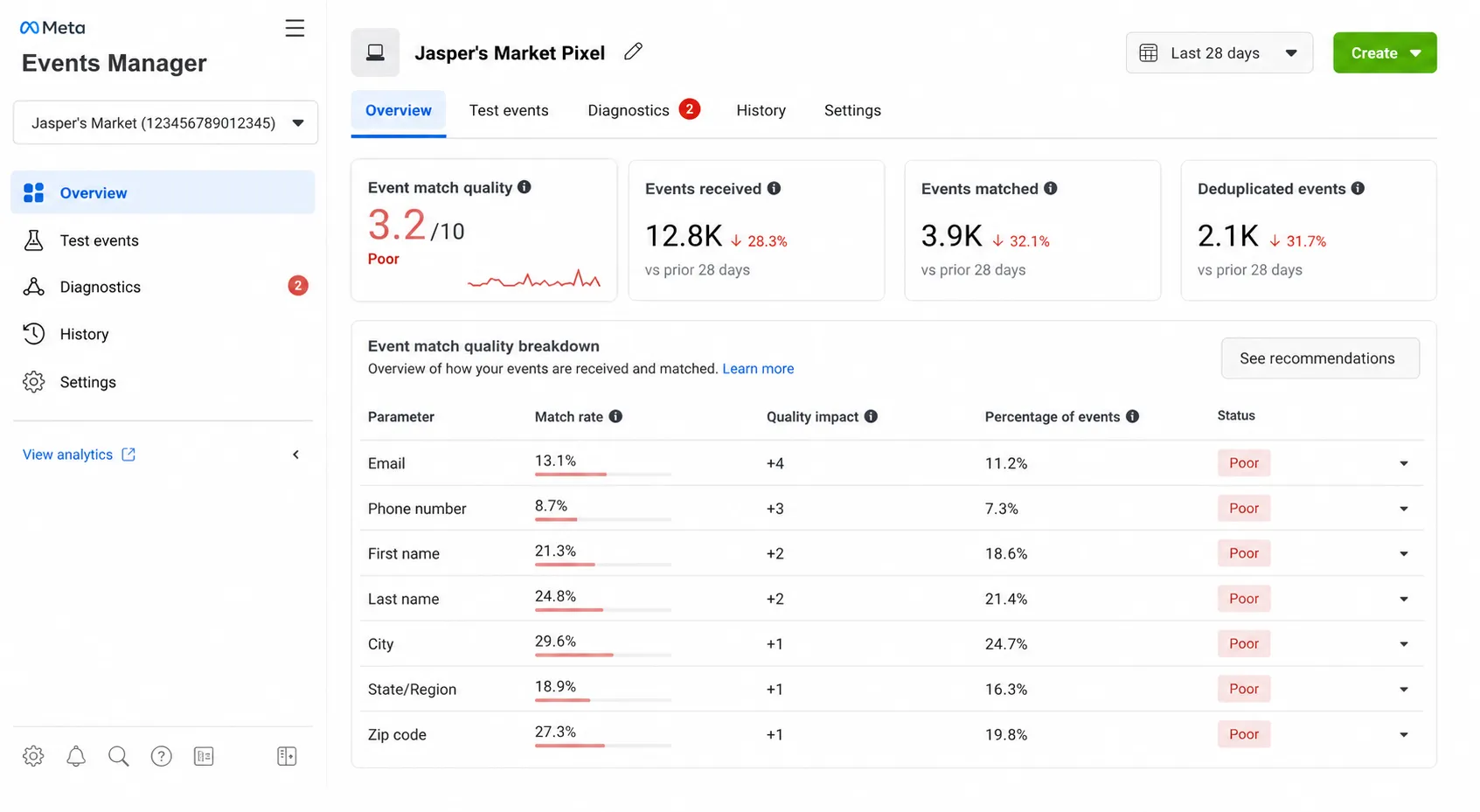
Without _fbc, your match quality tanks, and Meta can’t give proper credit to the campaign that drove the sale.
2. The Mismatched event_id (The Double-Counting Nightmare)
To prevent counting the same purchase twice, Meta requires the exact same event_id string from both the browser pixel and the server (CAPI).
Native BigCommerce setups regularly mess this up:
- The browser pixel fires on the thank-you page with an ID like
bc_pix_992. - The server webhook fires in the backend with an ID like
ORDER_10482.
Because the IDs don’t match, Meta assumes these are two completely separate orders. Every time a customer refreshes their order confirmation page on mobile, your reported revenue inflates by another $150.
3. Parallel Integration “Junk Events”
This is another headache for performance markets……
Are you running the native BigCommerce Facebook app alongside Google Tag Manager scripts or custom checkout tags?
One of our client’s meta events managers was facing this issue, and really it was a big headache for them to sort the deduplication.
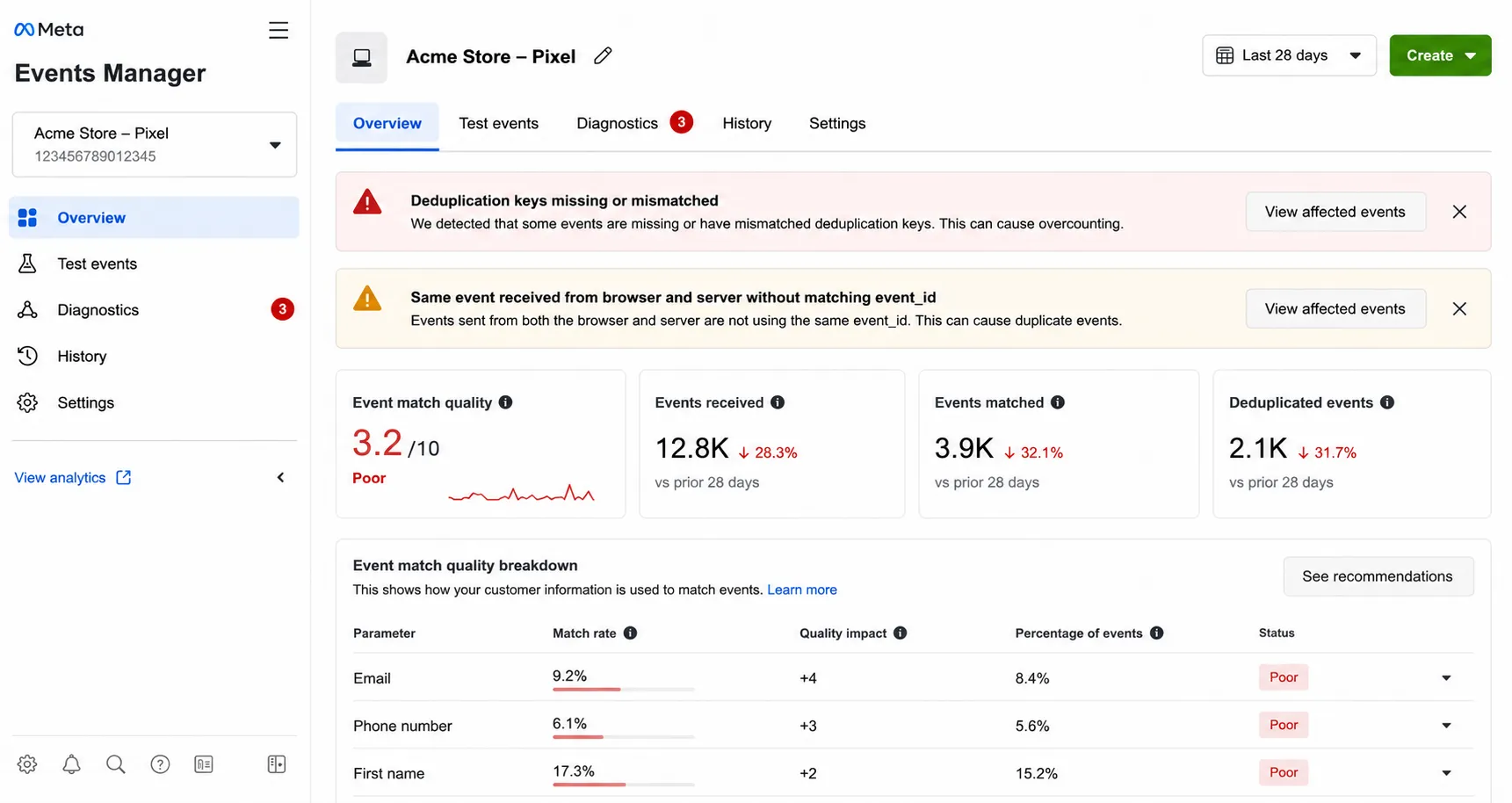
When multiple tracking layers run uncoordinated, they compete against each other. Your pixel ends up throwing duplicate client hits for every server event sent, flooding Meta Events Manager with warning flags and degrading campaign optimization.
Now let’s see how we gonna fix it……
How CustomerLabs 1PD Ops Rebuilds Your Meta Signal Engine ?
Instead of slapping another fragile JavaScript plugin onto your store, CustomerLabs acts as a First-Party Data Operations (1PD Ops) and creates a clean server-side bridge between BigCommerce and Meta CAPI.
Wanna know how it fixes the three leaks automatically behind the scenes:
1. First-Party Subdomain Routing (Plugging the _fbc Leak)
ITP treats third-party ad scripts like intruder software, wiping browser cookies in as little as 24 hours. By routing your tracking through your own domain (track.yourstore.com), CustomerLabs writes first-party server cookies directly from your primary domain.
- The outcome: When a shopper clicks your ad on Monday and finally buys on Thursday, the Meta Click ID (
_fbc) is still alive and resolved server-side.
2. Unified event_id Engine (Zero Double Counting)
Native apps fail because the browser script and backend webhooks invent two different IDs for the same transaction. CustomerLabs intercepts both storefront hits and BigCommerce order webhooks, stamping them with one identical order key (e.g., ORD_100492).
- The outcome: Meta’s deduplication engine merges the signals instantly. Even if an iPhone user refreshes their order confirmation page five times, Meta registers exactly one purchase.
3. Automatic Trait Enrichment (Pushing EMQ to 8.0+)
Meta can’t match sales to user profiles if you only send basic order amounts. CustomerLabs pulls raw checkout data directly from BigCommerce, hashes customer traits using SHA-256 compliance, and appends them to every CAPI payload:
| Metric | Native BigCommerce Tracking | CustomerLabs 1PD Ops Pipeline |
|---|---|---|
| Average EMQ Score | 3.5 – 5.0 (Poor) | 8.0 – 9.5 (Great) |
| _fbc Parameter Match | Missing on 30-40% of iOS purchases | Captured & Resolved Server-Side |
| Deduplication Rate | Poor (Causes double-firing) | 100% Deduplicated via Unique event_id |
| Setup Time | High technical overhead | 15-Minute Setup |
Step-by-Step Setup Guide: BigCommerce + Meta CAPI via CustomerLabs
Follow this exact workflow to connect your BigCommerce backend signals directly to Meta’s Conversions API via CustomerLabs.
Phase 1: Ingesting BigCommerce Data (Source Setup)
To track events accurately without custom JavaScript, install the CustomerLabs tracking script inside BigCommerce.
(For full property schemas and event payload specs, see the official CustomerLabs BigCommerce E-Commerce Tracking Setup Documentation)
1.Copy CustomerLabs Tracking Code:
Log in to your CustomerLabs account. Navigate to Menu → Setup Tracking → Website Tracking and copy your account’s unique JavaScript tracking code.
2.Access BigCommerce Script Manager:
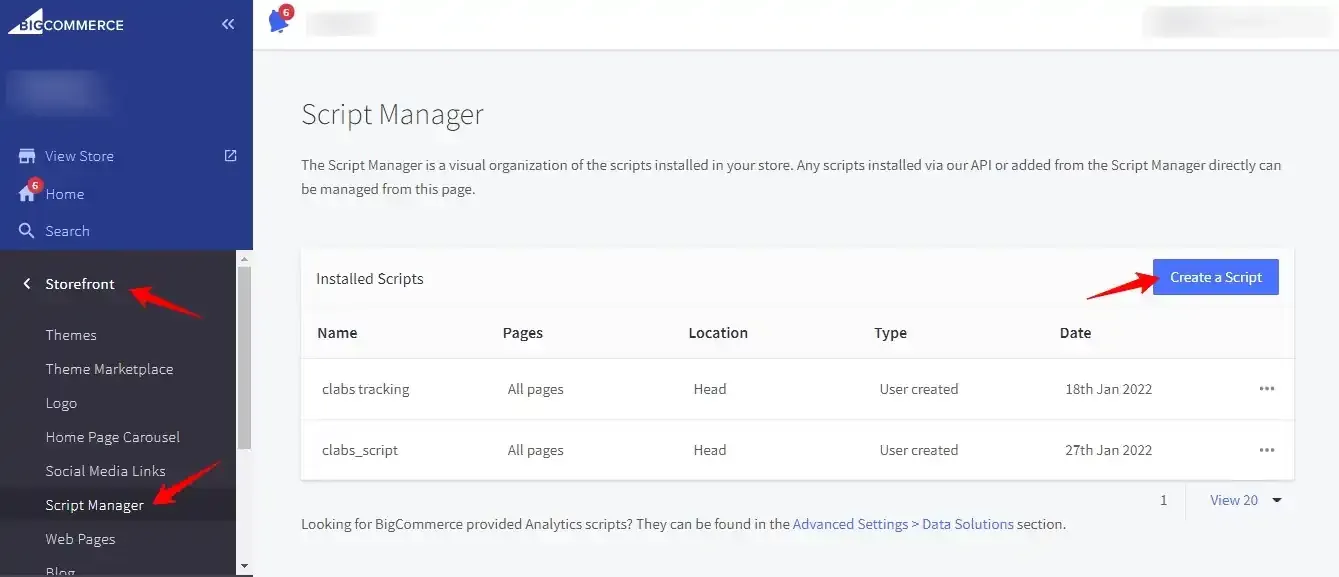
Log into your BigCommerce Store Admin. Go to Storefront → Script Manager and click Create a Script.
3.Configure Script Settings:
Configure the script with the following parameters: Set the location to Head, select All Pages, choose Essential / Analytics, paste your code snippet, and hit Save.
4.Enable BigCommerce E-Commerce Tracking:
In CustomerLabs, navigate to Integrations → BigCommerce. Enter your BigCommerce store URL, enable the source, and turn on default tracking for core e-commerce events (Product Viewed, Added to Cart, Checkout Started, and Purchased).
Phase 2: Plug the _fbc Leak via First-Party Subdomain
To ensure cookie longevity past ITP expiration windows:
- Go to your DNS Manager (Cloudflare, AWS Route53, GoDaddy) and add a CNAME Record:
- Host: track.yourstore.com (e.g., track.mybrand.com)
- Value/Target: custom.customerlabs.biz
- In CustomerLabs, go to Settings → First-Party Domain and enter track.yourstore.com.
- CustomerLabs now writes _fbc and _fbp cookies as first-party server cookies directly from your primary root domain.
Phase 3: Connect Meta CAPI via System User Authentication
To send deduplicated server events to Meta, authenticate via Meta Business Manager using the System User workflow.
(For detailed permissions requirements, read the official CustomerLabs + Meta CRM Pixel Integration Documentation).
1.Enable Meta CRM Pixel Destination:
Inside CustomerLabs, navigate to Destinations → Meta CRM Pixel / Facebook Ads and click Enable.
2.Authenticate Meta Business Account:
In Configuration Settings, click Authenticate Facebook Account. Choose Recommended Authentication (System User) to prevent authentication drops when personal admin accounts change passwords.
3.Select Meta Assets:
Meta Business Manager Pop-up.
Follow the prompt to select your Meta Business Manager Account, the target Ad Account, and the exact Pixel ID you want to receive CAPI events. Click Save Settings.
4.Enable Server-Side CAPI Transmission:
Toggle ON the switch for Send data via server-side (Conversions API). Click Save Changes.
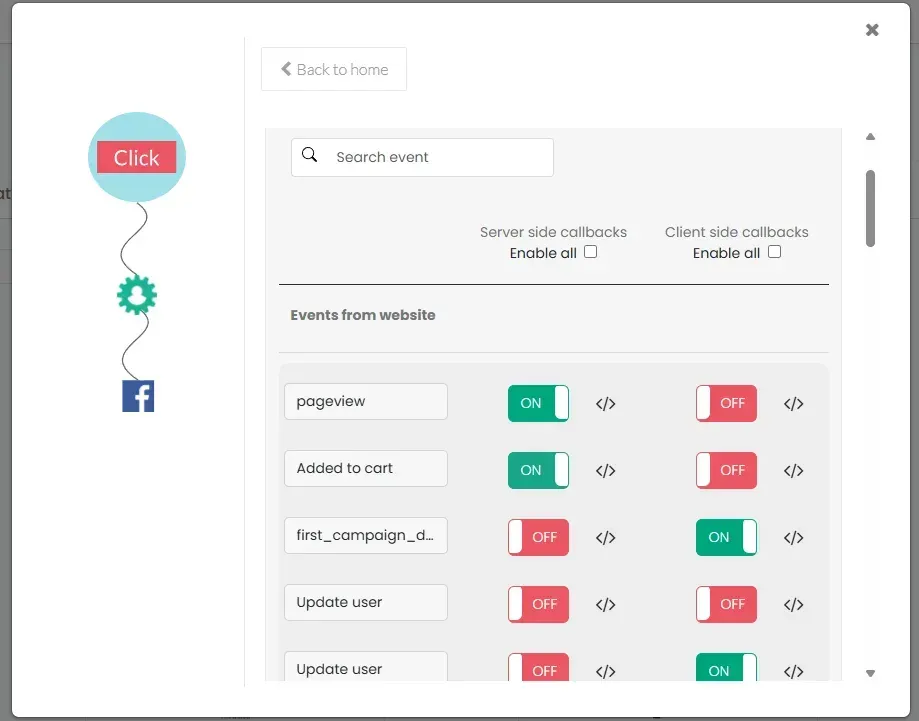
5.Configure Event Mapping & Trait Setup:
Go to Destinations → Meta CRM Pixel → Setup Event Workflow. Toggle ON the events you want to route (e.g., Purchase, Lead, AddToCart). Ensure user identity traits (hashed email, phone, external ID, fbp, fbc) are enabled under Field Mappings to maximize your EMQ score.
Fix Your Meta Attribution Today
Stop letting inaccurate browser tracking distort your advertising metrics and waste your ad spend.
With CustomerLabs, you get:
- True ROAS Visibility: Ads Manager revenue that matches actual BigCommerce backend payout logs.
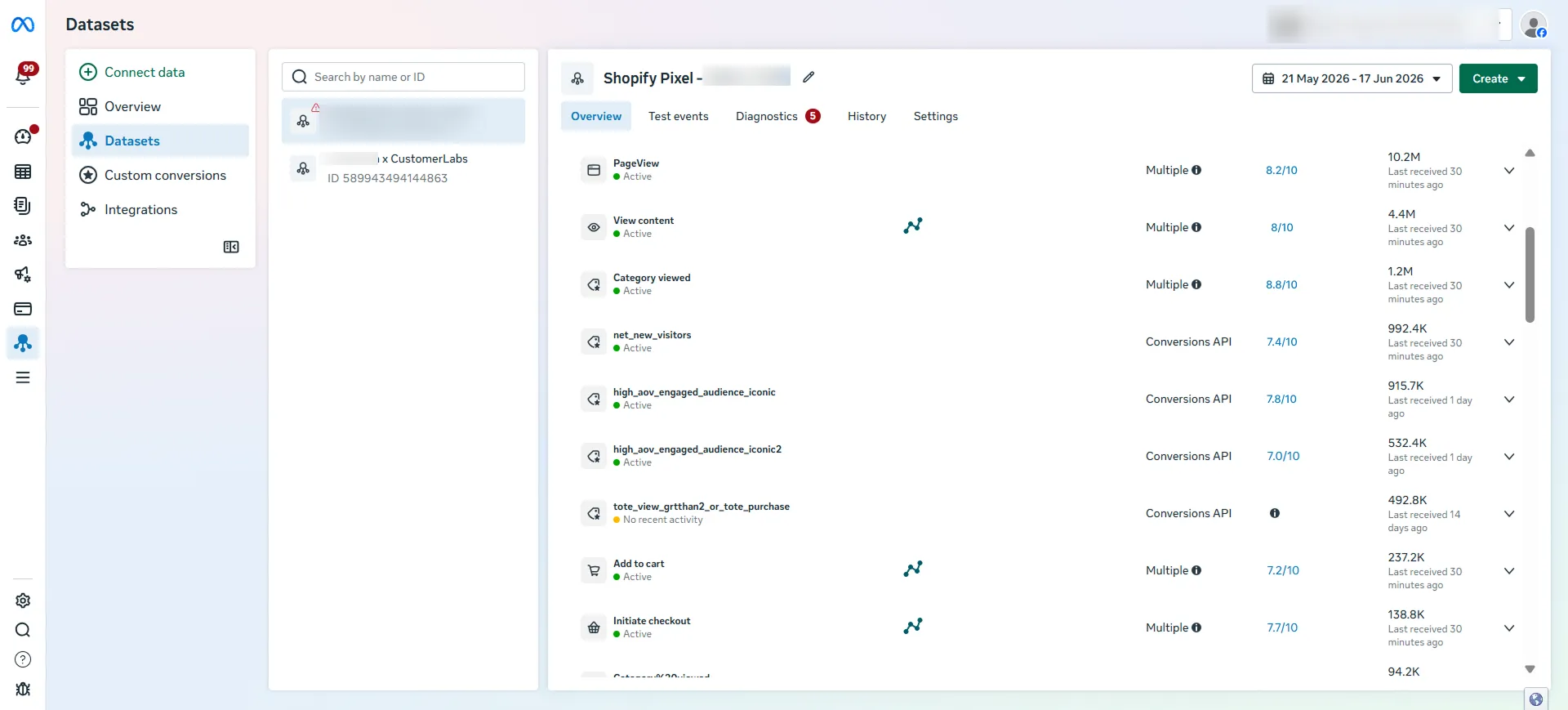
- Higher Conversion Match Quality: Reaching an EMQ score of 8.0+ to sharpen retargeting and Lookalike audiences.
- Rapid Deployment: Go live in minutes with a fully managed server-side signal pipeline.
Book a Strategy Call with a Signal Specialist to fix your BigCommerce Meta CAPI tracking today.